TL;DR:
- Thorough diagnostics are essential in Mac repairs to accurately identify issues, prevent unnecessary replacements, and protect data integrity. Skilled technicians use both hardware and software tools to diagnose complex or intermittent faults, ensuring targeted repairs that save time and costs. In Los Angeles, reputable shops emphasize diagnostic reports before proceeding, offering swift, transparent, and effective service to restore your Mac’s performance.
When your Mac starts failing, the instinct is to assume a part has gone bad and needs replacing. That assumption costs Los Angeles users thousands of dollars every year. The real differentiator between a repair that sticks and one that leaves you back at square one is thorough diagnostics, and most users never realize this until they’ve already paid for the wrong fix. This guide breaks down exactly how diagnostics work in professional Mac repair scenarios, what tools and methods are involved, how they protect your data, and what to expect when you bring your device to a reputable shop in Los Angeles.
Table of Contents
- Why diagnostics matter for Mac repairs
- Key diagnostic tools and methods for Mac users
- How diagnostics prevent data loss and unnecessary repairs
- What to expect from a professional Mac diagnostic in Los Angeles
- The truth most Mac users miss: Diagnostics are half the battle
- Expert diagnostics and Mac repairs — Get the help your device needs in LA
- Frequently asked questions
Key Takeaways
| Point | Details |
|---|---|
| Diagnostics prevent waste | Accurate diagnostics stop unnecessary repairs and protect your investment. |
| Save data with precision | Pinpointing the issue early helps avoid permanent data loss. |
| Know what to expect | Professional LA shops offer transparent, step-by-step diagnostic procedures. |
| Insist on a clear report | Always ask for a diagnostic summary before committing to repairs. |
Why diagnostics matter for Mac repairs
In Mac repair, diagnostics refers to a structured process of identifying the root cause of a hardware or software failure before any repair work begins. This is not just a preliminary check. It is the foundation on which every reliable repair decision is made. Without it, technicians are essentially guessing, and guesses with Apple hardware can be costly.
A common misconception among Mac users is that visible symptoms point directly to the faulty component. A MacBook that won’t boot, for example, might seem like a failed SSD. But the actual cause could be a corrupted APFS (Apple File System) partition, a failed T2 or M-series security chip, a broken flex cable, or even a logic board fault that mimics storage failure. Replacing the SSD in that scenario would solve nothing and waste hundreds of dollars.
Professional Mac repair experts rely on thorough diagnostics to identify root causes before attempting any hardware or software fixes. Skipping this step doesn’t speed up the process. It almost always leads to repeat visits, additional costs, and in some cases, permanent data loss caused by unnecessary component swaps.
The professional diagnostic process follows a clear sequence: assess, scan, test, and confirm. Each stage builds on the last, narrowing down possible causes until the actual fault is isolated with confidence.
Key consequences of skipping diagnostics include:
- Replacing functional components based on symptom guessing
- Missing underlying firmware or OS-level corruption that will resurface post-repair
- Overwriting recoverable data during premature repair attempts
- Paying for labor and parts that don’t address the actual problem
- Voiding data recovery options by disturbing storage architecture prematurely
“Diagnostics are not a step before the repair. They are the repair, in the sense that every decision made afterward depends entirely on what they reveal.”
Pro Tip: Before authorizing any repair work, ask the technician to walk you through their diagnostic findings. A trustworthy shop following solid MacBook repair steps will never recommend part replacements without documented test results to back up their assessment.
Key diagnostic tools and methods for Mac users
Now that we’ve established why diagnostics matter, it’s crucial to recognize the tools and techniques that set expert repairs apart from trial-and-error fixes. Professional Mac repair in Los Angeles involves two primary categories of diagnostics: hardware and software. Both are necessary, and neither is sufficient on its own.
Hardware diagnostics involve a hands-on inspection of the physical components inside your Mac. Technicians examine the logic board under magnification for signs of corrosion, blown capacitors, or damaged traces. They run dedicated logic board testing procedures to isolate failure points at the chip level. Physical connectors, thermal paste, battery health, and storage interface components are all evaluated systematically.
Software diagnostics target the OS layer, firmware, and storage integrity. This includes running Apple Diagnostics (the built-in tool accessed via the D key at startup), SMART (Self-Monitoring, Analysis, and Reporting Technology) monitoring for hard drive and SSD health, firmware version checks, and filesystem integrity scans using tools like Disk Utility or third-party applications. Diagnostics commonly involve both software assessments and targeted hardware tests specific to different Mac models, meaning a diagnostic approach for a 2019 MacBook Pro with a T2 chip differs significantly from one for a 2015 MacBook Air.
One area where diagnostics prove especially valuable is detecting intermittent faults. These are failures that don’t occur consistently, making them nearly impossible to catch without targeted testing. For example, a client might report occasional kernel panics during video rendering. Without diagnostics, this looks like a GPU issue. With proper logic board testing, the actual cause might be a failing power delivery circuit that only triggers under sustained load.
| Tool | Typical use | Example fault caught |
|---|---|---|
| Apple Diagnostics | System-level hardware scan | RAM failure, GPU error |
| SMART monitoring | SSD and HDD health tracking | Pre-failure sector degradation |
| Logic board testing | Circuit-level component analysis | Power delivery failure, short circuit |
| APFS filesystem scan | Storage integrity verification | Corrupted partition table, volume errors |
| Thermal imaging | Heat distribution mapping | Overheating capacitor, blocked cooling path |
| Multimeter testing | Voltage and continuity checks | Broken charging circuit, dead fuse |
A particularly important diagnostic layer for modern Macs is NAND flash analysis in soldered SSDs, which are standard in post-2017 MacBook models. Because these drives are physically bonded to the logic board and can’t be swapped out like traditional drives, diagnosing them requires specialized tools that read directly from the NAND chips. Missing this step means potentially misidentifying a recoverable storage fault as a catastrophic board failure.
Studies suggest that intermittent hardware faults account for a significant portion of repeat Mac repairs at shops that skip structured diagnostics, reinforcing the case for thorough testing before any component is touched.
How diagnostics prevent data loss and unnecessary repairs
Understanding the technology behind diagnostics brings us to the most practical question: how do these processes protect your files and your wallet?
The short answer is precision. When a technician knows exactly which component is failing and why, the repair is targeted and controlled. Accurate diagnostics often lead to targeted repairs that recover data without complete part replacements. This is the difference between a $150 firmware repair and a $600 logic board replacement, or between recovering your files and losing them permanently.

Consider a real-world scenario: a client brings in a MacBook Pro that crashes randomly and loses files intermittently. Without diagnostics, a technician might reinstall macOS, potentially overwriting file metadata needed for recovery. With proper diagnostics, the technician identifies early-stage SSD degradation visible in SMART data. The drive is cloned before any repair begins, data is preserved, and the failing storage is replaced with the client’s files fully intact.
Here are the steps diagnostics take before any replacement is considered:
- Intake and symptom documentation: Record all reported behaviors, frequency of failure, and recent changes (OS updates, liquid exposure, drops).
- Non-invasive software scan: Run SMART, Apple Diagnostics, and filesystem checks without altering any data or settings.
- Visual hardware inspection: Check for physical damage, corrosion, or swollen battery before opening the device further.
- Targeted component testing: Test specific components flagged by the software scan using hardware-level tools.
- Data imaging: If storage appears at risk, create a sector-by-sector clone of the drive before proceeding with any repair.
- Root cause confirmation: Cross-reference all findings to confirm the single point of failure before recommending any repair path.
- Repair recommendation with evidence: Present the client with a documented report and clearly explained options.
Pro Tip: Always insist on a written diagnostic report before approving any repair. You can also explore hard drive restoration strategies to understand what data recovery looks like after a confirmed storage fault.
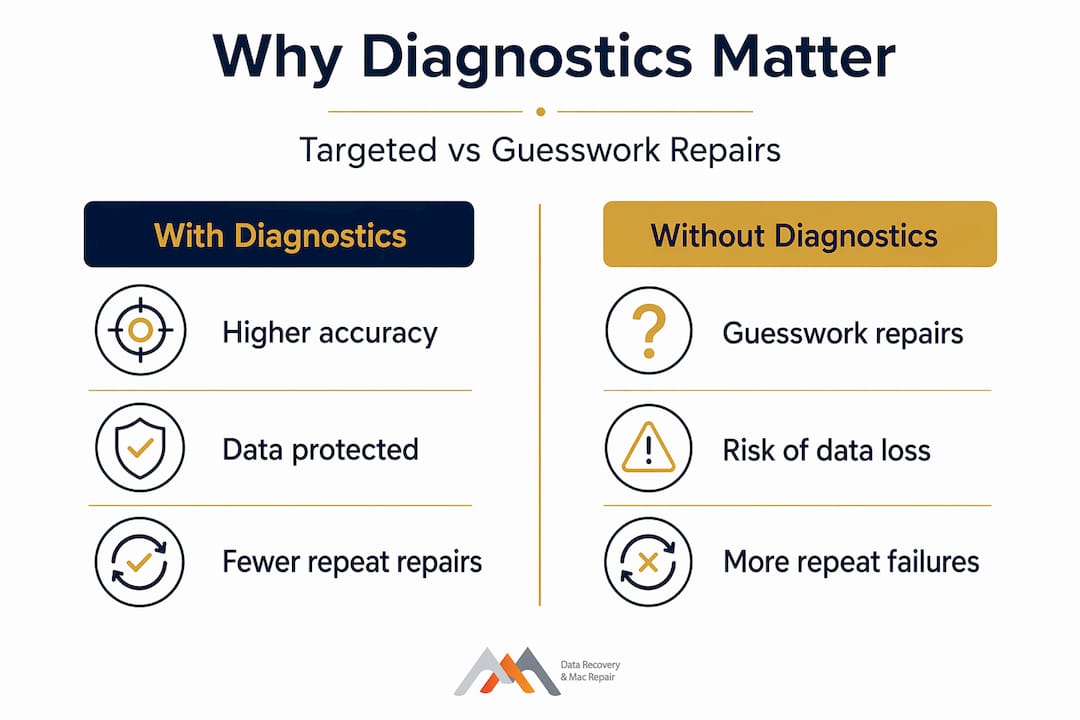
| Factor | With diagnostics | Without diagnostics |
|---|---|---|
| Repair accuracy | High, targeted to confirmed fault | Low, based on assumption |
| Potential cost | Lower, avoids unnecessary parts | Higher, repeat visits likely |
| Likelihood of data loss | Significantly reduced | Elevated, especially with OS reinstalls |
| Time to resolution | Faster after initial testing | Often longer due to trial and error |
| Client confidence | High, backed by documented findings | Low, limited transparency |
This comparison makes clear that diagnostics are not an optional add-on. They are the framework that makes the entire repair process defensible and effective.
What to expect from a professional Mac diagnostic in Los Angeles
If you’re now convinced diagnostics are essential, here’s exactly what happens when you bring your Mac to a repair shop in Los Angeles.
The process typically begins with an intake assessment. The technician asks targeted questions: When did the issue start? Has the device been exposed to liquid? Has the battery been serviced? Were there any software updates before the problem began? These questions aren’t small talk. They narrow the diagnostic focus and save time.
Next, the technician runs non-invasive software scans with your device in its current state. No data is altered at this stage. SMART data is pulled, Apple Diagnostics is run, and filesystem status is checked. This usually takes 30 to 60 minutes depending on drive size and the number of tests run.
The technician then moves to physical inspection, examining ports, connectors, the battery, and the cooling system. If a logic board issue is suspected, components are examined under magnification. Only after all findings are collected does the technician compile a formal report.
LA repair companies offer clear diagnostic procedures, transparent reporting, and no-obligation repair assessments, meaning you should never feel pressured to commit to a repair without understanding exactly what was found and why it matters. Most reputable shops in Los Angeles complete diagnostics within 24 to 48 hours, though same-day diagnostics are available for urgent situations.
When preparing for your diagnostic appointment, bring the following:
- Your Mac, power adapter, and any dongles or cables you regularly use
- A clear description of the symptoms, including when they started and how often they occur
- Notes on any recent changes such as OS updates, new software, drops, or spills
- Any error codes or messages the device has displayed
- Your Apple ID credentials may be needed for firmware-level diagnostics in some cases
Pro Tip: Choose a shop that provides a written diagnostic report as a standard part of the service. Documented findings protect you from upselling and give you something to reference if the issue recurs. Shops offering access to Mac repair services that include formal reporting are your strongest option in a competitive market like Los Angeles.
The truth most Mac users miss: Diagnostics are half the battle
After years of working with Mac users across Los Angeles, one pattern stands out more than any technical challenge: clients who arrive having already had one or two failed repairs elsewhere. In nearly every case, those earlier repairs were done without proper diagnostics. A part was swapped because it “usually causes this symptom,” and the real problem was left untouched.
The instinct to move fast is understandable. When your Mac is down, you need it working. But eager part replacements don’t just waste money. They sometimes destroy recovery options entirely. A hasty SSD swap on a device with a corrupted APFS volume, for example, can result in the original drive being discarded before a forensic image is captured. That’s an unrecoverable situation.
What clients are consistently surprised to learn is that seemingly catastrophic failures often have straightforward causes when properly diagnosed. A MacBook that won’t power on and looks like a dead logic board may simply have a failed T-con controller chip that costs a fraction of a board replacement. Without diagnostics, that distinction is invisible. With them, it’s routine.
Los Angeles has a competitive Mac repair market, and that’s actually good for consumers, but only if you know what to look for. The shops that consistently earn long-term client trust are the ones with robust diagnostic protocols, not the ones promising the fastest or cheapest turnaround. You can read more about the benefits of pro Mac recovery to understand how structured, diagnostics-first processes consistently outperform quick-fix approaches.
Think of diagnostics not as an added cost but as an investment in repair accuracy. A $50 to $100 diagnostic fee that prevents a $400 unnecessary repair is not an expense. It’s a return.
Expert diagnostics and Mac repairs — Get the help your device needs in LA
When your Mac is malfunctioning or your data is at risk, the worst thing you can do is rush into a repair without a clear picture of what’s actually wrong. Macwest Data Recovery & Mac Repair has been serving Los Angeles clients since 2006 with a diagnostics-first approach that minimizes guesswork, protects your data, and gives you full transparency before a single repair dollar is spent.
Whether you’re dealing with a failed hard drive, logic board issues, or unexplained crashes, our team starts with thorough diagnostics before recommending any repair path. We offer Mac repair service in Los Angeles with same-day options available for urgent cases. For clients facing data emergencies, our Los Angeles data recovery services include specialized access to hard drive data recovery from damaged, corrupted, or failing storage devices. Contact us today for a no-obligation diagnostic assessment and get a clear path forward for your Mac.
Frequently asked questions
How long do Mac diagnostics usually take in Los Angeles?
Most professional shops in Los Angeles complete diagnostics within 24 to 48 hours, though same-day diagnostics are available for urgent or emergency situations depending on complexity.
Will getting diagnostics first really save me money on Mac repairs?
Yes, because targeted repairs recover data without unnecessary part replacements, diagnostics consistently lower total repair costs by identifying the precise fault rather than replacing components based on guesswork.
Are diagnostic fees applied to the cost of my Mac repair?
Many quality shops in Los Angeles apply diagnostic fees toward your final repair bill if you proceed with the recommended work, so it’s worth asking about this policy upfront.
What information should I bring for a Mac diagnostic appointment?
Bring your device, power adapter, a detailed description of the symptoms and when they started, notes on recent changes like software updates or physical incidents, and any error messages the Mac has displayed.
Can diagnostics help recover lost data from my Mac?
Yes, because thorough diagnostics identify recoverable data and prevent accidental overwrites, starting with a proper diagnostic assessment significantly improves the likelihood of successful data recovery before any repair work begins.