TL;DR:
- Los Angeles Mac users face unique environmental risks that cause specific hardware and storage issues.
- Prompt professional repair and data recovery are crucial to prevent irreversible damage and data loss.
- Certified LA repair shops with Mac-specific expertise ensure safe, effective, and timely service.
A MacBook failure never happens at a convenient time. Whether it’s a cracked screen after a commute on the 405, a coffee spill at a Silver Lake café, or a sudden hard drive failure mid-project, the disruption is immediate and the anxiety about lost data is real. Los Angeles Mac users face a unique set of risks, from coastal humidity and extreme summer heat to the daily grind of urban life that puts hardware under constant stress. This guide walks you through diagnosing your issue, taking safe first steps, and finding the right certified repair and data recovery experts in LA, so you can get back to work with confidence.
Table of Contents
- Diagnosing common MacBook issues in Los Angeles
- Essential tools and steps before starting a MacBook repair
- Step-by-step guide: First aid for a damaged or failing MacBook
- Finding the best MacBook repair and data recovery experts in Los Angeles
- Our perspective: What most MacBook users overlook about local repair
- Get expert MacBook repair and recovery support today
- Frequently asked questions
Key Takeaways
| Point | Details |
|---|---|
| Act fast | Quickly addressing MacBook issues reduces costs and risk of data loss. |
| Know your options | Evaluate DIY repair only for safe problems and use certified LA experts for serious issues. |
| Always backup | Staying prepared with backups prevents heartache and makes recovery easier. |
| Choose qualified support | Top-rated local shops offer reliable repairs and transparent estimates. |
Diagnosing common MacBook issues in Los Angeles
Now that you know how urgent MacBook issues can feel, let’s start by pinpointing your specific problem. Accurate diagnosis is the foundation of any successful repair, and rushing past this step often leads to wasted money or further damage.
Common hardware symptoms to watch for
Los Angeles Mac users report a consistent set of hardware problems, many of which are directly tied to the city’s environment and lifestyle. Here are the most frequent issues our technicians see:
- Screen damage: Cracked or flickering displays, backlight failures, and dead pixels caused by drops or pressure damage in bags
- Battery degradation: Swollen or rapidly draining batteries, especially in MacBooks exposed to high temperatures inside parked cars
- Keyboard failure: Sticky or unresponsive keys, often linked to dust, food debris, or liquid exposure on the butterfly and scissor-switch mechanisms
- Liquid damage: Coffee, water, and other liquids that penetrate the chassis and corrode the logic board, trackpad, or keyboard assembly
- Overheating: Fans running constantly or the system shutting down unexpectedly, frequently caused by dust buildup or thermal paste degradation
- Charging port failure: MagSafe or USB-C ports that no longer charge reliably, sometimes from physical stress or debris
Signs of data corruption or storage failure
Beyond hardware, storage issues present their own warning signs. A clicking or grinding noise from an older HDD-based Mac is a serious red flag indicating mechanical failure. On newer APFS-formatted SSDs, symptoms are subtler: unexpected application crashes, files that won’t open, or the system freezing at the Apple logo during boot. Frequent kernel panics, where your Mac restarts with a gray or black screen and an error message, often point to storage corruption or RAM failure.
Important: If your MacBook was exposed to liquid, do not attempt to power it on or charge it. Energizing a wet logic board accelerates corrosion and can permanently destroy components that would otherwise be recoverable. Seek liquid damage repair immediately.
LA-specific risk factors
The Los Angeles environment adds layers of risk that Mac users in other cities may not face. Beach proximity means fine sand particles can infiltrate keyboard mechanisms and cooling vents. Summer temperatures regularly exceed 100°F in the Valley and Inland Empire, and a MacBook left in a hot car can experience battery swell, solder joint stress, and SSD data corruption. The coffee shop culture in neighborhoods like Echo Park and Los Feliz means liquid spill incidents are disproportionately common. Knowing these local factors helps you understand why choosing the right Mac repair service in your area matters so much. Top-rated LA repair shops are well-versed in these specific failure patterns, which speeds up diagnosis and repair.

Pro Tip: If your MacBook is running hot or shutting down unexpectedly, check Activity Monitor first. A runaway process consuming 90%+ CPU is often the culprit and requires no hardware repair at all. If the heat persists with normal CPU usage, it’s time to call a professional.
Knowing whether your issue is a simple software fix, a DIY hardware task, or a job for a certified technician is critical. Most logic board failures, soldered SSD recoveries, and data recovery for MacBook Pro scenarios require professional-grade tools and clean-room conditions that simply aren’t available at home.
Essential tools and steps before starting a MacBook repair
After recognizing the type of MacBook problem, it’s crucial to gather the right tools and take the safest steps before attempting any fixes. Skipping preparation is one of the most common reasons DIY repairs go wrong.
Pre-repair safety checklist
Before touching any component inside your MacBook, complete these steps:
- Power off completely: Hold the power button until the system shuts down. Do not just close the lid.
- Disconnect all cables and peripherals: Remove the power adapter, external drives, and any connected USB-C accessories.
- Discharge static electricity: Touch a grounded metal surface or use an anti-static wrist strap before handling internal components.
- Back up your data immediately: If the Mac still boots, connect an external drive and run a Time Machine backup, or sync critical files to iCloud. This is non-negotiable.
- Document the issue: Take photos or video of any visible damage, error messages, or unusual behavior before starting any repair attempt.
Tools and resources overview
| Tool or resource | Purpose | Where to find it |
|---|---|---|
| Pentalobe screwdriver set | Opening MacBook chassis | iFixit, Amazon, local hardware stores |
| Anti-static wrist strap | Preventing ESD damage to components | Electronics retailers |
| External backup drive | Time Machine backup before repair | Best Buy, B&H Photo, online |
| Isopropyl alcohol (90%+) | Cleaning liquid-damaged boards | Pharmacies, electronics stores |
| Spudger and plastic pry tools | Safely disconnecting ribbon cables | iFixit toolkit |
| Certified local repair shop | Complex repairs, data recovery | Top LA repair options, 2026 |
Safety warning: Never attempt to open a MacBook with a swollen battery. Puncturing a lithium-ion battery can cause fire or toxic gas release. If you notice any bulging around the trackpad area or the bottom case, take the device directly to a certified technician for Apple liquid damage assessment or battery replacement.
When to skip DIY entirely
Some repairs are genuinely accessible to technically confident users: replacing a bottom case screw, resetting the SMC, or reinstalling macOS from Recovery Mode. But the majority of MacBook repairs in 2026 involve soldered components, T2 or Apple Silicon security chips, and NAND storage that is physically bonded to the logic board. Attempting to desolder or reflow these components without proper equipment will almost certainly cause permanent data loss. If your issue involves the logic board, SSD, or any component requiring heat tools, go straight to a professional.
Step-by-step guide: First aid for a damaged or failing MacBook
With your workspace prepared, you’re ready for the most important first aid steps to minimize damage and keep your data safe.
Immediate response steps
- Power off the MacBook immediately. If it’s on, hold the power button for 5 seconds. Do not allow it to restart.
- Disconnect from power. Remove the USB-C or MagSafe cable right away. For liquid incidents, this step is critical within the first 30 seconds.
- Flip and drain if liquid is involved. Turn the MacBook upside down in an inverted “V” shape to allow liquid to drain away from the logic board. Do not shake it.
- Do not use rice. This is a persistent myth. Rice does not absorb internal moisture effectively and can introduce starch and debris into the chassis.
- Assess visible damage. Look for cracks, dents, liquid residue, or burn marks. Photograph everything.
- Attempt a backup if the device still powers on. Use Time Machine or manually copy critical files to an external drive or cloud storage.
- Contact a certified repair specialist. For liquid damage, logic board issues, or data loss, call a local LA repair shop within the first few hours. The faster you act, the higher the recovery success rate.
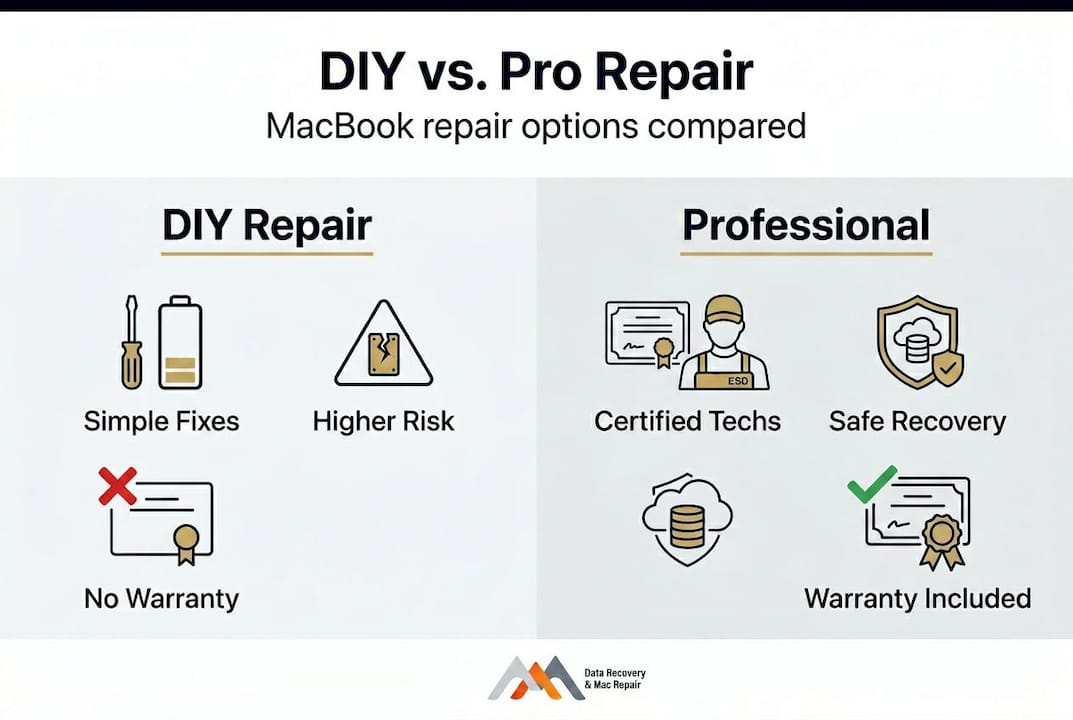
DIY vs. professional repair comparison
| Repair type | DIY feasibility | Risk level | Professional advantage |
|---|---|---|---|
| RAM upgrade (older MacBooks) | Moderate | Low | Faster, warranty-safe |
| Battery replacement | Low to moderate | Medium | Proper calibration, safe disposal |
| Screen replacement | Low | High | Correct panel sourcing, no backlight damage |
| Logic board repair | Not recommended | Very high | Micro-soldering, specialized equipment |
| SSD data recovery | Not recommended | Extreme | NAND access, clean-room tools |
| Liquid damage cleaning | Partial only | High | Ultrasonic cleaning, full board inspection |
Pro Tip: Always keep at least two backup copies of important data: one on Time Machine and one in iCloud or another cloud service. The 3-2-1 rule (three copies, two different media types, one offsite) is the standard that IT professionals use to protect against exactly the kind of sudden hardware failure that brings most LA Mac users through our door.
For a more thorough walkthrough of repair procedures, the detailed MacBook repair steps resource covers model-specific guidance. When the situation clearly exceeds DIY scope, a professional repair service provides the fastest and safest path to recovery.
Finding the best MacBook repair and data recovery experts in Los Angeles
After immediate intervention, the next step is choosing a qualified repair or data recovery expert you can trust. Not all repair shops are equal, and in a city as large as Los Angeles, the options range from highly certified specialists to unlicensed general tech shops with no Mac-specific training.
What to look for in a local repair shop
When evaluating any LA Mac repair provider, prioritize these factors:
- Apple certification or extensive Mac-specific experience: Look for technicians who specialize in Apple hardware, not general PC repair shops that also accept Macs as an afterthought.
- Transparent pricing and written estimates: A reputable shop provides a clear, itemized estimate before any work begins. Verbal quotes with no documentation are a red flag.
- Data privacy practices: Ask explicitly how the shop handles your data. Certified providers follow strict protocols to protect client information during repair.
- Turnaround time and emergency service availability: Same-day and emergency services matter when you’re running a business or facing a deadline.
- Verified reviews: Check top-rated LA Mac repair shops on Yelp, where updated 2026 listings include providers like Mac PC Repair Clinic, YPT, and Sam’s IT, giving you a reliable starting point for comparison.
- Warranty on repairs: Quality shops stand behind their work with at least a 90-day warranty on parts and labor.
Questions to ask before you book
Before committing to any repair provider, ask these questions directly:
- Do you specialize in Apple Mac hardware, or is it one of many brands you service?
- Do you have experience with T2 chip and Apple Silicon logic board repairs?
- What is your data recovery success rate for failed SSDs?
- Will you provide a written diagnostic report before starting any repair?
- What happens to my data if the repair is unsuccessful?
Red flags to avoid
Watch out for shops that offer unusually low flat-rate pricing with no diagnostic step, claim they can recover data from a failed Apple Silicon SSD without specialized equipment, or refuse to provide a written estimate. Any provider that cannot explain the difference between APFS and HFS+ file systems, or who doesn’t ask about FileVault encryption status before attempting a data recovery, likely lacks the Mac-specific expertise your device requires.
For a clear overview of your MacBook data recovery options, certified specialists can walk you through what’s realistically achievable based on the specific failure type and storage architecture of your model.
Our perspective: What most MacBook users overlook about local repair
With the practical steps laid out, here’s our frank take on what really matters but often goes unsaid about professional MacBook repair in LA.
The most consistent pattern we see after nearly two decades serving Los Angeles Mac users is this: the cost of waiting is almost always higher than the cost of acting immediately. A client who brings in a liquid-damaged MacBook within two hours has a dramatically better outcome than one who waits three days hoping it will dry out on its own. Corrosion on a logic board progresses quickly, especially in humid coastal air, and what starts as a repairable board-level issue can become a total loss within 72 hours.
There’s also a persistent belief that any tech repair shop can handle a Mac. This is simply not accurate. Apple’s hardware architecture, particularly on M-series chips, involves deep integration between the Secure Enclave, the SSD controller, and the T2 or Apple Silicon processor. Data on these machines is cryptographically tied to the chip. A shop without the right tools and training cannot recover that data, no matter how experienced they are with Windows hardware. This is why Mac-specific expertise is not a marketing claim but a genuine technical requirement.
The other overlooked reality is the value of routine maintenance. Regular backups, annual thermal paste replacement on older Intel MacBooks, and periodic cleaning of cooling vents are simple habits that prevent the majority of catastrophic failures we see. Investing 30 minutes in a Time Machine backup today is worth far more than the stress and expense of emergency data recovery later. Following expert MacBook repair advice from certified specialists, rather than general internet forums, helps you build the right habits for your specific model and usage pattern.
Get expert MacBook repair and recovery support today
If your MacBook is showing any of the symptoms described in this guide, or if you’ve already experienced a failure, Macwest Data Recovery & Mac Repair is ready to help. Serving Los Angeles since 2006, our certified technicians handle everything from screen replacements and battery swaps to complex logic board micro-soldering and NAND-level data recovery on Apple Silicon machines.
You can book a Mac repair appointment online for on-site or mail-in service, with free diagnostic estimates and fast turnaround times. Whether you’re dealing with liquid damage, a failed SSD, or a MacBook that simply won’t boot, our team provides transparent pricing, written estimates, and a recovery process built around protecting your data. For storage-specific emergencies, our LA hard drive data recovery service covers HDDs, SSDs, RAID arrays, and memory cards across all Mac models. Don’t wait. Every hour matters when data is at risk.
Frequently asked questions
What are the warning signs my MacBook needs professional repair?
Sluggish performance, strange noises, frequent crashes, and liquid exposure all mean you should seek expert help right away, as these symptoms often indicate hardware or storage failures that worsen without intervention. Certified LA repair specialists can provide a proper diagnostic to confirm the root cause.
How long does a typical MacBook repair in LA take?
Most standard repairs, such as screen replacements or battery swaps, take 1 to 3 business days, but complex logic board repairs or parts shortages can extend the timeline to a week or more. Shops offering same-day service, like those listed among top LA repair centers, can accelerate turnaround for urgent situations.
Is liquid damage repairable on a MacBook?
Yes, liquid damage is often repairable, but prompt action is essential. Stop using the device immediately and contact a certified LA repair specialist as soon as possible to maximize the chance of a full recovery.
Will I lose my data if my MacBook needs hardware repair?
Data can often be recovered even after significant hardware failure, especially when you act quickly. Reputable LA repair shops offer professional data recovery services and will assess your storage device before any repair work begins to protect your files.