TL;DR:
- LaCie external hard drive repairs depend on accurate diagnosis of whether the failure is logical or physical. Logical issues are repairable with software tools, while physical damage requires specialized professional recovery in cleanrooms. Proper maintenance, cautious handling, and prompt action prevent most failures and data loss.
LaCie external hard drive repair is defined as the process of diagnosing and resolving logical or physical failures on a LaCie drive to restore access and recover data. Mac users face a specific set of challenges here because macOS formats drives in APFS or HFS+, and the repair path depends entirely on whether the failure is software-based or hardware-based. Tools like Mac Disk Utility, Disk Drill, and Recoverit handle logical issues effectively, while physical damage requires professional intervention. Getting the diagnosis right from the start determines whether you recover your files in an hour or lose them permanently.
How to diagnose your LaCie external hard drive repair needs
Data recovery success depends on correctly diagnosing the failure type first. Logical failures are recoverable with software, while physical failures require expert service. Treating a physical fault as a software problem is one of the most common and costly mistakes Mac users make.
Symptoms of logical failures
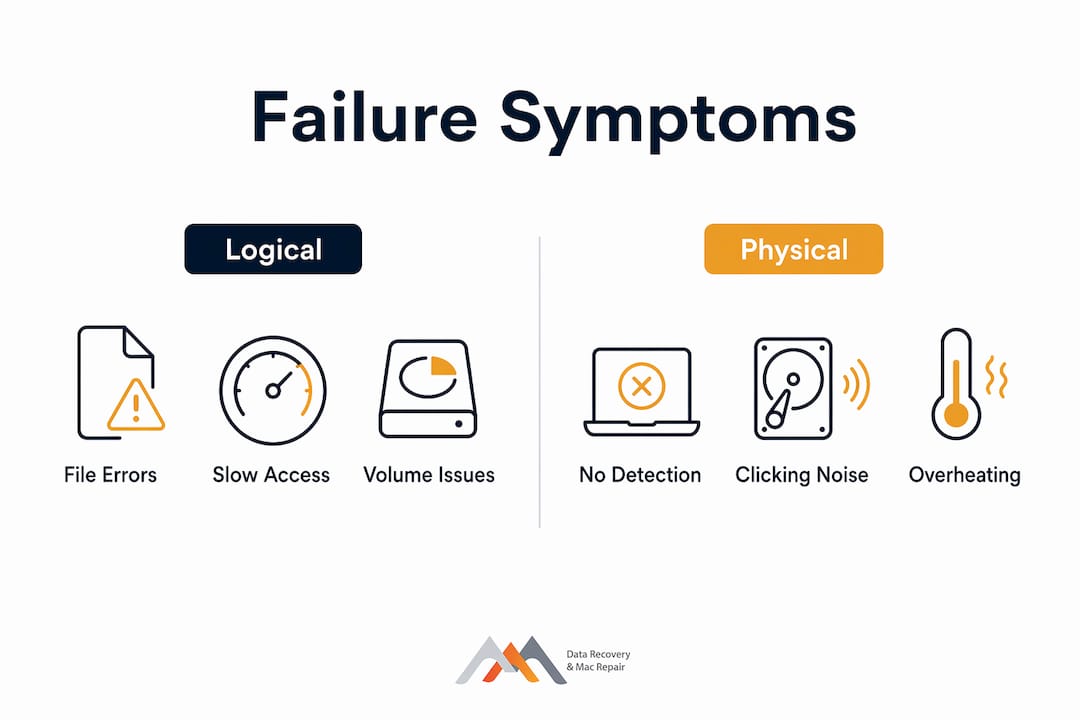
Logical failures leave the drive’s hardware intact but corrupt or misplace the file system. You will typically see one or more of these signs:
- The drive mounts in Finder but shows no files or unexpected folders
- macOS displays an error like “disk not initialized” or “unreadable volume”
- Disk Utility shows the drive but reports file system corruption
- Files disappear after a forced shutdown or improper ejection
- The APFS or HFS+ volume fails to mount even though the drive appears in System Information
These symptoms point to recoverable conditions. The file data is almost always still on the drive. The file system pointers are simply broken or missing.
Symptoms of physical failures
Physical failures involve actual hardware damage. The signs are harder to miss:
- Clicking, grinding, or beeping sounds when the drive spins up
- The drive is completely undetected in System Information under USB or Thunderbolt
- The drive gets unusually hot within seconds of connection
- The enclosure shows visible damage from a drop or liquid exposure
- The drive was detected once, then never again after a forced disconnection
Repeatedly reconnecting a physically troubled LaCie drive risks worsening damage and increasing the chance of permanent data loss. Stop all disk writes immediately and do not attempt further connections if you hear clicking or grinding.
Pro Tip: Open System Information on your Mac (hold Option, click the Apple menu, select System Information) and check the USB or Thunderbolt tree. If your LaCie drive appears there but not in Disk Utility, the enclosure’s bridge controller may have failed, not the drive itself.
Step-by-step: fixing logical errors on a LaCie drive
Mac Disk Utility’s First Aid is the correct first step for file system issues. It removes errors that prevent volume access before you run any recovery software. Running recovery software on an unchecked, corrupted volume can reduce the number of files you get back.
Step 1: run first aid in disk utility
- Connect your LaCie drive and open Disk Utility (Applications > Utilities > Disk Utility).
- Select the LaCie volume in the left sidebar. If you see both the physical disk and a volume beneath it, select the volume first.
- Click First Aid, then click Run. Let the process complete without interrupting it.
- If First Aid reports errors it cannot repair, note the specific error message before proceeding.
- Eject the drive safely, wait 30 seconds, and reconnect. Check if the volume now mounts normally.
Step 2: use recovery software for missing files
If First Aid completes but files are still missing or the volume remains inaccessible, use a dedicated recovery tool. Disk Drill and Recoverit both support APFS and HFS+ volumes on macOS and can perform deep scans that recover files even after formatting.
Formatting clears file system pointers but leaves data blocks intact if nothing has been written over them. This means a formatted LaCie drive can often be fully recovered if you act quickly.
| Scenario | Recommended Tool | Expected Outcome |
|---|---|---|
| Corrupted APFS volume, drive mounts | Disk Utility First Aid | File system repaired, files accessible |
| Files missing after accidental deletion | Disk Drill or Recoverit deep scan | High recovery rate if no overwrite occurred |
| Drive formatted accidentally | Recoverit low-level scan | Strong recovery if writes stopped immediately |
| Drive mounts but shows wrong capacity | Disk Utility First Aid, then Disk Drill | Partition table repair, then file recovery |
Step 3: recover to a separate drive
Never save recovered files back to the same LaCie drive. Copy everything to a separate Mac volume or a second external drive first. Once recovery is confirmed, you can reformat the LaCie drive and restore from your backup.
Pro Tip: Before scanning with Disk Drill or Recoverit, enable macOS’s “ignore ownership on this volume” setting in Disk Utility’s Get Info panel. This prevents permission errors from blocking the scan on APFS volumes.
Why physical LaCie drive damage requires professional recovery
Physical damage to a LaCie drive is not a DIY repair situation. The internal components of a hard drive, including the read/write heads, platters, and actuator arm, operate within tolerances measured in nanometers. Opening a drive outside a certified cleanroom introduces dust particles that destroy platters instantly.
Common physical faults on LaCie drives include:
- Mechanical head failure: The read/write heads crash onto the platters, causing clicking sounds and complete read failure
- Bridge controller failure: The USB-C or Thunderbolt bridge chip between the enclosure and the internal drive fails, making the drive undetectable even when the internal storage is intact
- Firmware corruption: The drive’s service area, which stores calibration data, becomes corrupted, preventing the drive from spinning up correctly
- Platter damage: Physical scratches on the magnetic platters from a head crash, which requires specialized imaging tools to extract partial data
Professional data recovery includes cleanroom head replacement, firmware repair using tools like the PC-3000, and direct imaging of the platters. Turnaround typically runs 1–7 days depending on fault severity. Costs vary based on failure type, but professional recovery is almost always less expensive than the value of the data being recovered.
LaCie Rugged drives present a specific recovery advantage. Bridge-controller failure is common in the Rugged line, but the internal SSD or HDD is often completely intact. Professionals can extract the internal drive from the enclosure and image it directly, bypassing the failed bridge entirely. This is a clean, high-success-rate recovery path that no DIY tool can replicate.
For LaCie Rugged models specifically, the orange enclosure is designed for shock resistance, but the USB-C Thunderbolt bridge chip is a known failure point after repeated drops or connector stress. If your Rugged drive stops mounting after a fall, the internal drive is likely fine. The enclosure is the problem.
How to maintain your LaCie drive and prevent future failures
Regular checks with Disk Utility and proper ejection practices improve drive longevity significantly. Most LaCie drive failures that Macwestlosangeles sees in the shop are preventable with basic habits.
Follow these practices to protect your drive:
- Always eject safely. Right-click the LaCie drive in Finder and select Eject before unplugging. Forced disconnections corrupt APFS metadata and can trigger the exact file system errors that require First Aid or recovery software.
- Back up with Time Machine. Connect your LaCie drive to Time Machine as a backup destination, or use it as a source and back up its contents to a second drive or iCloud. A single copy of data is not a backup.
- Monitor drive health monthly. Open Disk Utility and run First Aid on your LaCie drive once a month. Catching early file system errors prevents them from compounding into full volume corruption.
- Use quality cables and surge protection. Cheap USB-C cables cause intermittent connections that stress the bridge controller. Use Apple-certified or LaCie-supplied cables. Connect through a surge-protected power strip if the drive uses external power.
- Keep macOS updated. Apple regularly patches APFS driver bugs in macOS updates. Running an outdated macOS version increases the risk of file system incompatibilities with newer LaCie firmware.
Pro Tip: Third-party apps like DriveDx provide S.M.A.R.T. monitoring for LaCie hard drives connected via USB. S.M.A.R.T. data gives you early warning of reallocated sectors and read errors before the drive fails completely. Disk Utility does not expose S.M.A.R.T. data for USB-connected drives, so a dedicated tool fills that gap.
Key takeaways
Successful LaCie external hard drive repair requires accurate failure diagnosis first, then targeted software repair or professional recovery based on whether the fault is logical or physical.
| Point | Details |
|---|---|
| Diagnose before acting | Identify logical versus physical failure before using any tool or software. |
| First Aid runs first | Always run Disk Utility First Aid before launching Disk Drill or Recoverit on a Mac. |
| Stop writes after data loss | Cease all disk activity immediately to preserve recoverable data blocks on the drive. |
| Physical damage needs a lab | Cleanroom recovery with tools like the PC-3000 is required for head crashes and firmware faults. |
| Prevention beats recovery | Monthly Disk Utility checks and safe ejection habits prevent most common LaCie failures. |
When to stop DIY and call a professional
My honest assessment, after years of seeing LaCie drives come through the door at Macwestlosangeles, is that most Mac users wait too long before calling for professional help. They run First Aid, then Disk Drill, then a second recovery tool, then try a different Mac, and by the time they call us, the drive has been connected and disconnected a dozen times. Each reconnection on a mechanically failing drive risks further platter damage.
The rule I follow is simple. If you hear any abnormal sound, stop immediately. If the drive is not detected in System Information at all, stop immediately. DIY recovery for logical failures has higher success and fewer risks when done promptly and correctly with Mac tools. But the moment hardware is involved, the calculus changes completely.
The other thing most guides do not tell you is that professional recovery labs do not just recover your files. They also tell you why the drive failed. That diagnosis prevents the same failure from happening to your replacement drive. Free diagnostics, like what Macwestlosangeles offers, give you that information at no risk. You only pay if data is successfully recovered.
— Kaya
Get professional LaCie recovery help in los angeles
Macwestlosangeles has specialized in LaCie data recovery and Mac repair since 2006, serving West LA, Santa Monica, Beverly Hills, Brentwood, Westwood, Venice, Hollywood, and Culver City. The team handles APFS and HFS+ volume recovery, RAID arrays, NVMe SSDs, and LaCie Rugged enclosure failures. Free diagnostics are available with same-day appointments at 12041 Wilshire Blvd, Ste 26, near UCLA and the Getty Center. The policy is simple: no recovery, no charge. For hard drive data recovery in Los Angeles, call Macwestlosangeles at 310-866-0828 to speak with a technician today.
FAQ
What causes a LaCie drive to stop mounting on a mac?
The most common causes are APFS file system corruption, a failed USB-C or Thunderbolt bridge controller in the enclosure, or mechanical head failure inside the drive. Run Disk Utility First Aid first. If the drive does not appear in System Information at all, the fault is likely physical.
Can i recover data from a formatted LaCie drive?
Yes. Formatting removes file system pointers but leaves data blocks intact if no new data has been written. Stop all disk activity immediately and run a deep scan with Disk Drill or Recoverit on your Mac to maximize recovery chances.
How do i know if my LaCie rugged drive has a bridge failure?
If the drive is completely undetected in macOS System Information but shows no physical damage and makes no abnormal sounds, bridge-controller failure is the likely cause. Professionals can bypass enclosure faults by extracting and directly imaging the internal drive.
Is it safe to open a LaCie hard drive myself?
Opening a hard drive outside a certified cleanroom introduces dust that destroys the magnetic platters instantly. Physical repair of the internal mechanism requires a cleanroom environment and specialist tools. Only the enclosure, not the internal drive, can be safely opened outside a lab.
How long does professional LaCie data recovery take?
Professional recovery typically takes 1–7 days depending on the fault type. Logical recoveries from software corruption are faster. Physical recoveries involving head replacement or firmware repair take longer due to cleanroom procedures and component sourcing.