TL;DR:
- Data recovery triage evaluates storage devices quickly to determine the most effective recovery approach before imaging. It involves assessing drive health, encryption, and data priority to save time and reduce risk during recovery.
What is data recovery triage?
Data recovery triage is the rapid evaluation and prioritization of storage devices or data sources to determine the most effective recovery approach before any full imaging or extraction begins. Stop all disk writes immediately when a drive arrives for assessment. Every write operation risks overwriting recoverable blocks, particularly on SSDs where TRIM and garbage collection can permanently erase deleted data.
Triage is not a full recovery. It is the diagnostic phase that tells you which drives are worth imaging, which files are most critical, and which recovery path will yield results fastest. Think of it as the intake exam before surgery.
Key triage actions performed during this phase include:
- Checking SMART data and controller health to assess drive viability
- Identifying encryption status, including BitLocker, FileVault, or APFS encryption on Mac volumes
- Evaluating data volatility, particularly RAM contents and live session tokens on running systems
- Determining whether full disk imaging or targeted file extraction is appropriate
- Flagging high-priority data sets such as finance folders, mailboxes, and active project directories
Table of Contents
- Why triage is the foundation of every successful recovery
- How to perform data recovery triage step by step
- Triage vs. full disk imaging: which method fits your situation?
- RAID 5 and complex array triage: what changes
- Expert insights from Macwestlosangeles
- How to evaluate and prioritize drives at intake
- Digital forensic triage methods
- Why documentation and audit trails cannot be skipped
- Timelines and urgency: how fast does triage need to happen?
- Decision criteria during triage
- How triage fits into the broader recovery workflow
- Challenges and limitations of data recovery triage
- Real-world triage scenarios
- Macwestlosangeles handles triage when the stakes are highest
- Key Takeaways
- FAQ
Why triage is the foundation of every successful recovery
Triage exists because not all drives, and not all data, are equal. A technician who images every drive without first assessing health, encryption, and scope wastes hours on unrecoverable media while a client’s critical database sits waiting.
The core goals of triage in a professional workflow are:
- Speed: Identify the fastest path to restoring operational continuity
- Accuracy: Confirm which data is actually recoverable before committing resources
- Risk reduction: Prevent further data loss by halting writes and isolating the source device
- Scope definition: Determine whether the client needs full recovery or targeted file restoration
- Documentation: Capture the device state at intake for auditability and legal defensibility
Triage prioritizes critical data like finance folders, mailboxes, and project files to restore operational continuity rapidly, delivering immediate business value while full recovery continues in the background.
How to perform data recovery triage step by step
A repeatable triage workflow prevents missed steps and protects both the data and the technician’s liability.
- Power management and device preservation. Shut down or disconnect the affected drive immediately. For SSDs, this halts TRIM and garbage collection. For spinning drives, it prevents further head contact with degraded platters.
- Capture SMART and controller data. Run a SMART utility or diagnostic script to log wear level, reallocated sectors, pending sectors, and controller temperature. Attach this output to the recovery ticket before touching anything else.
- Assess encryption status. Check whether the volume uses BitLocker, FileVault, APFS encryption, or VeraCrypt. Unlock encrypted volumes early and document the key type, authorization method, and timestamp. If decryption is not possible, image the encrypted volume first and decrypt on the clone.
- Define recovery scope. Confirm with the client whether they need full disk recovery or targeted restoration of specific folders, databases, or mailbox stores. Record the scope in the ticket.
- Decide between full imaging and targeted acquisition. Use SMART data, physical symptoms, and scope requirements to choose the appropriate method.
- Create a verified image. Generate a sector-by-sector copy, verify it with hash checksums, and mount it read-only. All recovery work happens on the image, never the source.
- Prioritize and extract critical data first. Recover high-value data sets before proceeding with full recovery, so the client regains access to what matters most.
Document every action with timestamps throughout. The data recovery process depends on this record for both quality control and client reporting.
Triage vs. full disk imaging: which method fits your situation?

Triage acquisition gathers volatile data like RAM and network connections quickly, whereas full disk acquisition copies all sectors for comprehensive evidence. Neither method is universally superior. The right choice depends on urgency, legal requirements, and the scope of data loss.
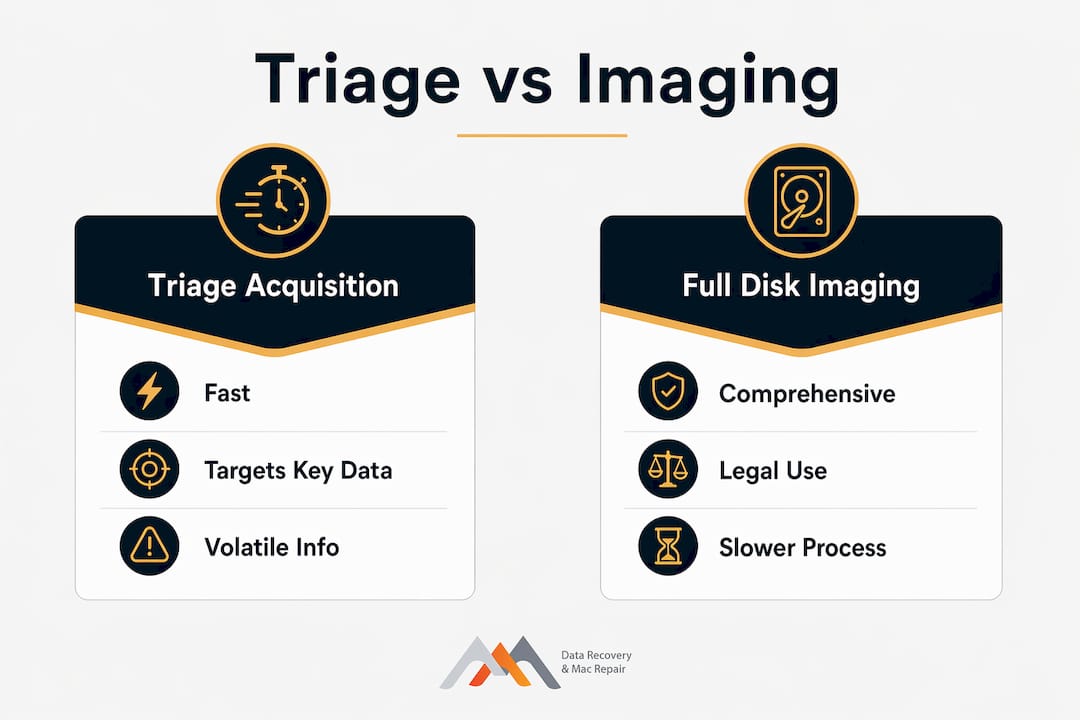
| Factor | Triage acquisition | Full disk imaging |
|---|---|---|
| Speed | Fast, targets high-value artifacts | Slow, copies every sector |
| Completeness | Partial, focused on priority data | Complete, all allocated and unallocated sectors |
| Data integrity | Altered by live access | Preserved bit-for-bit |
| Best use case | Live systems, urgent recovery, large device counts | Legal proceedings, known compromised machines |
| Encryption handling | Capture keys from RAM before powering down | Must decrypt before or after imaging |
Full disk imaging is the right call when legal admissibility is required or when the investigation scope has already been narrowed. Triage wins when time is the primary constraint and the goal is restoring operations, not building a court record.
RAID 5 and complex array triage: what changes
RAID 5 failures rarely announce themselves loudly. RAID 5 fails by hesitating and pausing rather than producing loud, obvious errors, which makes triage more demanding than with single drives.
RAID 5 triage essentials:
- Never rebuild before triaging. A premature rebuild on a degraded array with two failed members destroys parity and makes recovery exponentially harder.
- Document the disk order. Identify each member drive’s slot position, serial number, and SMART status before removing any drive from the array.
- Image each member individually. Create verified images of every member drive before attempting any reconstruction.
- Identify the failure mode. Distinguish between a single-drive failure (degraded but intact), a double-drive failure (data at risk), and a controller failure (array metadata corrupted).
| Symptom | Likely cause | Triage response |
|---|---|---|
| Array pauses, then resumes | Single drive read errors | Image all members immediately |
| Array shows degraded status | One drive failed | Do not rebuild; image all members first |
| Array offline, no rebuild option | Controller failure or two-drive failure | Escalate to lab-level reconstruction |
| Misleading “healthy” status | Silent corruption | Run SMART on all members; compare sector counts |
RAID 0 and RAID 1 triage follow similar principles. RAID 0 has no redundancy, so a single member failure means partial data loss at minimum. RAID 1 mirrors are more forgiving, but both members still require individual SMART assessment before any recovery attempt.
Expert insights from Macwestlosangeles
Since 2006, Macwestlosangeles has handled data recovery challenges across every storage type, from spinning hard drives to NVMe SSDs with soldered NAND and Logic Board component failures. Several patterns repeat across thousands of cases.
- Technicians who skip documentation during triage create problems downstream. A recovery that cannot be audited cannot be defended to a client or a court.
- SSDs with APFS volumes require extra care. APFS’s copy-on-write architecture means deleted file remnants disappear faster than on HFS+ volumes, making the “stop writes immediately” rule even more critical.
- Live triage trades perfect forensics for speed but demands high audit standards due to inevitable evidence alterations. Every action on a live system changes something.
- Free diagnostics at intake, combined with a “no recovery, no charge” policy, allow technicians to triage honestly without financial pressure to overcommit on difficult cases.
Pro Tip: On encrypted Mac volumes using FileVault or APFS encryption, capture the recovery key and volume UUID during triage intake. If the drive degrades further before imaging is complete, these credentials are the only path to readable data on the clone.
Same-day appointments mean triage can begin within hours of a data loss event, which is often the difference between a full recovery and a partial one.
How to evaluate and prioritize drives at intake
Not every drive that arrives deserves equal attention. Prioritization at intake determines where technician time goes first.
Drives with the highest recovery priority share three traits: the data is irreplaceable, the hardware is still partially functional, and the client has an active business need. A drive with a clicking head and no backup containing a company’s only copy of a client database ranks above a drive with minor logical corruption containing files that exist elsewhere.
SMART attributes to check at intake include reallocated sector count, pending sector count, uncorrectable sector count, and spin retry count. A drive with reallocated sectors in the hundreds but stable pending sectors is a different recovery profile than one with rapidly climbing pending sectors, which signals active degradation.
Digital forensic triage methods
Digital triage shifts from “image everything, analyze later” to targeted acquisition of communications, logs, and encryption keys for actionable intelligence in minutes. In forensic contexts, this means prioritizing volatile memory capture before any other action.
The order of volatility, as outlined in RFC 3227, dictates collection sequence: RAM first, then system state, network data, and finally persistent storage. Encryption keys held in RAM disappear the moment power is cut, and extracting keys from memory before imaging enables access to encrypted data that would otherwise be permanently locked.
Digital triage is also recognized as a pre-forensic examination process. Per published research in the Journal of Digital Forensics, Security and Law, digital triage is the process of viewing digital evidence before the traditional forensic methodology, used to gather quick intelligence that guides search and seizure efforts or determines whether a full examination is warranted.
Why documentation and audit trails cannot be skipped
Every triage action in live environments alters system state, necessitating rigorous documentation to maintain legal admissibility. This is not a bureaucratic formality. It is the mechanism that makes triage defensible.
A complete triage audit trail includes: the device’s SMART data at intake, all tools used with version numbers, every action taken with timestamps, hash values before and after imaging, and the names of technicians who handled the device. Without this record, a recovery that succeeds technically can still fail legally or professionally.
Timelines and urgency: how fast does triage need to happen?
The window for successful recovery shrinks with every hour a failed drive remains powered on or in use. For SSDs, the urgency is acute. Continued write activity triggers garbage collection that permanently clears recoverable data blocks. For spinning drives with degraded heads, each additional read attempt risks further platter damage.
Triage should begin within the first hour of a data loss event when possible. For business clients with active operations, same-day triage directly affects whether they can resume work the next morning.
Decision criteria during triage
Three questions drive every triage decision: Is the hardware stable enough to image? Is the data encrypted, and do credentials exist? What is the minimum viable recovery that restores the client’s operations?
If the hardware is unstable, escalate to a lab environment before attempting any imaging. If encryption credentials are unavailable, image the encrypted volume and defer decryption. If the client needs three specific folders today and the full recovery will take 48 hours, deliver those folders first.
How triage fits into the broader recovery workflow
Triage is the first phase, not a standalone process. It feeds directly into imaging, which feeds into extraction, which feeds into validation and delivery. Skipping or rushing triage forces corrections later, usually at higher cost and lower success rates. The role of experience in recovery shows most clearly at the triage stage, where a technician’s read of SMART data, physical symptoms, and client context determines the entire recovery trajectory.
Challenges and limitations of data recovery triage
Triage is not infallible. On cloud-synced systems using on-demand sync services, a disk image may capture only metadata pointers with no actual file content, because the data was never stored locally. Full-disk encryption compounds this: powering down a machine to image it can lock out the data permanently if keys are not captured first.
Physical damage also limits what triage can assess. A drive with a seized spindle or delaminated platters cannot yield reliable SMART data. In these cases, triage identifies the limitation quickly and routes the device to a clean-room environment rather than wasting time on software-level attempts.
Real-world triage scenarios
A West LA accounting firm’s NVMe SSD arrived showing no SMART data and failing to mount. Triage identified a controller failure within 15 minutes. The drive was imaged at the NAND level, bypassing the failed controller entirely, and the APFS volume was reconstructed from raw NAND reads. The client’s QuickBooks data was recovered the same day.
A Venice-based creative agency lost a RAID 5 array after a power surge. Triage of the four member drives found two with reallocated sector counts above threshold and one with a failed controller. Individual images of all four members were created before any reconstruction was attempted. The parity data was intact on the two healthy members, and the full array was reconstructed from the images.
Macwestlosangeles handles triage when the stakes are highest
When data loss hits a business or a critical personal project, the triage phase determines everything that follows. Macwestlosangeles has performed professional-grade triage and hard drive data recovery across Los Angeles since 2006, covering NVMe SSDs, RAID 0, 1, 3, and 5 arrays, APFS volumes, and Logic Board-level failures. Free diagnostics at intake and a “no recovery, no charge” guarantee mean you get an honest assessment before any commitment. Same-day appointments are available at 12041 Wilshire Blvd, Ste 26, serving West LA, Santa Monica, Beverly Hills, Brentwood, Westwood, Venice, Hollywood, and Culver City. Call (310) 866-0828 to start triage today.
Key Takeaways
Data recovery triage is the structured evaluation and prioritization of storage devices that determines recovery approach, scope, and sequence before any imaging or extraction begins.
| Point | Details |
|---|---|
| Stop writes immediately | Halting all disk activity prevents TRIM and garbage collection from erasing recoverable SSD blocks. |
| Encryption first | Unlock or document encrypted volumes before imaging to avoid an unreadable clone. |
| RAID triage sequence | Image every member drive individually before any array rebuild attempt. |
| Documentation is mandatory | Every triage action must be timestamped and logged to maintain auditability and legal defensibility. |
| Macwestlosangeles | Offers free diagnostics, same-day triage appointments, and a no-recovery, no-charge policy for all storage types. |
FAQ
What is data triage in a recovery context?
Data recovery triage is the rapid evaluation and prioritization of drives or data sources to determine the best recovery path before full imaging begins. It focuses on hardware health, encryption status, and data volatility to guide technician decisions.
Do data recovery technicians look at your files?
Technicians access files only to the extent required to verify recovery success and confirm file integrity. Professional labs document all access and operate under confidentiality agreements.
What are the four types of data recovery?
The four primary types are logical recovery (file system errors), physical recovery (hardware damage), RAID reconstruction (array failures), and forensic recovery (evidence-grade extraction). Triage determines which type applies before any work begins.
What is the purpose of data recovery?
Data recovery restores access to files that have been lost due to hardware failure, accidental deletion, corruption, or damage. The goal is returning the client to operational continuity with the least additional risk to the original data.