TL;DR:
- Effective data recovery security involves using immutable backups, isolated validation environments, and application-consistent restores. Validation and testing must be performed beforehand and take approximately 4 to 8 hours to prevent second breaches and ensure operational readiness. Prioritizing these practices reduces human error, protects against preexisting infections, and complies with regulatory requirements.
Data security during recovery is the practice of protecting data integrity, confidentiality, and availability throughout every step of restoring data after loss or compromise. Stop all disk writes immediately if you suspect active data loss. The difference between a clean restore and a catastrophic reinfection often comes down to one decision: whether you validated your backup before reconnecting it to production. Immutable backups, air-gapped storage, and isolated recovery environments are the three pillars that separate a successful recovery from a second breach. This guide explains how each layer works and how to apply them to your situation in 2026.
What are the main risks to data security during recovery?
Recovering data into a compromised environment causes immediate reinfection. This is the most underestimated risk in the entire recovery process, and it catches organizations off guard precisely because the focus shifts to speed rather than security the moment data loss occurs.
The threats fall into three categories:
- Dormant malware in backups. Ransomware frequently stages itself inside backup repositories weeks before triggering. Restoring from an infected backup reintroduces the threat directly into your production environment.
- Credential compromise. If your identity provider was part of the breach, the credentials you use to authenticate recovery access may already be in an attacker’s hands. Pre-built digital jump bags, which are offline credential stores containing contact lists and recovery procedures, are the only reliable fallback when primary identity systems are down.
- Human error. Human error causes about 80% of cybersecurity breaches. That statistic applies with equal force during recovery, when teams are under pressure and procedural discipline tends to slip.
Mitigation requires clean-room recovery environments, strict role-based access controls, and separate credential management for recovery operations. The recovery team should operate with credentials that are entirely distinct from day-to-day administrative accounts.
Pro Tip: Create a dedicated recovery identity set stored offline and test it quarterly. If your primary directory service is compromised, you need a path back in that does not depend on the systems you are trying to restore.

How do immutable backups and air-gapped storage protect your data?
Immutable backups are copies of data that cannot be modified, deleted, or encrypted for a defined retention period, regardless of administrator-level commands. The S3 Object Lock standard is the most widely adopted implementation, and over 50 storage providers now support it. That level of industry adoption reflects a consensus that write-once protection is a baseline requirement, not an optional feature.
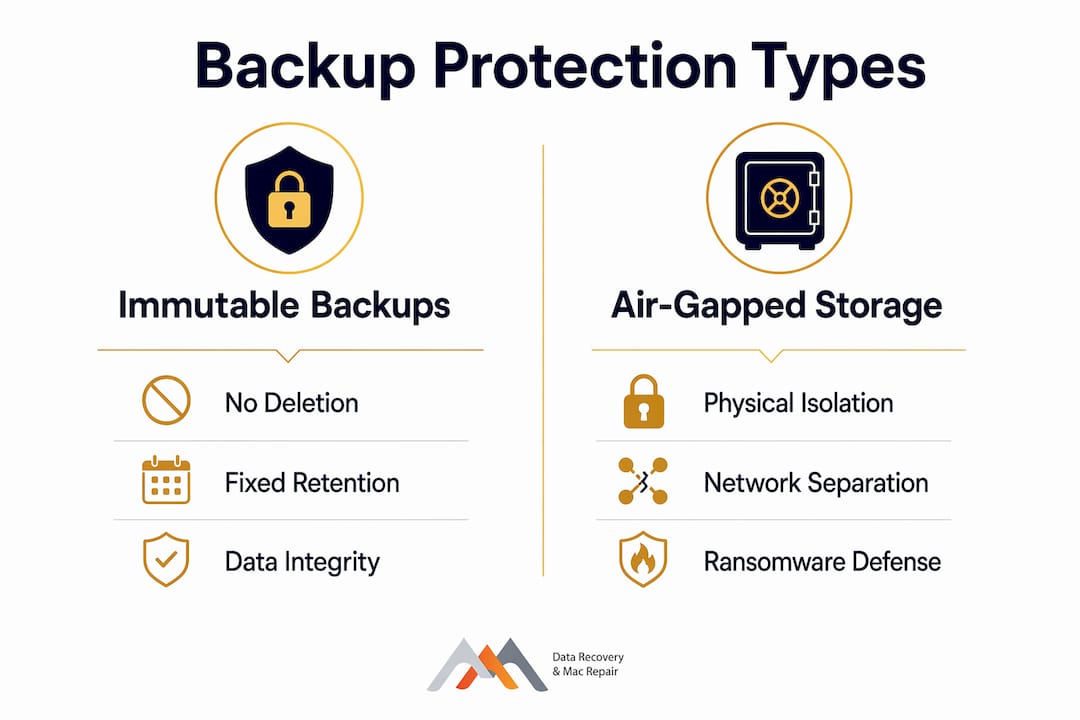
Air-gapped storage takes protection a step further by physically or logically isolating backup copies from any network connection. An attacker who compromises your entire cloud environment cannot reach a tape or disk that has no network path to exploit. The practical result is significant: 30TB across 50 servers has been recovered overnight using immutable backups combined with air-gapped infrastructure, demonstrating that security and speed are not mutually exclusive.
The table below compares the two approaches across key protection dimensions:
| Protection dimension | Immutable backups | Air-gapped storage |
|---|---|---|
| Prevents deletion or encryption | Yes | Yes |
| Blocks network-based attacks | Partial | Yes |
| Protects against preexisting infection | No | No |
| Requires physical media management | No | Often yes |
| Recovery speed | Fast | Moderate |
| Best use case | Cloud-native environments | High-value or regulated data |
Immutable backups have a critical limitation worth stating plainly: they protect against deletion but not logical corruption introduced before the backup was taken. If ransomware encrypted your files three weeks ago and your backup captured that encrypted state, immutability preserves the corrupted version perfectly. This is why backup validation with cryptographic hash verification is mandatory before any restore begins.
Pro Tip: Run SHA-256 hash verification on your most recent backup set before a crisis, not during one. Discovering a corrupted backup at 2 a.m. after a breach is far more costly than discovering it during a scheduled test.
The 3-2-1 backup model is now insufficient for cyber-resilient recovery. The updated 3-2-1-1 model, which adds one immutable or air-gapped copy to the standard three copies on two media with one offsite, is the current minimum standard.
Application-consistent vs. crash-consistent recovery: which one matters?
Crash-consistent recovery restores data to the state it was in at the moment of failure, similar to pulling the power cord on a running system. The files exist, but in-flight transactions are incomplete, database write buffers are unflushed, and application state is undefined. Crash-consistent recovery restores data presence but does not ensure application workflows or business transactions function after restoration.
Application-consistent recovery captures a coordinated snapshot where all applications have flushed their buffers and acknowledged the checkpoint. When you restore from an application-consistent backup, your database, email server, or ERP system resumes from a known-good state rather than attempting to reconstruct incomplete transactions.
The table below shows the practical difference between the two recovery states:
| Recovery state | Data completeness | Application functionality | Suitable for production? |
|---|---|---|---|
| Crash-consistent | Files present | Workflows may fail | Rarely without repair steps |
| Application-consistent | Files present and coherent | Workflows resume correctly | Yes |
Regulatory frameworks increasingly require demonstration of application-consistent recovery outcomes, not just proof that data exists. For businesses subject to HIPAA, SOC 2, or PCI DSS, a crash-consistent restore that leaves your billing system in an inconsistent state is a compliance failure, not just a technical inconvenience. True data protection in recovery means restoring usable, functional services, not just raw files.
How to build an isolated recovery environment for safe validation
An isolated recovery environment (IRE) is a network-separated space where restored data is validated before it touches production systems. The concept is straightforward: clean data is the new security perimeter, and automated pipelines combining malware scanning and baseline verification are required before production restoration. Building this environment before a crisis is mandatory. Building it during one is nearly impossible.
Here is a practical sequence for setting up and using an IRE:
- Provision the isolated environment in advance. Use a separate network segment with no routing path to production. Assign dedicated credentials that exist only for recovery operations and are stored in your digital jump bag.
- Restore the backup into the IRE first. Never restore directly to production. Mount the backup in the isolated environment and treat it as untrusted until validation is complete.
- Run malware scans and integrity checks. Standard validation procedures in isolated environments typically take 4–8 hours per restore cycle. Use endpoint detection tools and verify cryptographic hashes against your pre-recorded baseline values.
- Test application consistency. Start dependent services in the correct order and confirm that transactions, workflows, and data relationships are intact. Document any anomalies before proceeding.
- Promote to production only after sign-off. Require a second authorized reviewer to approve the move from IRE to production. This two-person rule prevents a single point of human error from bypassing the entire validation process.
- Run tabletop exercises quarterly. Recovery is a sequence of separately authenticated, audited steps validated through tabletop exercises, not a single instant restore. Teams that have never practiced the sequence under simulated pressure will make errors when the pressure is real.
For Mac environments specifically, APFS snapshots on NVMe drives support application-consistent checkpoints natively, which makes IRE validation faster when the source system is a MacBook Pro or iMac with a T2 or Apple Silicon chip. FileVault encryption adds another layer to manage: confirm that encryption keys are stored separately from the backup repository, because losing encryption keys for self-managed encrypted repositories results in zero recovery path. This is a common and catastrophic error for small businesses.
For guidance on proven Mac recovery methods that align with these security practices, Macwestlosangeles has documented the process in detail for Los Angeles users.
Key Takeaways
Effective data security during recovery requires immutable backups, isolated validation environments, and application-consistent restores working together before a crisis occurs.
| Point | Details |
|---|---|
| Validate before restoring | Run malware scans and hash checks in an isolated environment before touching production. |
| Use the 3-2-1-1 model | Add one immutable or air-gapped copy to your backup strategy as the minimum standard. |
| Prioritize application consistency | Crash-consistent restores leave workflows broken; application-consistent restores resume operations correctly. |
| Prepare digital jump bags | Store offline credentials and recovery procedures before a breach, not during one. |
| Practice the recovery sequence | Quarterly tabletop exercises prevent human error from undermining technically sound recovery plans. |
The tradeoff I see teams get wrong every time
Every recovery situation I have worked through carries the same tension: the business wants data back in an hour, and the security process requires four to eight hours of validation. The temptation to skip the IRE and restore directly to production is real, and I understand it. But every team that has yielded to that pressure and skipped validation has paid for it with a second incident, usually worse than the first.
The insight that changed how I think about this is that true recovery success is measured by the ability to restore critical business applications and workflows, not just files. A file that exists but belongs to a corrupted database is not a recovery. It is a false sense of security. The four to eight hours spent in the IRE are not a delay. They are the recovery.
The other pattern I see consistently is organizations that invest in immutable backups and then neglect key management. An immutable backup protected by a passphrase stored only in the compromised system is not a recovery option. It is an expensive archive of inaccessible data. Treat your encryption keys with the same care you give your most sensitive files, and store them in a location that survives whatever scenario you are recovering from.
For complex recoveries involving RAID arrays, NVMe SSDs, or logic board failures, the role of professional experience in achieving a clean outcome is not a marketing claim. It is the difference between a validated restore and a permanent loss event. Engage a specialist before the situation becomes irreversible.
— Kaya
How Macwestlosangeles secures your data recovery in West LA
Macwestlosangeles has provided professional data recovery and Mac repair services in Los Angeles since 2006, serving clients across West LA, Santa Monica, Beverly Hills, Brentwood, and Westwood. Every recovery follows a clean-room process that mirrors the isolated validation principles described in this guide, with no data returned to production until integrity checks are complete. Services cover hard drive data recovery, RAID 0, 1, 3, and 5 array recovery, NVMe SSD extraction, and Logic Board component repair for MacBook, iMac, Mac Mini, and Mac Pro systems. Free Diagnostics are included with every case, and the No Recovery, No Charge policy means you pay only for results. Same-day appointments are available at 12041 Wilshire Blvd, Ste 26, Los Angeles. Call 310-866-0828 to speak with a recovery specialist today.
FAQ
What is data security during recovery?
Data security during recovery is the practice of protecting data integrity, confidentiality, and availability while restoring data after loss or compromise. It includes using isolated environments, immutable backups, and validation checks before reconnecting restored data to production systems.
How long does validation in an isolated recovery environment take?
Standard validation procedures in an isolated environment typically take 4–8 hours per restore cycle. This window covers malware scanning, cryptographic hash verification, and application consistency testing.
What is the difference between immutable and air-gapped backups?
Immutable backups cannot be modified or deleted for a defined retention period, while air-gapped backups are physically or logically disconnected from any network. Both protect against ransomware, but air-gapped copies also block network-based attacks that immutable cloud storage cannot fully prevent.
Why is application-consistent recovery required for business continuity?
Crash-consistent recovery restores files but leaves application workflows and database transactions in an undefined state. Application-consistent recovery ensures that services resume correctly, which is required by regulatory frameworks including HIPAA, SOC 2, and PCI DSS.
What is a digital jump bag and why do I need one?
A digital jump bag is an offline, immutable store of recovery credentials, contact lists, and documented procedures. It provides the access path needed to begin recovery when primary identity systems are compromised or unavailable during a breach.