TL;DR:
- Business data loss occurs when critical digital information becomes inaccessible, corrupted, or deleted, threatening a company’s operations. Preventative strategies, such as the 3-2-1 backup rule and regular testing, are essential for safeguarding data. Trust and reputation damage are often the most costly consequences beyond immediate technical recovery.
Business data loss is defined as the event in which critical digital information becomes inaccessible, corrupted, or permanently deleted, directly threatening a company’s ability to operate. Stop all disk writes immediately if you suspect an active loss event. 60% of small businesses close within six months of a significant data loss incident. That number alone reframes data protection from an IT concern into a survival issue. The causes range from human error and hardware failure to ransomware and natural disasters, and the financial and reputational consequences extend far beyond the initial incident. Understanding what business data loss means, and what drives it, is the first step toward building a business that can withstand it.
What are the main causes of business data loss?
Human error is the single largest driver of data loss, responsible for 60–95% of breaches across industries. That range reflects how broadly “human error” applies, from an employee accidentally deleting a shared folder to a misconfigured cloud storage bucket left open to the public. The uncomfortable truth is that most data loss events are preventable.

Hardware failure is the second major cause. Approximately 140,000 hard drives fail every week in the United States. That figure translates to roughly 20,000 drive failures per day, many of them inside business servers and workstations running without any redundancy.
Cyberattacks, particularly ransomware, have accelerated sharply. Ransomware attacks occur every 19 seconds in 2026. Attackers no longer target only large enterprises. Small and mid-sized businesses are frequently chosen precisely because their defenses are weaker.
The major causes of business data loss include:
- Human error: Accidental deletion, overwrites, and misconfiguration. 34% of SaaS data loss comes from accidental deletion alone.
- Hardware failure: Mechanical hard drive failures, SSD NAND degradation, and RAID controller faults.
- Cyberattacks: Ransomware, phishing, and malicious insiders who deliberately destroy or exfiltrate data.
- Natural disasters: Fires, floods, and earthquakes that physically destroy on-site storage with no off-site copy.
- Software corruption: Bugs, failed updates, and file system errors that render data unreadable without destroying the physical media.
Pro Tip: Silent data degradation is the threat most businesses never see coming. A drive can report healthy status in macOS Disk Utility while quietly corrupting files in the background. Schedule monthly integrity checks using tools like fsck or SMART monitoring software.
What is the financial and operational impact of data loss?
The financial damage from a data loss event extends well beyond the cost of recovery. The average enterprise data loss incident costs $8.6 million. That figure includes downtime, lost productivity, emergency recovery services, regulatory fines, and the long-term cost of rebuilding client trust.
Downtime is the most immediate financial wound. Every hour a business cannot access its data, revenue stops and labor costs continue. For a mid-sized company, even a single day of downtime can represent tens of thousands of dollars in lost output.
Regulatory exposure compounds the financial damage. Businesses operating under HIPAA, CCPA, or PCI-DSS face mandatory breach notification requirements and potential fines when protected data is lost or exposed. A healthcare provider that loses patient records faces both federal penalties and civil liability simultaneously.
Reputational damage and loss of client confidence are often permanent after a data loss event. Clients who lose trust rarely return, and the word spreads faster than any recovery effort.
Post-recovery operations frequently take longer and cost more than the initial technical recovery. Validating recovered data, auditing discrepancies, and reconciling records with clients and partners can consume weeks of staff time. Most business owners budget for the recovery itself but not for the operational drag that follows it.
How does data corruption occur and why is it hard to detect?
Data corruption is defined as any change to data that renders it inaccurate, unreadable, or unusable without the owner’s intent. It differs from deletion in that the file still exists but its contents are damaged. Corruption can affect a single document or an entire file system.
| Corruption type | Cause | Detection difficulty |
|---|---|---|
| Silent (undetected) | Cosmic rays, hardware wear, firmware bugs | Very high. No system alert is triggered. |
| Detected corruption | Failed writes, power loss during save | Moderate. OS may report an error on access. |
| File system corruption | Improper shutdown, RAID failure | High. Drive mounts but files are inaccessible. |
| Logical corruption | Software bugs, bad updates | Moderate to high. Data appears present but is wrong. |
Silent data corruption produces undetected errors that progressively worsen without any warning. A single flipped bit in a database record can cascade into thousands of corrupted entries before anyone notices. By the time the problem surfaces, the backup copies may already contain the corrupted data.
Hardware wear is the most common physical cause. As NAND flash cells in SSDs age, they lose the ability to hold a charge reliably. NVMe drives used in MacBook Pro and Mac Pro systems are especially susceptible to this over time, particularly in high-write environments.
Pro Tip: Never assume a backup is clean just because it completed without errors. Test restores quarterly on a non-production machine. Many businesses discover their backups are corrupt or incomplete only during an actual crisis, when it is too late.
What are effective strategies to prevent business data loss?
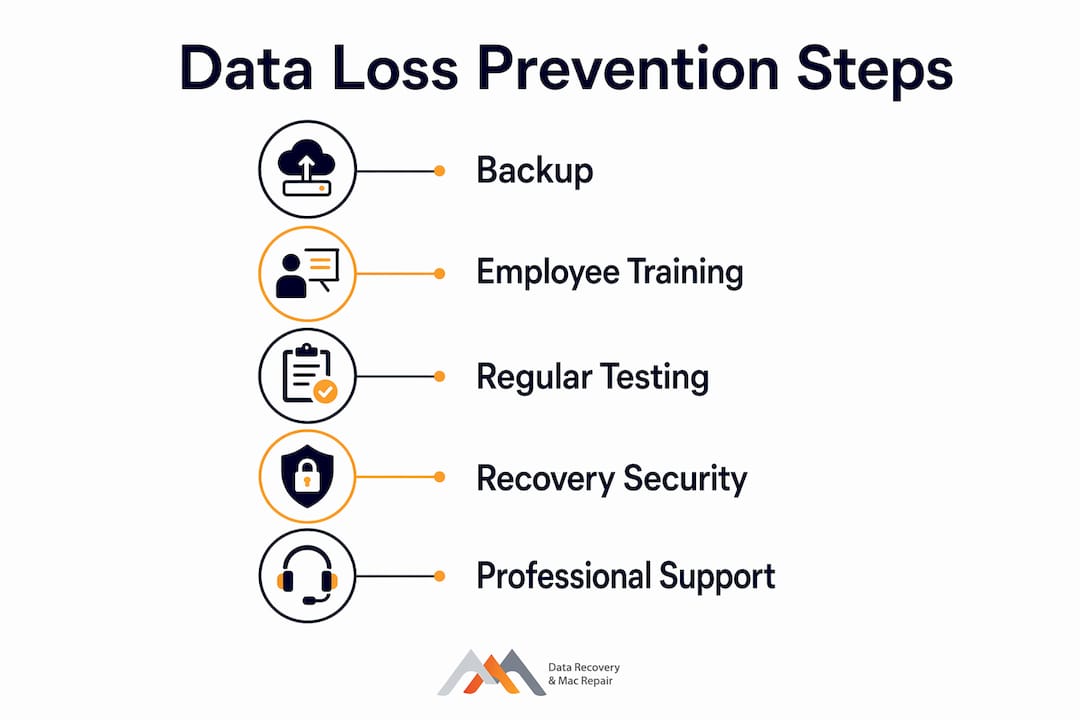
Prevention requires a layered approach, not a single tool. The most widely adopted framework is the 3-2-1 backup rule: maintain 3 copies of your data, stored on 2 different media types, with 1 copy stored off-site or in the cloud. A business running macOS with Time Machine on a local NAS plus a cloud backup to Backblaze B2 satisfies this rule at low cost.
Effective data loss prevention strategies, ranked by impact:
- Implement the 3-2-1 backup rule with automated, scheduled backups. Manual backups fail because people forget or skip them under deadline pressure.
- Test backups regularly. A backup you have never restored is a backup you cannot trust. Run a full restore drill at least once per quarter.
- Adopt a data-centric security approach. Classify and encrypt sensitive data at the source rather than relying solely on perimeter defenses like firewalls. Data moves across users, cloud environments, and devices. Encryption at the source protects it everywhere.
- Train employees on error prevention. Since human error drives the majority of incidents, structured training on file management, phishing recognition, and access controls delivers measurable risk reduction.
- Invest in a formal disaster recovery plan. Disaster recovery investments yield over 138% ROI by limiting downtime and per-incident costs. Calculating your expected annual loss helps justify the spend to stakeholders.
- Enable continuous backup for critical systems. Point-in-time snapshots every 15 minutes mean you lose at most 15 minutes of work, not an entire day.
| Prevention method | Cost level | Risk reduction |
|---|---|---|
| 3-2-1 backup rule | Low | High |
| Employee training | Low to medium | High |
| Data encryption at source | Medium | High |
| Disaster recovery plan | Medium to high | Very high |
| Continuous backup | Medium | Very high |
67.7% of businesses experienced a significant data loss event in the past year, yet only 40% of IT professionals trust their backup solutions. That gap between exposure and confidence is where most businesses get hurt. Closing it requires treating backups as a tested, living system rather than a set-and-forget task.
Understanding data security during recovery is equally critical. The recovery process itself creates vulnerabilities if data is transferred or handled without proper encryption and access controls.
Key Takeaways
Business data loss destroys operations, finances, and client trust simultaneously, making layered prevention and tested backups the only reliable defense.
| Point | Details |
|---|---|
| Human error dominates | 60–95% of data breaches trace back to human mistakes, making employee training the highest-leverage prevention investment. |
| Financial damage is severe | The average enterprise incident costs $8.6 million, and post-recovery validation often exceeds the initial technical recovery cost. |
| Silent corruption is invisible | Undetected data corruption can spread across backup copies before any alert triggers, requiring regular restore testing to catch it. |
| 3-2-1 rule is the baseline | Three copies, two media types, one off-site location is the minimum viable backup strategy for any business. |
| Recovery ROI is measurable | Disaster recovery investments yield over 138% ROI by reducing downtime and limiting per-incident financial exposure. |
Why trust is the real cost of data loss
The technical side of data loss gets most of the attention. The trust side is where businesses actually die.
I have seen companies recover their files within 48 hours and still lose their largest clients within 90 days. The data came back. The confidence did not. Clients who hand you sensitive financial records, patient data, or proprietary designs are making a trust decision, not just a vendor decision. When that trust breaks, the conversation shifts from “can you fix it” to “should we have trusted you at all.”
What most business continuity planning misses is the post-recovery phase. The technical recovery is the easy part, relatively speaking. The hard part is auditing every recovered record, reconciling discrepancies with clients, and communicating transparently about what was lost and for how long. That process routinely takes longer than the recovery itself, and it costs more in staff time and relationship repair than most businesses budget for.
The other thing I have learned is that experience in data recovery matters more than equipment. The tools are widely available. Knowing which recovery path to take on a FileVault-encrypted APFS volume with a failing NVMe controller requires judgment built over years, not a software license.
Invest in prevention before you need recovery. And if you need recovery, choose a provider whose track record you can verify, not just one who answers the phone fastest.
— Kaya
Professional data recovery for Los Angeles businesses
When prevention fails and data loss has already occurred, the next decision determines how much you recover and how quickly. Macwestlosangeles has provided hard drive data recovery services to businesses across West LA, Santa Monica, Beverly Hills, Brentwood, and Culver City since 2006. The team handles APFS and HFS+ volumes, NVMe and RAID (0, 1, 3, 5) arrays, logic board component repair, and memory card recovery. Free diagnostics are available with same-day appointments, and the practice operates on a no-recovery, no-charge guarantee. For businesses facing an active data loss event, call 310-866-0828 or visit the office at 12041 Wilshire Blvd, Ste 26, Los Angeles.
FAQ
What is business data loss, exactly?
Business data loss is the inaccessibility, corruption, or permanent deletion of digital information that a company needs to operate. It can result from hardware failure, human error, cyberattacks, or natural disasters.
How much does a data loss incident cost a business?
The average enterprise data loss incident costs $8.6 million when accounting for downtime, recovery, regulatory fines, and reputational damage. Small businesses face proportionally severe costs, with 60% closing within six months of a major incident.
What is the 3-2-1 backup rule?
The 3-2-1 rule means keeping 3 copies of your data on 2 different media types with 1 copy stored off-site or in the cloud. It is the minimum viable backup standard for any business handling critical data.
How can I tell if my data is being silently corrupted?
Silent data corruption produces no system alerts. The only reliable detection method is regular restore testing, where you actually recover files from backup to a test environment and verify their integrity.
What should I do immediately after a data loss event?
Stop all disk writes to the affected drive immediately to prevent overwriting recoverable data. Then contact a professional data recovery service before attempting any self-recovery tools, which can permanently reduce recovery success rates.