Stop all disk writes immediately. Most data recovery in Santa Monica ranges from several hundred dollars for simple deleted-file cases, to higher prices for mechanical hard drive failures and even more for SSD firmware faults, chip-off NAND work, or failed RAID arrays. A free diagnostic typically confirms the real recovery cost before payment, under a no recovery, no charge policy, so your next move is to power down the drive and call a local lab rather than run repair software yourself.
TL;DR:
- The cost of data recovery in Santa Monica varies significantly based on failure type, from $300–$700 for logical file recovery to over $1,800 for chip-off NAND work.
- Most cases involve either logical corruption or mechanical damage, with physical repairs requiring a cleanroom and higher labor costs.
- Accurate quotes depend on a thorough diagnostic that identifies the failure category, with transparent, written estimates including failure details and recovery method.
- Immediate action involves power down and avoiding software repair attempts on a failing drive to prevent further damage and cost escalation.
- Expedited, same-day recovery services are available mainly for logical and some firmware cases but may significantly increase the total price.
Table of Contents
- What Does Data Recovery Cost in Santa Monica by Device Type?
- Why Do Failure Type and Device Condition Change the Price So Much?
- How Do Data Recovery Providers Produce an Accurate Quote?
- How Long Does Data Recovery Take, and What Does Rush Service Cost?
- What Should You Do in the First Hour After Data Loss?
- What Makes a Santa Monica Data Recovery Lab Trustworthy?
- How Do Warranty and Refund Policies Affect What You Pay?
- When Is It Worth Paying More for Recovery?
- Start Your Santa Monica Recovery Case With Macwest
- Sources
- FAQ
What Does Data Recovery Cost in Santa Monica by Device Type?
Price depends far more on what actually failed than on whether the device is a hard drive, an SSD, or a memory card. A lab looks at symptoms first: does the drive spin up, does the operating system see it, does it click, does it throw firmware errors on boot. Those symptoms sort every job into a cost band before anyone opens a case.
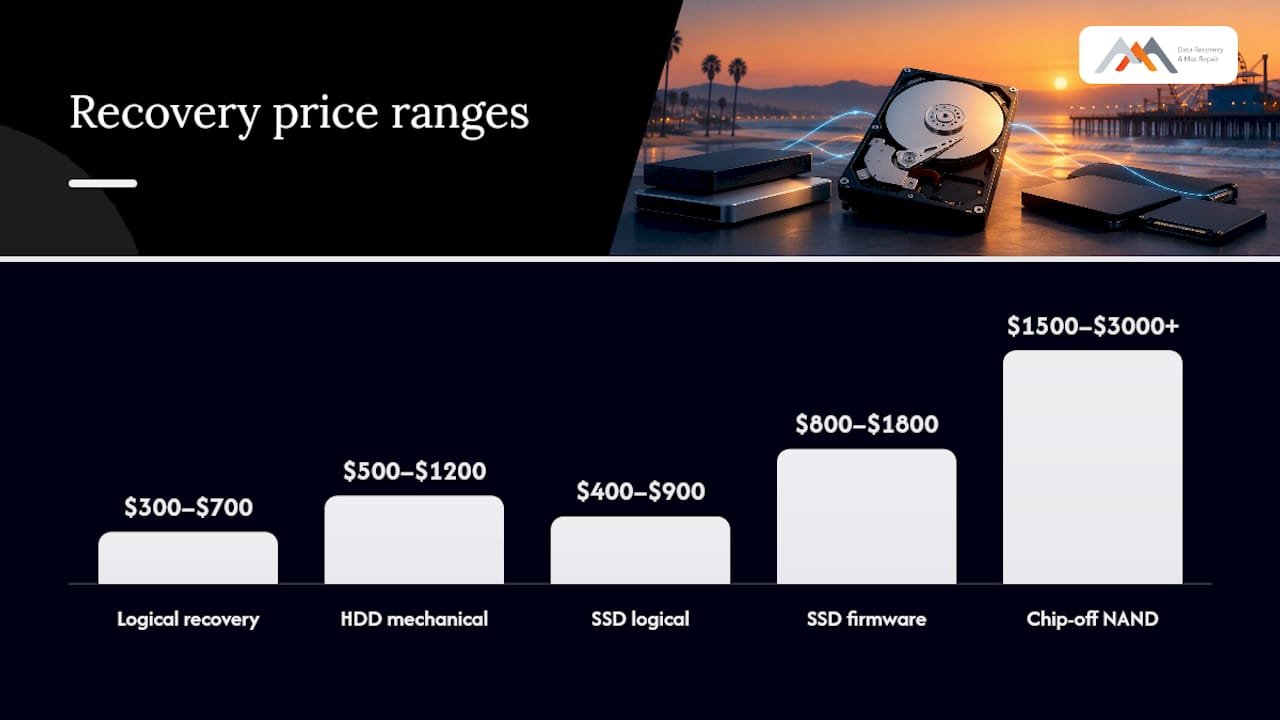
Here’s how the ranges typically break down for Santa Monica clients, based on the failure categories labs commonly quote against:
- Logical recovery (deleted or formatted files): Often $300–$700. A drive that mounts fine but lost files to accidental deletion, a bad format, or a corrupted partition table falls here. Example: someone erases a Time Machine backup drive by mistake, the hardware is healthy, and the lab just needs to rebuild the file system index.
- HDD mechanical failure (clicking, grinding, dead spindle): Usually $500–$1,200. This covers head assembly swaps, platter transplants, and spindle motor issues, work that has to happen inside a cleanroom to avoid contaminating the platter surface.
- SSD or NVMe logical recovery: Typically $400–$900. Even though there’s no moving parts, SSD logical cases still require specialized tools because TRIM commands and wear-leveling scatter data across the flash differently than on a spinning disk.
- SSD firmware or controller failure: Commonly $800–$1,800. When the controller chip that manages the drive’s flash translation layer dies or corrupts, a technician has to work around or replace that controller before any file structure becomes visible again.
- Chip-off NAND recovery: Often $1,500–$3,000+. This is the ceiling of SSD recovery pricing, and for good reason. The NAND chips are physically desoldered from the board and read with specialized programmers, then the raw flash data gets reconstructed byte by byte in a lab environment.
- USB drives and SD cards: Generally $200–$600 for logical issues, climbing toward $800–$1,200 if the flash controller itself has failed.
- RAID arrays (RAID 0, 1, 5): Typically $800–$3,500+, and this is the category where the range widens the most. A two-disk RAID 1 with one failed member costs far less to recover than a five-disk RAID 5 where two members failed and someone already attempted a rebuild.
Advertised “flat rate” prices you see from national mail-in chains almost always describe the low end of the logical category only. They frequently cap the file count or data volume included, and anything beyond that threshold gets billed as an add-on. A quote of $99 for “hard drive recovery” that doesn’t specify logical versus physical, and doesn’t mention a diagnostic step, deserves real skepticism.
Pro Tip: Ask any provider quoting a flat rate exactly which failure type that price assumes. If they can’t answer without seeing your drive first, the number is marketing, not an estimate.
Roughly 90% of hard drive failures that reach a professional lab involve either logical corruption or a mechanical fault serious enough to need cleanroom conditions, according to patterns SWGDE’s best practices documentation describes for handling damaged media. That split is exactly why a single flat price rarely covers what actually shows up in a real Santa Monica shop, and why an honest quote waits for a diagnostic before naming a number.
If you want a deeper breakdown of what drives SSD pricing specifically, the SSD recovery cost guide walks through why chip-off work sits so much higher than logical cases.
Why Do Failure Type and Device Condition Change the Price So Much?
The single biggest cost driver isn’t the brand of drive or its storage capacity. It’s which of four failure categories the device falls into, because each one demands a different skill set, different tools, and a different amount of lab time.
Logical failures mean the hardware works but the data structure pointing to your files is damaged, deleted, or overwritten. These are the fastest and cheapest cases because the drive itself never needs to be opened.
Physical failures involve actual hardware damage: a seized spindle motor, a scored platter, a head that’s crashed into the disk surface. These require a cleanroom, because any dust particle introduced while the drive is open can permanently scratch the platter and destroy the very sectors you’re trying to save.
Firmware failures sit in between. The drive’s internal management system, the code that tells it how to read its own sectors, has become corrupted or inaccessible. On modern SSDs and NVMe drives, this often means the controller can’t even present the drive to your Mac’s APFS file system, so the operating system sees nothing at all rather than a drive full of garbled files.
NAND or chip-off failures are the most severe SSD category. The flash memory chips themselves are still intact, but the path to reading them through the drive’s own electronics is gone. Recovering this data means physically removing each NAND chip and reading it with dedicated hardware.
A few conditions push a case up in cost regardless of which category it starts in:
- Prior DIY attempts. Running disk repair utilities, re-plugging a clicking drive repeatedly, or letting a formatted drive keep getting written to before recovery can turn a $400 logical case into an $1,100 physical one.
- RAID complexity. RAID recovery pricing climbs with the RAID level, the number of failed member disks, and whether metadata about the original disk order and stripe size has been lost. A RAID 5 array missing two of five disks, where someone already tried a rebuild, is a meaningfully harder reconstruction than an intact RAID 1 mirror with one dead drive.
- Encryption. FileVault-encrypted APFS volumes add a verification step, since the recovery process has to work around the encryption layer rather than through it, which typically adds time but not always a separate fee if the credentials are available.
- Age and prior wear. An NVMe drive with heavy write cycles and failing NAND blocks across multiple chips takes longer to image than a drive with one clean failure point.
The practical lesson: never attempt to rebuild a RAID array or run “fix” software on a drive that’s already showing symptoms. SWGDE’s guidance on damaged storage media is blunt about this, noting that preserving the original member disks and their order untouched is critical, since a single incorrect rebuild step can make reconstruction far harder and more expensive later.
How Do Data Recovery Providers Produce an Accurate Quote?
A trustworthy quote starts with a physical or remote diagnostic, not a phone-based guess. The technician needs to see the drive’s actual condition, run read tests, and identify which of the four failure categories applies before any number means anything.
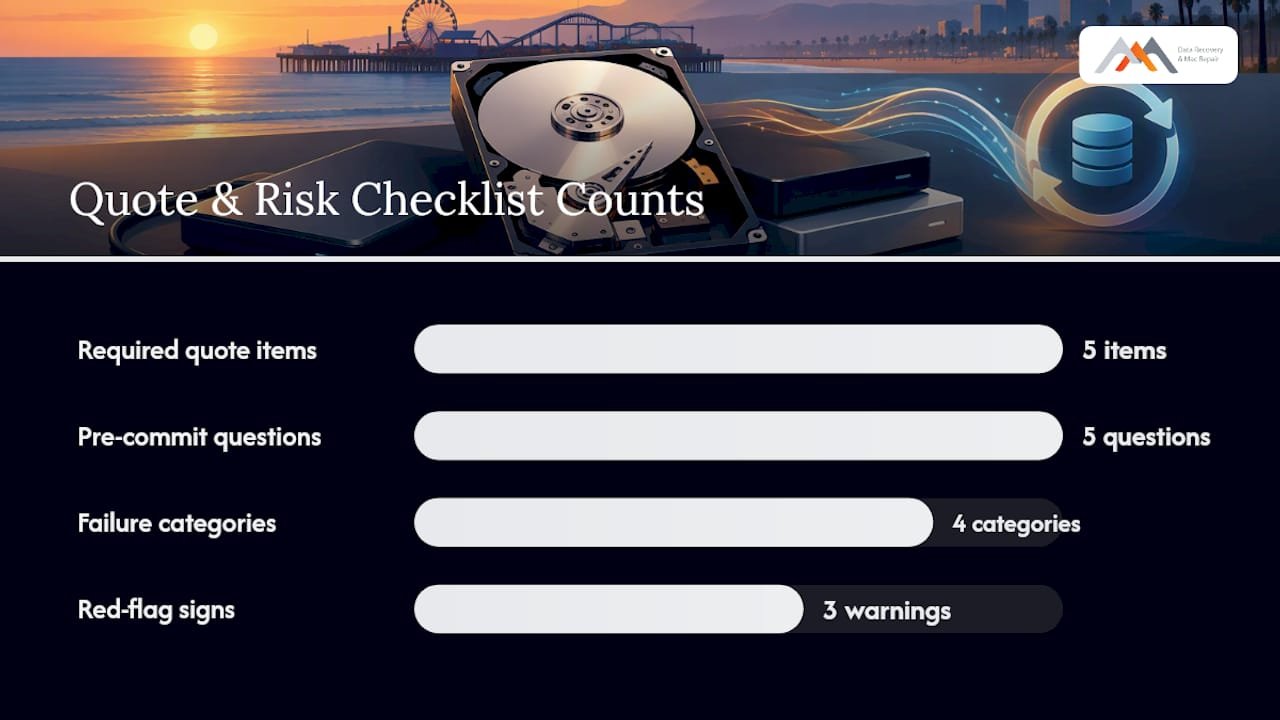
A quote worth trusting in writing should include these five items, based on the vendor-contract standards the National Archives recommends for anyone hiring a recovery vendor:
- A stated diagnostic outcome. What specifically failed, in plain language you can verify against your symptoms.
- A price range tied to work type, not just a single number pulled from thin air, since complex jobs sometimes reveal added complications mid-recovery.
- The return format. Will recovered files come back on a new external drive, via secure download, or on your original media once repaired?
- The no recovery, no charge policy in writing. If nothing meaningful comes back, you shouldn’t pay for the attempt.
- Chain-of-custody documentation. Especially for business clients handling regulated data, you want a paper trail showing who touched the drive and when.
Ask these questions before committing to any lab, local or mail-in:
- Do you have an ISO-rated cleanroom on-site, or do you outsource physical cases elsewhere?
- How much hands-on experience does your team have with APFS volumes and NVMe controllers specifically, not just older HFS+ hard drives?
- Can you show a sample recovery report so I know what documentation to expect?
- What’s your estimated success rate for a case matching my symptoms, not just an industry-wide average?
- Will I get a written estimate before any billable work begins?
Red flags worth walking away from: a provider that wants payment before diagnosing anything, one that can’t describe a cleanroom process for physical cases, or one that refuses to put the no recovery, no charge policy in writing. Selecting a provider based on symptom-specific expertise matters more than chasing the lowest advertised starting price, since a lab specializing in logical recoveries may not have the chip-off equipment your case actually needs.
Pro Tip: Ask specifically for the recovery report format before you drop off the drive. A lab that can’t describe what that document looks like probably doesn’t produce one, which becomes a real problem if you need proof of due diligence for insurance or compliance later.
How Long Does Data Recovery Take, and What Does Rush Service Cost?
Turnaround depends entirely on which failure category applies, and the price difference between standard and expedited service can be substantial. A logical recovery on a healthy drive can sometimes complete diagnosis and recovery within the same day. A chip-off NAND job or a multi-disk RAID rebuild can take a week or more of dedicated lab time.
| Case type | Typical diagnostic time | Standard turnaround | Same-day/emergency option |
|---|---|---|---|
| Logical (deleted/formatted) | Under 24 hours | 1–2 days | Often same-day |
| HDD mechanical (head/platter) | 24 hours | 3 days | Rush available, premium applies |
| SSD firmware/controller | 24 hours | 3–5 days | Limited same-day cases |
| Chip-off NAND | 2–4 days | 5 days | Rarely same-day due to lab process |
| RAID array (multi-disk) | 2–5 days | 5–14 days | Depends on member count and damage |
Same-day and emergency service make sense when the cost of downtime exceeds the rush premium, which is common for businesses that lost access to active project files or client records. For a personal photo drive with no deadline, standard turnaround usually saves money without meaningfully increasing risk.
What actually extends a timeline beyond these windows: waiting on a replacement head assembly or donor drive for an obsolete model, cleanroom scheduling conflicts when multiple physical cases arrive at once, and multi-stage firmware work where the first repair attempt reveals a second, deeper fault. RAID cases in particular can stretch out if member disks arrive at different times or if prior rebuild attempts scrambled stripe order, forcing the technician to reconstruct the array’s original configuration before touching the actual data recovery.
What Should You Do in the First Hour After Data Loss?
Stop all disk writes immediately, and power off any drive that’s clicking, grinding, or failing to be recognized by your Mac. Every additional read or write attempt on a failing drive increases the area of damage, and repeated boot attempts or running disk utility repair tools on a struggling drive frequently widens the affected sector range, turning what started as a simple logical case into a costlier mechanical one.
Follow these steps in order:
- Power down immediately if you hear clicking, grinding, or repeated spin-up failures. Don’t try “just one more restart.”
- Don’t open the enclosure. Opening a sealed hard drive outside a cleanroom introduces dust that can permanently scratch the platter surface.
- Don’t run recovery software on a physically failing drive. Software recovery tools work by reading the drive repeatedly, which is exactly what a mechanically failing drive can’t tolerate.
- Document what happened. Note the exact symptoms, when they started, and any error messages you saw. This speeds up the diagnostic and helps the technician skip guesswork.
- For water or fire damage, don’t power the drive on at all. Pack it in a sealed bag with desiccant if available, and bring it in as-is. SWGDE and National Archives guidance both note that submersion beyond 24 hours changes the handling approach entirely, and powering on a liquid-exposed drive risks a short circuit that destroys the platters.
- Bring the drive itself, not just a description. A technician needs to see and test the actual media, and if it’s a laptop or desktop drive, bring the power adapter and any relevant cables too.
If your drive is actively clicking right now, this walkthrough on clicking hard drive recovery covers exactly what to image and preserve before you do anything else.
What Makes a Santa Monica Data Recovery Lab Trustworthy?
Location and technical range both matter here. A lab that’s operated since 2006 has handled nearly every failure pattern a Mac or Windows drive can produce, and that history shows up in faster, more accurate diagnostics rather than guesswork.
Macwest Data Recovery & Mac Repair works from a facility centrally located at 12041 Wilshire Blvd, Ste 26, between the 405 freeway and Santa Monica, close to UCLA and the Getty Center, serving West LA, Santa Monica, Beverly Hills, Brentwood, Westwood, Venice, Hollywood, and Culver City. That location matters practically: local drop-off means your drive doesn’t spend days in transit before diagnosis even starts, which can shave real time off a mechanical or RAID case.
Technical capability directly affects both price and outcome. Here’s what to look for and why each one matters:
- APFS expertise, since nearly every modern Mac uses this file system and its snapshot and encryption structure differs meaningfully from older HFS+ volumes.
- NVMe protocol experience, because NVMe drives communicate with the system differently than SATA SSDs, and a lab without NVMe-specific tools can misdiagnose a controller fault as unrecoverable.
- RAID 0, 1, 3, and 5 reconstruction, covering both striped arrays with no redundancy and mirrored or parity-based arrays that need metadata reconstruction.
- Logic-board component repair, relevant when the data loss traces back to a Mac hardware fault rather than the drive itself.
- Chip-off and cleanroom facilities, the two capabilities that separate labs that can handle severe physical and NAND cases from ones that only handle logical work.
| Capability | Why it affects cost |
|---|---|
| Free diagnostic | Confirms real failure type before you commit to any price |
| No recovery, no charge | Removes financial risk if the case is unrecoverable |
| Cleanroom access | Required for platter and head-level physical repairs |
| APFS/NVMe experience | Prevents misdiagnosis on modern Mac hardware |
| Same-day appointments | Reduces downtime cost for urgent business cases |
Starting a case is simple: call ahead, describe the symptoms, and ask about same-day appointments if the situation is urgent. Bring the drive itself along with any power cables it needs, and expect the diagnostic to produce a written estimate before any billable recovery work begins. For a closer look at what the process involves once you arrive, the hard drive data recovery services overview walks through what happens between drop-off and pickup.
How Do Warranty and Refund Policies Affect What You Pay?
The no recovery, no charge model is itself a form of warranty: if the attempt doesn’t produce usable files, you owe nothing for the labor beyond, in some cases, a nominal diagnostic fee that reputable labs typically waive or apply toward the recovery cost anyway. That protects you from paying full price for a failed attempt, but it doesn’t cover a scenario where recovery partially succeeds.
Partial recovery is the gray area to clarify before work begins. Ask upfront how partial success is billed, whether it’s a reduced flat fee, a percentage of the standard quote, or the full rate regardless of recovery percentage.
Refunds on parts, such as a donor drive or replacement controller board sourced for a physical repair, are typically non-refundable once ordered, since those components can’t be resold. A written estimate should flag any parts cost separately from labor so you know exactly what’s refundable and what isn’t if the case doesn’t proceed. Always get the no recovery, no charge terms, and any partial-success billing policy, in writing before authorizing work, per the contract-clause guidance National Archives publishes for vendor agreements.
When Is It Worth Paying More for Recovery?
Cost decisions come down to what the data is actually worth to you, not what recovery technically costs. A business that loses access to active client files or financial records for a week can lose far more in downtime than a $2,000 recovery bill, which makes paying for expedited, higher-tier recovery an easy call when regulatory obligations like HIPAA or PCI compliance are in play.
For personal drives, the calculation is different. If the lost files are backed up elsewhere and the drive just held convenience copies, a full-price physical recovery rarely makes sense. But irreplaceable material, family photos, a decade of creative work, a single unbacked business database, justifies paying for the higher recovery tier even when the number climbs past $1,500.
Before authorizing expensive work, run through four questions: Is there a backup anywhere, even a partial or outdated one? What does each day without this data actually cost you in lost work or business? Does any regulation require you to recover or account for this specific data? And honestly, how much does the sentimental or business value outweigh the invoice? A logical-only partial recovery is often the right call when the answer to all four is “not much.” Full chip-off or RAID reconstruction earns its price when even one answer is “a lot.”
— Kaya
Start Your Santa Monica Recovery Case With Macwest
A reputable data recovery service in the Los Angeles area typically offers a free diagnostic and a no recovery, no charge policy, so you know the real cost before committing to anything. That combination gives Santa Monica residents and local businesses something a mail-in national chain can’t: a technician who can look at your drive in person, the same day in many cases, instead of waiting on a shipping cycle to even find out what’s wrong.
Call 310-866-0828 to describe your symptoms and ask about same-day appointments, or drop the drive off directly at 12041 Wilshire Blvd, Ste 26, between the 405 and Santa Monica. Bring the drive itself, any power cables or adapters it needs, and a short note on what happened and when the symptoms started. The diagnostic will produce a written estimate covering the failure type, an expected turnaround window, and the exact price before any recovery work begins. Start your case through the Mac data recovery services page and get a straight answer on your specific drive rather than a generic price range.
Sources
The pricing and safety guidance in this article draws on published standards from three organizations that set the practical baseline for how recovery vendors should handle damaged media and business contracts.
The SWGDE best practices for handling damaged digital storage devices covers technician qualifications, cleanroom requirements, and packaging standards for HDD, SSD, and NVMe media. NIST SP 800-88 Rev.1 governs media sanitization, useful for business clients who need to securely dispose of a drive after recovery and verification are complete. The National Archives’ vendor-agreement guidance lists the contract terms, timetable, fee schedule, chain-of-custody, and success reporting, that any business should require before signing with a recovery provider. If your organization handles regulated data, checking these documents against your vendor contract is worth the twenty minutes it takes.
- SWGDE: Best practices for handling damaged digital storage devices
- Electronic media: Basic information to consider when developing a contractual agreement with data recovery vendors (National Archives)
FAQ
How Much Should I Pay for Data Recovery?
Expect a broad range of prices for data recovery depending on the complexity, from lower amounts for simple logical recoveries to higher charges for mechanical and complex SSD or RAID cases. A free diagnostic under a no recovery, no charge policy should confirm the actual cost for your specific device before payment.
How Much Does It Cost to Recover 1TB of Data?
Cost depends on failure type, not the amount of data on the drive, since a 1TB logical case and a 1TB physical case sit in entirely different price bands. A healthy 1TB drive with deleted files typically falls in the $300–$700 logical range, while a 1TB drive with a mechanical fault runs $500–$1,200 or higher.
Is It Worth Paying for Data Recovery?
For business records, irreplaceable photos, or any data without a backup, professional recovery is usually worth the cost given how often DIY attempts turn a fixable logical case into a more damaged physical one. A free diagnostic removes the risk of paying for an attempt that doesn’t work.
How Much Does Geek Squad Charge for Data Recovery?
Mail-in national chains typically advertise a starting price for basic logical recovery, but that rate usually excludes physical, firmware, or chip-off cases, which get quoted separately once your drive is diagnosed. Local labs offering a same-day, in-person diagnostic can often give you a more accurate total cost faster, since you avoid a shipping cycle before finding out the real scope.
What’s the Difference Between Logical and Physical Recovery Cost?
Logical recovery addresses software-level problems such as deleted files or corrupted partitions and generally has a lower cost range. Physical recovery requires hardware repair and cleanroom conditions, which increases the cost depending on damage severity.