Stop all disk writes immediately if a RAID array has failed. Expect moderate cost ranges for most consumer and small-business RAID recoveries in Los Angeles, with complex multi-drive server or enterprise cases running higher once a technician sees the actual damage. Every legitimate lab starts with free diagnostics, and the final number depends entirely on what that evaluation finds, not on a number quoted over the phone before anyone has looked at the drives.
TL;DR:
- The cost to recover a RAID in Los Angeles generally ranges from $300 to over $4,000, depending on the number of failed drives and the complexity of physical or logical damage.
- RAID recovery costs are heavily influenced by the failure type, with simple logical failures costing less and multi-drive physical damages or proprietary controllers incurring higher charges.
- A failed rebuild attempt or prior unauthorized repair can drastically increase recovery costs, often turning a simple job into a complex, expensive one.
- Labs provide detailed, stage-by-stage quotes after free diagnostics, emphasizing the importance of proper initial assessment to avoid hidden charges.
- Immediate actions include stopping all disk writes, recording drive positions, and photographing failure evidence before removing any drives or seeking professional help.
Table of Contents
- How Much Does RAID Recovery Cost in Los Angeles?
- What Moves Your RAID Recovery Quote
- What Does RAID Recovery Cost by RAID Level and Device Type?
- How Do Labs Diagnose RAID Failures and Price the Work?
- What Should You Do Right Now if Your RAID Failed?
- Why Choose a Local Los Angeles RAID Lab?
- Pricing Checklist: Questions to Ask on the Call
- Does Insurance Cover RAID Data Recovery in Los Angeles?
- Does Your Location Within LA Affect RAID Recovery Pricing?
- How to Choose a Reputable RAID Recovery Service in LA
- An Editorial Take on What Actually Drives RAID Costs
- Get a Free RAID Diagnostic in West LA Today
- Sources
- FAQ
How Much Does RAID Recovery Cost in Los Angeles?
RAID recovery cost in Los Angeles breaks into three rough bands, and where your case lands depends on how many drives failed, whether the damage is physical or purely logical, and how the array was configured. Industry pricing pages and local shop quotes typically frame RAID work as starting in the low thousands for anything requiring a rebuild, with simpler jobs landing lower and multi-drive physical failures pushing higher.
- Low end (roughly $300–$700): A single logical failure on a two-bay NAS. Corrupted array metadata, an accidental reformat, or one drive dropped from a mirrored set with no physical damage.
- Typical range (roughly $700–$1,800): One physically failed drive in a RAID 5 or RAID 6 array, or a controller failure on a small business NAS, requiring cleanroom imaging of the bad member plus reconstruction of the array’s logical structure.
- High end ($1,800–$4,000+): Multiple failed drives, a failed rebuild attempt that scrambled parity data, proprietary NAS controllers with encrypted or nonstandard file systems, or large multi-bay enterprise servers where several members need platter-level work.
Quotes vary this much because RAID data recovery cost isn’t priced like a flat-rate service call. A four-bay array with two dead drives and a botched rebuild attempt is a fundamentally different job than a single-drive dropout, even though both start with the same complaint: “my RAID is gone.” Local Los Angeles pricing reflects the labor and cleanroom time each case actually requires, not a generic hard drive recovery LA rate card.
What Moves Your RAID Recovery Quote
A handful of technical factors decide whether your job lands at $600 or $4,000. Understanding them helps you ask better questions and avoid surprise line items later.
- Number of failed drives versus array size. One dead drive in a five-bay RAID 6 is often recoverable with parity data alone; two or more failed members in the same array usually means physical recovery on each one.
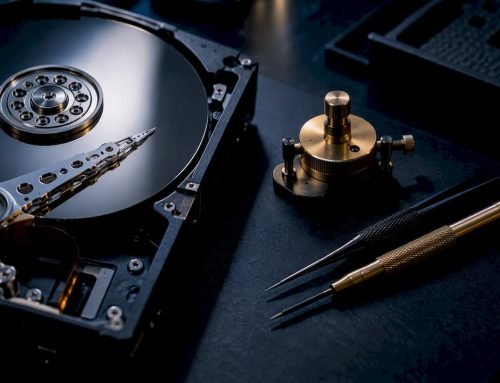
- Physical work versus logical reconstruction. Head swaps and platter transplants in an ISO-rated cleanroom cost far more than rebuilding a corrupted array map on drives that still spin normally.
- Controller and firmware complexity. Proprietary NAS controllers, especially those using nonstandard RAID striping or encrypted volumes, require more diagnostic time before reconstruction can even begin. NIST’s own research on RAID imaging confirms that member configuration and controller metadata have to be inventoried before any rebuild is attempted, which is exactly why proprietary controllers add hours to a quote.
- Forced rebuilds and read errors. If someone already tried rebuilding the array through the NAS’s own utility, that attempt may have overwritten parity data across every drive, turning a single-drive job into an all-member recovery.
- SSD and NVMe complexity. Wear-leveling and TRIM behavior on flash-based RAID members make logical reconstruction more technical than spinning-disk arrays.
- Turnaround urgency. Rush service for a business that can’t wait the standard queue typically carries a premium over standard processing.
Pro Tip: If your NAS shows a degraded array warning, do not click “rebuild” in the admin console. A failed rebuild attempt is the single most common reason a $700 job turns into a $2,500 job.
What Does RAID Recovery Cost by RAID Level and Device Type?
Different RAID levels fail differently, and the level itself is one of the biggest cost signals a lab sees during intake.
- RAID 1 and two-bay NAS mirrors. These are the cheapest cases to fix because a second full copy of the data usually still exists on the surviving drive. A single-drive RAID 1 failure with no physical damage often falls into the low end of the pricing range.
- RAID 5 with one failed drive. Parity data lets the lab reconstruct the missing drive’s contents mathematically, keeping this in the typical mid-range. RAID 5 with two or more failed drives, or a failed rebuild attempt, is a different story entirely. A government procurement case involving a RAID 5 rebuild documented exactly this: additional member problems surfaced once the rebuild began, pushing the job well past the original scope.
- RAID 6 and enterprise arrays. Built with double parity for extra fault tolerance, RAID 6 can survive two drive failures, but a third failed member or a corrupted controller pushes costs toward the high end fast.
- Multi-bay servers and NVMe/SSD arrays. Eight-bay and larger server arrays take longer to image, and flash-based members add firmware-level complexity that spinning disks don’t have.
How Do Labs Diagnose RAID Failures and Price the Work?
Free diagnostics come first at any reputable lab: a technician inspects each drive, checks for physical damage, and reports back what actually happened before quoting reconstruction work. That intake step is nondestructive and does not add charge regardless of outcome.
From there, the workflow splits into distinct billed stages. Imaging comes first, where each drive is copied member by member so the originals are never touched again during reconstruction. This mirrors NIST’s guidance on integrating forensic techniques into incident response, which recommends preserving originals and working exclusively from verified copies. Reconstruction happens on those images, rebuilding the array’s logical structure. Verification checks file integrity before anything gets handed back.
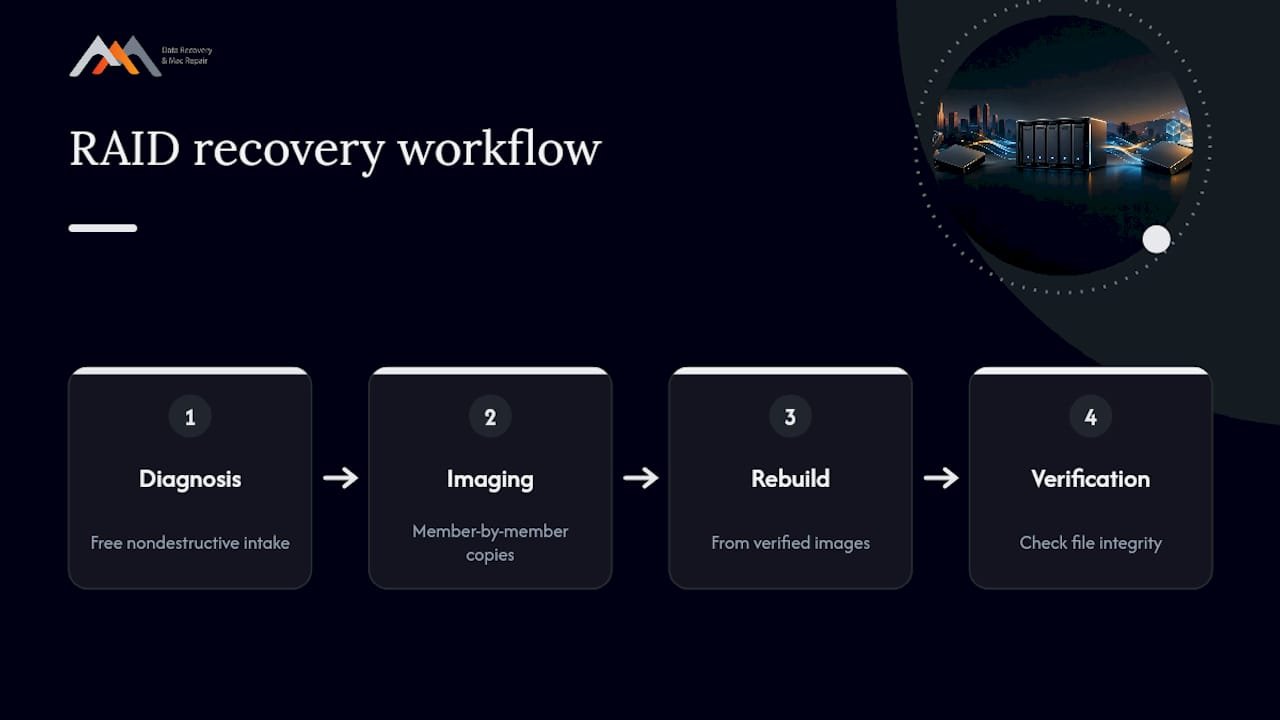
Labs separate these fees because each stage carries its own labor and risk. A written estimate should show diagnosis, imaging, and reconstruction as line items, not one bundled number. Timelines run anywhere from same-day for simple logical cases to a week or more for large arrays with physical damage on multiple members, since imaging alone can take many hours per drive on large-capacity server arrays.
What Should You Do Right Now if Your RAID Failed?
- Stop all disk writes immediately. Power down the NAS or server and don’t restart it, don’t run “repair,” and don’t copy new files.
- Do not rebuild, reinitialize, or run file system checks. These are the most common causes of a recoverable array becoming unrecoverable.
- Record the drive order and slot positions before removing anything, along with the exact controller and NAS model number.
- Write down the failure timeline and grab screenshots of any error messages or admin console warnings.
- For businesses, preserve chain-of-custody documentation when shipping drives, including who handled them and when.
Pro Tip: Photograph each drive’s slot position with your phone before pulling anything. Labs rely on original member order to reconstruct striping, and guessing wrong can cost hours of diagnostic time you’ll pay for.
Why Choose a Local Los Angeles RAID Lab?
A local specialist lab in West LA has experience handling Mac-based and mixed-platform RAID failures since 2006, working with APFS, NVMe, and legacy RAID configurations across NAS and server environments. Many reputable labs start with free diagnostics and operate on a no recovery, no charge basis, meaning you don’t pay if the data can’t be retrieved.
Before committing to any RAID data retrieval provider, confirm they maintain a certified cleanroom, have documented logic-board and component-level repair capability, and can speak specifically to your controller brand. Ask how they handle evidence custody and data security during transit and storage, especially if the drives contain client or patient records.
Pricing Checklist: Questions to Ask on the Call
- Request a written diagnosis scope and itemized quote before any destructive work begins.
- Confirm the no data, no charge policy explicitly and ask exactly what it covers (imaging attempts, cleanroom labor, or both).
- Ask whether the lab preserves your original drives and works exclusively from verified images during reconstruction.
- Get a timeline estimate, rush-fee schedule, and drive-replacement policy in writing, along with a plain description of their data security procedure.
Does Insurance Cover RAID Data Recovery in Los Angeles?
Business insurance sometimes covers RAID recovery costs, but it depends entirely on the policy type your company carries. Standard commercial property policies rarely cover data recovery directly. Cyber liability policies and business interruption riders are far more likely to include data restoration as a covered expense, particularly when the failure stems from a ransomware attack, hardware failure tied to a covered event, or a documented server outage.
Homeowners’ policies almost never cover personal RAID or NAS failures unless the damage traces back to a covered peril like fire, flood, or power surge, and even then the drive itself, not the data on it, is typically what gets valued.
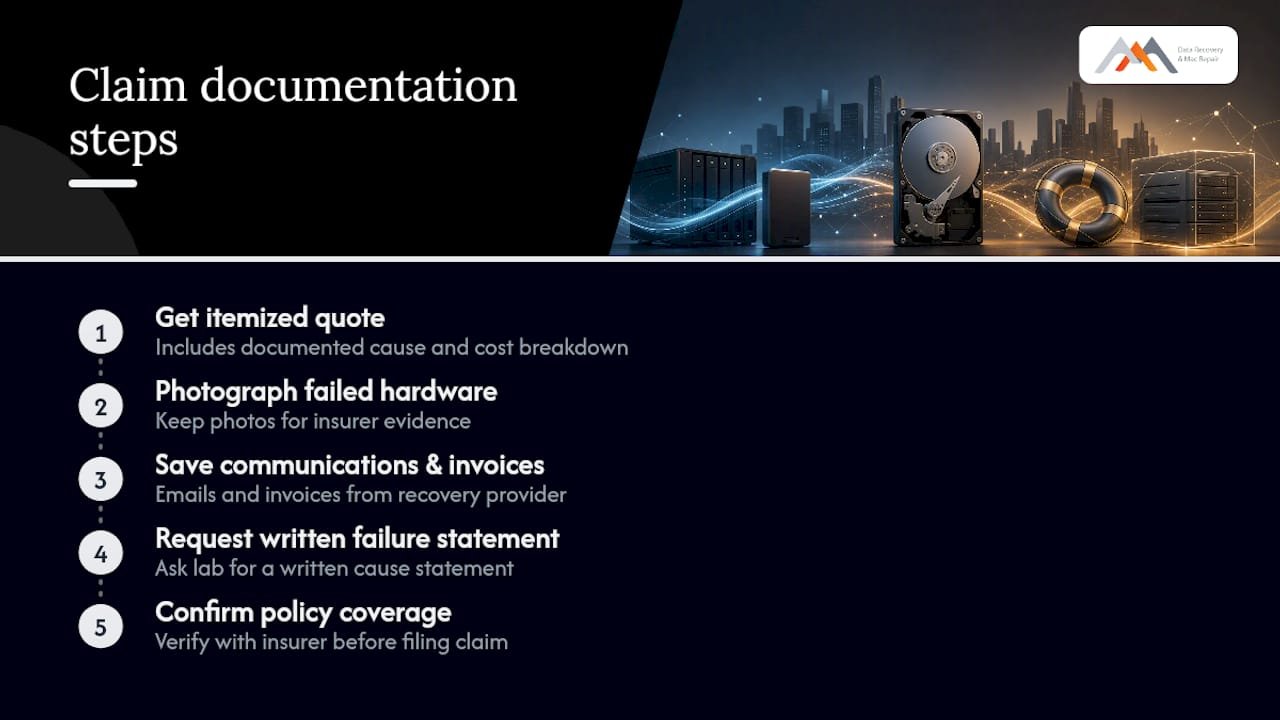
If you believe you have coverage, the practical process looks like this: get the itemized diagnostic and repair quote from the recovery lab first, since insurers require a documented cause of failure and a cost breakdown before processing any claim. Photograph the failed hardware, keep every email and invoice from the recovery provider, and ask the lab directly whether they can provide a written failure-cause statement for your carrier. Some Los Angeles businesses have successfully claimed reimbursement this way when the underlying cause, such as a documented power surge or a covered cyberattack, matched their policy’s specific triggers. Always confirm coverage with your insurance provider before assuming a claim will be approved, since policy language on hardware versus data varies significantly between carriers.
Does Your Location Within LA Affect RAID Recovery Pricing?
Physical location within Los Angeles has a modest but real effect on RAID recovery pricing, mostly through logistics rather than the lab’s actual labor rates. A shop centrally located between the Westside and downtown, near major freeway access, reduces the drive-off and turnaround time for both individuals and IT departments who need to hand off hardware in person rather than ship it.
Businesses in Santa Monica, Beverly Hills, Brentwood, Westwood, Venice, Hollywood, and Culver City generally benefit from proximity to a West LA lab, since same-day drop-off avoids shipping delays and the handling risk that comes with mailing a failed RAID array across the country to an out-of-state recovery chain. Mail-in services often add days to the timeline just in transit, on top of their own diagnostic queue, and shipping fragile drives with damaged heads or platters introduces additional risk of further physical damage.
Suburban and outlying areas of the greater LA region don’t typically pay more for the recovery work itself. The difference shows up in convenience: how quickly you can get drives into a technician’s hands, how fast you can get diagnostic results back, and whether same-day service is realistic for your address. A downtown business with an urgent server outage benefits the same way a Westside resident does, as long as the lab is centrally located enough to make a same-day appointment logistically workable.
How to Choose a Reputable RAID Recovery Service in LA
Credentials matter more in RAID recovery than in almost any other repair category, because a botched attempt can destroy data permanently. Look for a lab that operates its own ISO-class cleanroom rather than outsourcing physical work to a third party, since every additional handoff adds risk and time.
Ask how long the company has operated in Los Angeles specifically. A shop with a decade or more of continuous local operation has handled a wider range of controller brands and failure patterns than a newer entrant, and that experience shows up in first-attempt success rates on unusual proprietary NAS systems.
Check whether the free diagnostics offer is genuinely free with no obligation, and whether the no recovery, no charge policy is stated in writing, not just implied verbally. Read recent customer reviews specifically mentioning RAID, NAS, or server recovery rather than general Mac repair, since a shop can be excellent at logic board work while being untested on multi-drive array reconstruction. Finally, confirm the lab can explain, in plain language, why your specific array failed and what stage of the recovery process the price you’re being quoted actually covers.
An Editorial Take on What Actually Drives RAID Costs
Most articles on this topic list price ranges and call it a day. What they miss is that the single biggest cost variable isn’t the RAID level or drive count. It’s whether someone already tried to fix it before calling a lab. A degraded RAID 5 array with one bad drive is often a straightforward, mid-range job. The same array after someone clicked “rebuild” in the NAS admin panel and watched it fail halfway through is a different, more expensive problem, because that rebuild attempt frequently overwrites parity data across every surviving member. The honest advice, backed by how NIST’s own incident-response guidance frames outsourcing decisions, is that RAID recovery is exactly the kind of infrequent, high-stakes, specialized task where DIY attempts cost more in the long run than the diagnostic fee ever would. The instinct to try one more thing before calling a professional is understandable and almost always the most expensive mistake in this entire process.
— Kaya
Get a Free RAID Diagnostic in West LA Today
A trusted local RAID and NAS recovery provider serves West LA, Santa Monica, and Beverly Hills businesses, offering free diagnostics, no obligation, and written scopes before any reconstruction begins. Such providers often offer a no recovery, no charge policy, so you are not billed if recovery fails, and may provide same-day appointments for urgent cases. The lab sits at 12041 Wilshire Blvd, Ste 26, between the 405 and Santa Monica, close enough to UCLA and the Getty Center for a same-day drop-off from Brentwood, Westwood, Venice, Hollywood, or Culver City. Call 310-866-0828 now, or start with a free RAID and NAS diagnostic to get your written quote before your array degrades any further.
Sources
For technical background on digital image handling, see NIST’s forensic digital image management guide and real-world RAID rebuild incident documentation.
- NIST Special Publication 800-86: Guide to Integrating Forensic Techniques into Incident Response
- The impact of RAID on disk imaging (NISTIR 7276)
- Data Recovery From RAID 5 Hard drives (US government procurement example)
FAQ
How Much Does It Cost to Recover RAID Data?
Most RAID recoveries in Los Angeles run between $600 and $2,500, depending on how many drives failed and whether the damage is physical or logical. Complex multi-drive server arrays or failed rebuild attempts can push costs higher, which is why a free diagnostic always comes before a final quote.
How Much Should I Pay for Data Recovery?
Pricing depends heavily on the type of failure: a simple deleted-file recovery costs far less than a multi-drive RAID reconstruction requiring cleanroom work. Get a written, itemized estimate after diagnosis rather than accepting a flat quote sight unseen, since hidden factors like forced rebuilds commonly change the actual scope.
Is a $300 Flat-Rate Data Recovery Quote Reliable?
A $300 flat fee can be accurate for a simple single-drive logical recovery, but it’s a red flag for RAID arrays, where hidden factors like multiple degraded members or proprietary controllers routinely change the job scope. Treat any RAID quote given without a diagnostic first with skepticism.
How Much Does Geek Squad Charge for Data Recovery?
Big-box retail data recovery pricing varies by case complexity and isn’t consistently published, and most retail counters send RAID and server cases out to third-party labs rather than handling them in-house. A local specialist lab that performs its own cleanroom and reconstruction work, like Macwestlosangeles, typically offers more transparent, itemized RAID pricing with free diagnostics included.
Does Macwestlosangeles Offer Free Diagnostics for RAID Recovery?
Yes, Macwestlosangeles provides free diagnostics on all RAID and NAS cases, with no obligation to proceed. The lab operates on a no recovery, no charge basis and offers same-day appointments for West LA, Santa Monica, and Beverly Hills customers who need urgent evaluation.