TL;DR:
- Drop-off data recovery involves bringing a failed storage device directly to a specialist lab for diagnosis and file recovery, avoiding shipping risks. The process includes an in-person check-in, diagnostics, a firm quote, and based on failure type, either logical or physical repairs. Immediate power-off, proper preparation, and understanding of failure symptoms greatly improve recovery success chances.
Drop-off data recovery is the in-person service where you bring a failed or inaccessible storage device directly to a specialist lab, hand it to a technician, and receive a diagnostic report, firm quote, and recovered files — all without shipping risk or remote-access limitations. Stop all disk writes immediately. Every second a failing drive stays powered, the operating system may overwrite sectors where your deleted files still exist — and on SSDs, TRIM can permanently zero those blocks within minutes.
Before you leave the house, do this:
- Power off the device completely. Do not restart it.
- Unplug external drives from the wall and from the computer.
- Do not run chkdsk, Disk Utility First Aid, or any format command.
- Do not put the drive in a freezer. That is a myth that causes condensation damage.
- Bring power cables and USB/Thunderbolt cords for any external drive.
- Note the last event before failure (drop, spill, sudden shutdown, error message).
Pro Tip: If your drive is clicking or grinding, unplug it immediately and do not power it on again. Each spin-up on a drive with a failed read/write head risks scoring the platters and permanently destroying data.
Table of Contents
- What happens when you drop off a device for recovery?
- What do technicians actually diagnose?
- How long does drop-off recovery take, and what does it cost?
- What are the privacy and chain-of-custody risks?
- What are the four types of data recovery?
- When is drop-off the right choice versus mail-in or remote recovery?
- How should you prepare your device before dropping it off?
- Why Macwest Data Recovery & Mac Repair is the right call in Los Angeles
- Key Takeaways
- A note from the team at Macwest
- Useful sources and further reading
- Macwestlosangeles: professional drop-off recovery for LA devices
- FAQ
What happens when you drop off a device for recovery?
The in-person workflow follows a consistent sequence at any reputable lab. Knowing each step removes the uncertainty that makes data loss feel worse than it is.
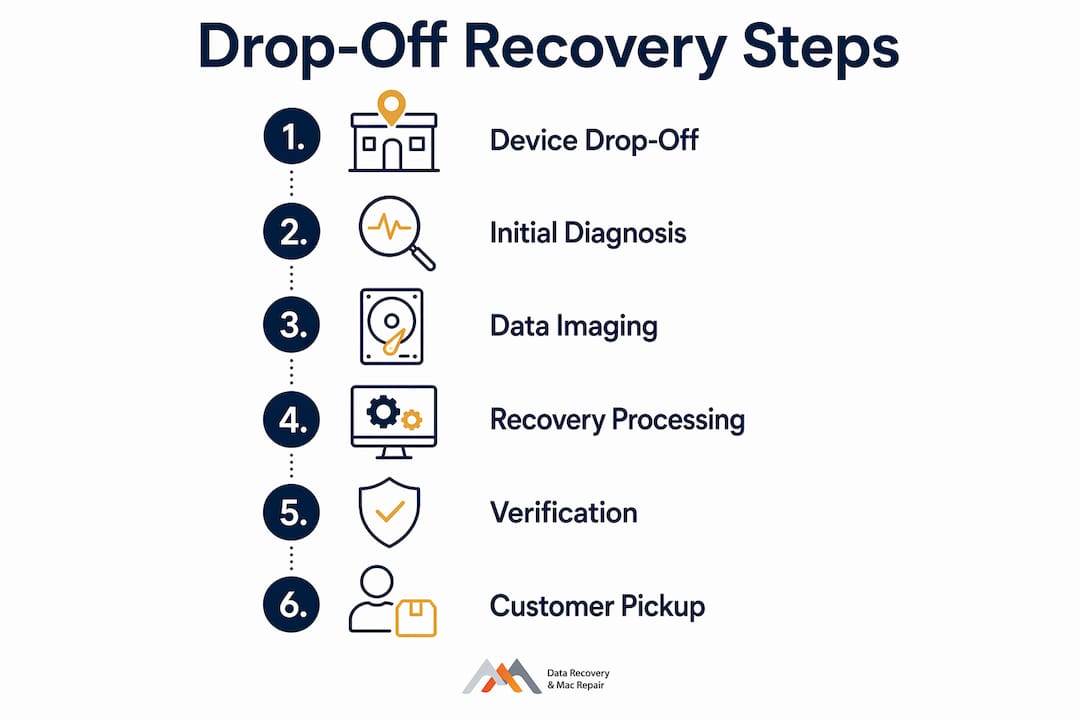
- Check-in and intake. A technician logs your device, records the serial number, and completes a chain-of-custody form. You receive a dated receipt. Bring cables for external drives; internal drives stay installed. The lab extracts them safely during diagnostics.
- Diagnostic phase. The technician runs a power-on test, reads S.M.A.R.T. attributes, listens for abnormal sounds, and attempts a controlled imaging pass. Labs typically complete this within a few business days before issuing any quote.
- Quote and consent. You receive a firm price or range, a turnaround estimate, and a clear statement of the “no recovery, no charge” policy or any applicable diagnostic fee. No work begins without your written approval.
- Recovery work. Logical failures are resolved on a bit-for-bit image of the drive. Physical failures — head crashes, stiction, PCB damage — require bench or clean-room work and sometimes donor parts. Logic board component repair handles certain controller-level failures on Mac hardware.
- Verification and pickup. The technician walks you through recovered files before transfer. Data is returned on an external drive you provide, or via secure transfer. The lab’s retention and secure-deletion policy should be confirmed at this step.
Pro Tip: Ask for a written diagnostic report, not just a verbal summary. That document is your record if a dispute arises and confirms the technician actually evaluated the device.
What do technicians actually diagnose?
Technicians map symptoms to failure modes before touching recoverable data. The imaging-first approach — creating a bit-for-bit copy before any write operation — is the industry standard because it preserves evidence for multiple recovery attempts with different tools.
| Symptom | Likely Cause | Recovery Path |
|---|---|---|
| Clicking or ticking on spin-up | Read/write head failure | Clean-room head swap, then image |
| Beeping on power-on | Spindle motor stiction or seized bearing | Clean-room intervention |
| Drive not recognized (no spin) | PCB or firmware corruption | PCB swap or firmware repair |
| RAW file system / OS errors | Logical corruption, bad sectors | Software imaging + file carving |
| Slow read speeds, many retries | Reallocated or pending sectors | Urgent imaging before further degradation |
| APFS/NVMe not mounting | Controller issue or NAND failure | Firmware or chip-level repair |
Elevated Reallocated Sector or Pending Sector counts in a S.M.A.R.T. report are urgent signals: the drive is actively failing and every power cycle increases the risk of unreadable sectors. When those counts appear, the technician prioritizes imaging above everything else.
How long does drop-off recovery take, and what does it cost?
Turnaround and price both depend on failure severity. The table below reflects typical turnaround times and cost relative to case complexity for professional U.S. labs, ranging from same-day to several weeks depending on failure type.
Key factors that shift cost upward: NVMe or soldered SSD (requires chip-level access), RAID array complexity, FileVault or third-party encryption, need for donor parts, and physical platter damage. Diagnostic fees vary by provider — some apply the fee toward the recovery bill, others advertise free diagnostics with a paid recovery if successful. Get the policy in writing before authorizing any work.
What are the privacy and chain-of-custody risks?
Handing a device to a stranger is a legitimate concern, especially when the drive contains financial records, client data, or personal files. These are the questions to ask at intake and the documentation to request.
- Where is recovered data stored? Ask whether the lab copies files to its own servers and for how long.
- Who has access? Request confirmation that only assigned technicians handle your device.
- Is data encrypted in transit and at rest? A reputable lab uses encrypted transfer for any remote verification.
- What is the retention policy? Some labs keep a temporary backup of recovered data for a fixed period before secure deletion — confirm the timeline.
- Request a documented intake form with the technician’s name, device serial number, date, and condition notes.
- Photograph the device before drop-off, including any existing physical damage, and keep a copy of the intake receipt.
Red flags to watch for: vague turnaround estimates with no written commitment, refusal to provide a receipt or diagnostic report, inability to describe lab facilities or certifications, and no clear “no recovery, no charge” or fee policy in writing.
For a deeper look at encryption and data security during recovery, Macwestlosangeles covers chain-of-custody controls specific to Mac hardware recoveries.
What are the four types of data recovery?
Understanding which type applies to your situation tells you whether drop-off is strictly necessary or whether a software approach might suffice.
- Logical recovery. Files deleted accidentally, drives formatted, partition tables corrupted, or OS errors preventing mount. The storage hardware is functional; recovery software or imaging tools work on a copy of the drive. Often the fastest and least expensive type.
- Physical recovery. Mechanical failures: failed read/write heads, seized spindle motors, scored platters, or damaged PCBs. Requires clean-room disassembly and often donor parts. Drop-off or mail-in to a lab is mandatory — DIY attempts on physically damaged drives almost always reduce recovery chances.
- Firmware and controller recovery. The drive’s internal firmware or an SSD’s NAND controller is corrupted, preventing the device from identifying itself to the OS. Requires specialized tools to rewrite or bypass firmware — not a software-only fix.
- RAID and complex-array recovery. RAID 0, 1, 3, or 5 arrays that have lost a member drive, experienced controller failure, or suffered multiple simultaneous failures. Reconstruction requires understanding the original stripe size, parity layout, and member order — a multi-day lab process.
Logical issues often resolve with logical data recovery methods that do not require a lab visit. Types 2, 3, and 4 almost always do.
When is drop-off the right choice versus mail-in or remote recovery?
The decision turns on three variables: failure type, urgency, and physical fragility of the device.
Drop-off advantages:
- Fastest intake — same-day appointments eliminate transit time entirely.
- Direct chain-of-custody from your hands to the technician’s.
- Physically damaged drives avoid the vibration and handling risk of shipping.
- Immediate hands-on inspection catches problems a remote session cannot detect.
Mail-in trade-offs:
- Convenient when no local lab is available, but adds 2–5 days of transit each way.
- Mechanically fragile drives (clicking, grinding) face real risk of further damage in transit, even with proper packaging.
Remote/software-only trade-offs:
- Lowest cost for logical issues on a fully functional drive.
- Completely unsuitable for physical failures or any drive making abnormal noises.
- Requires the drive to mount and respond — if it does not, remote access is impossible.
For a full comparison of remote vs. in-person recovery, the decision rule is straightforward: any noise on spin-up means drop-off immediately. A silent, mounting drive with deleted files is a reasonable candidate for remote or software recovery.
How should you prepare your device before dropping it off?
Bring:
- The device itself, powered off.
- Power adapter and USB, Thunderbolt, or SATA cables for any external drive.
- A separate external drive for returned data (recommended — labs often cannot supply one).
- Any passwords required for FileVault, BIOS, or device unlock, if the technician will need them.
Avoid:
- Running chkdsk, macOS First Aid, or any utility that writes to a suspect drive before imaging.
- Continuing normal use of a drive showing errors — every write risks overwriting recoverable data.
- Removing an internal drive yourself if you are not experienced; improper extraction can damage connectors or the drive itself.
Pro Tip: Photograph the device’s serial number label and any visible physical damage before you leave home. If the device has a case or enclosure, note its condition too. That documentation protects you if a dispute arises about pre-existing damage.
Why Macwest Data Recovery & Mac Repair is the right call in Los Angeles
When data loss hits, the fastest path to recovery is a lab you can walk into today. Macwest Data Recovery & Mac Repair has handled complex recoveries since 2006, covering APFS, NVMe, SSD, RAID (0, 1, 3, 5), and logic board component repair for MacBook, iMac, Mac Mini, and Mac Pro hardware.
What you get at drop-off:
- Free diagnostics with a firm quote before any recovery work begins.
- No recovery, no charge policy — you pay only when files are successfully retrieved.
- Same-day and emergency appointments for urgent cases.
- Centrally located at 12041 Wilshire Blvd, Ste 26, Los Angeles — between the 405 and Santa Monica, near UCLA and the Getty Center.
- Service areas: West LA, Santa Monica, Beverly Hills, Brentwood, Westwood, Venice, Hollywood, and Culver City.
Call 310-866-0828 to book a same-day appointment or walk in for a free evaluation. For hard drive data recovery or phone recovery, Macwestlosangeles handles the full range of device types and failure severities.
Key Takeaways
Drop-off data recovery requires stopping all disk writes immediately, then handing the device to a specialist who follows a diagnostic → quote → recovery → verification workflow before returning your files.
| Point | Details |
|---|---|
| Stop writes first | Power off immediately; every disk write risks overwriting recoverable data. |
| Diagnostic before quote | Labs complete a 1–3 day diagnostic and issue a firm quote before recovery begins. |
| Four recovery types | Logical, physical, firmware, and RAID each carry different timelines and costs. |
| Drop-off beats mail-in for physical failures | Clicking or grinding drives face added damage risk during shipping. |
| Macwestlosangeles | Free diagnostics, no recovery no charge, same-day appointments — call 310-866-0828. |
A note from the team at Macwest
We have been recovering data from failed drives, corrupted APFS volumes, and damaged logic boards since 2006, and the cases that reach us in the best condition are always the ones where the owner powered off immediately and did not attempt a repair first. If you are reading this after a failure, stop what you are doing, bring the device to 12041 Wilshire Blvd, Ste 26, and let us run a free diagnostic. Same-day appointments are available for urgent cases. Call us at 310-866-0828 — we will tell you exactly what we are dealing with and what it will take to get your data back.
Useful sources and further reading
These resources support the technician practices and consumer protections described above:
- Apple Support: If your Mac doesn’t start up — official guidance on startup failures and when hardware service is needed.
- FTC Consumer Information: Protecting Personal Information — U.S. consumer guidance on data handling and privacy expectations.
- Save My Disk: Hard Drive Data Recovery Guide — technical reference covering S.M.A.R.T. triage, imaging workflows, and failure classification.
For free diagnostics and same-day appointments in Los Angeles, call Macwestlosangeles at 310-866-0828 or visit 12041 Wilshire Blvd, Ste 26.
Macwestlosangeles: professional drop-off recovery for LA devices
Data loss on a Mac, external drive, or phone is stressful enough without spending hours researching which lab to trust. Macwestlosangeles offers Los Angeles residents and businesses a straightforward path: walk in, get a free diagnostic within 1–3 days, review a firm quote, and pay only if your files are recovered. The lab handles everything from a deleted APFS partition to a RAID 5 array with multiple failed members, and phone data recovery for iOS and Android devices is part of the same no-recovery-no-charge model. Call 310-866-0828 or visit 12041 Wilshire Blvd, Ste 26 to book your same-day appointment.
FAQ
What is drop-off data recovery, exactly?
Drop-off data recovery is an in-person service where you bring a failed storage device to a specialist lab, technicians diagnose the failure, and recover your files using professional imaging tools and clean-room techniques when needed.
Is it worth paying for professional data recovery?
For physically damaged drives or RAID failures, professional recovery is often the only viable option — DIY tools address logical issues but cannot repair head failures, firmware corruption, or array reconstruction.
What are the risks of drop-off data recovery?
The primary risks are privacy exposure and chain-of-custody gaps. Request a written intake form, confirm the lab’s data retention and deletion policy, and verify that recovered data is transferred encrypted.
Why is my iPhone showing “Attempting Data Recovery”?
That message typically follows an interrupted iOS update caused by low battery or an unstable connection. It usually signals a logical issue rather than hardware failure, though persistent cases may require a lab evaluation.
What are the four types of data recovery?
The four types are logical (deleted files, format errors), physical (mechanical failures requiring clean-room work), firmware/controller (corrupted drive firmware or NAND controller), and RAID/complex-array reconstruction. Each carries a different timeline, cost, and method.