An iMac repair in Los Angeles is priced by the failed component, not by the model name, and the only way to get a firm figure is a diagnostic on your machine. We run that diagnostic free at our lab at 12041 Wilshire Blvd, Ste 26, with same-day appointments, and we have repaired and recovered data from Macs since 2006. Call 310-866-0828 and describe the symptom, and we can tell you which cost range your problem usually falls into before you drive over.
Below is what moves the price of an iMac repair, which published figures exist, and how to avoid paying twice when the drive holds files you cannot replace.
TL;DR
- iMac repair cost depends on the failed part (display, power, logic board, storage, liquid damage) plus diagnostic time, which is why a single flat price does not exist for any model.
- Our diagnostics are free, and our “no recovery, no charge” policy applies to data recovery, so you learn the real cost before you commit.
- If the iMac holds data you need, stop all disk writes immediately and call us for a same-day appointment: 310-866-0828, West LA, near UCLA and the Getty Center.
Table of Contents
- What published figures tell you about iMac repair costs
- iMac repair cost by type of problem
- What else shows up on an iMac repair estimate
- If your iMac holds data you cannot lose
- Repair or replace: how to think about the quote
- Serving West LA and nearby neighborhoods
- Perspective
- Book a same-day diagnostic
- FAQ
- Sources
What published figures tell you about iMac repair costs
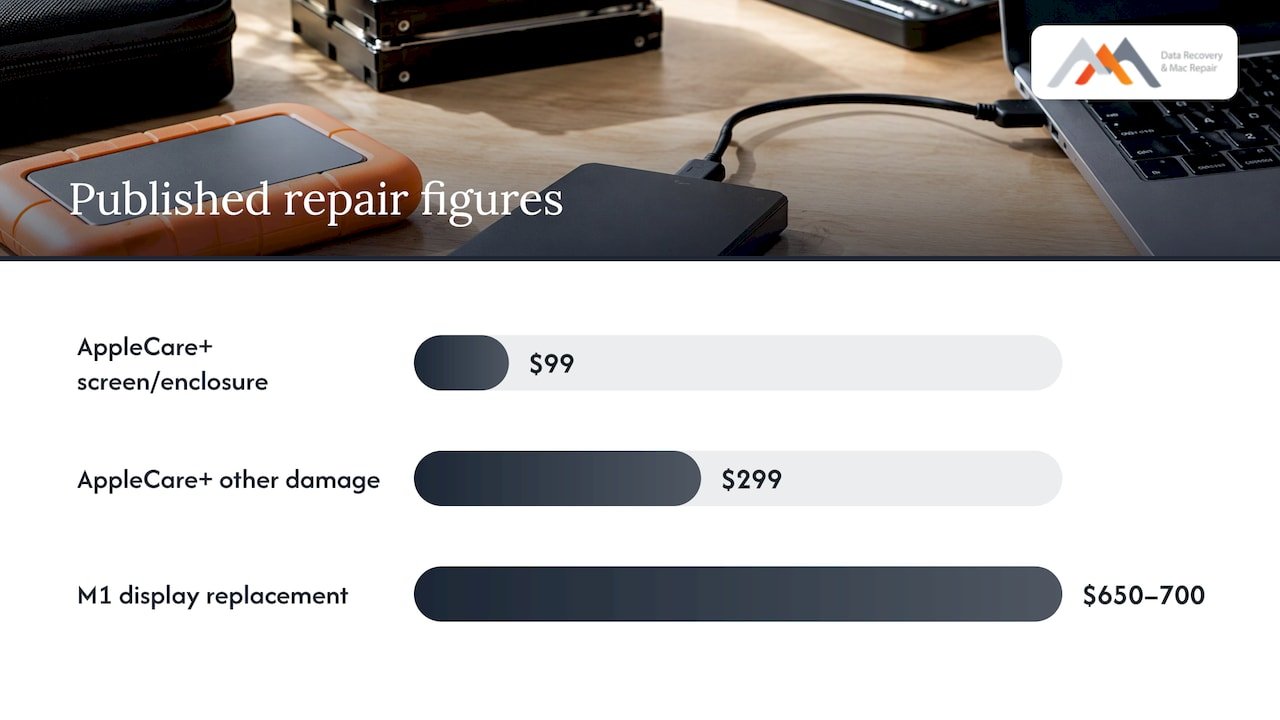
Apple does not publish a fixed out-of-warranty price for iMac repairs. As SwitchingToMac explains, final out-of-warranty fees are set only after the Mac is inspected. What Apple does publish is its AppleCare+ incident fees in the US: $99 for screen or external-enclosure damage and $299 for other accidental damage, such as liquid, on most Macs. Those numbers only apply to customers who bought coverage, so they are a reference point, not a market price.
For the market price, the best documented example is the 24-inch M1 iMac display failure. AppleInsider reported that affected owners were quoted roughly $650 to $700 for an out-of-warranty screen replacement, about half the price of a new base-model iMac, and that the dark horizontal lines typically appear around two years after purchase, usually after the warranty has ended. Macworld’s coverage describes the same pattern and notes that a few owners obtained free repairs after escalating within an Apple Store.
That is one failure on one model. A power fault, a dead storage chip and a liquid spill sit in very different price bands, and each depends on what is actually broken on the board.
iMac repair cost by type of problem
The table shows how each common failure behaves. It describes cost drivers, not prices, because the actual quote depends on diagnosis.
| Symptom | Likely cause | What sets the cost | Data at risk? |
|---|---|---|---|
| Dark lines, flicker, no image but the Mac chimes | Display panel, display cable or backlight | Panel versus cable versus board-level fault | Usually no |
| Cracked or shattered glass | Impact | Glass-only versus full display assembly | Usually no |
| Will not power on, no chime | Power supply, logic board short | Whether a failed component can be replaced on the board | Yes, if the drive is internal |
| Spinning globe, question mark folder, endless boot | Failing hard drive, Fusion Drive, corrupted APFS volume | Drive replacement plus whether data must be imaged first | Yes |
| Spill, humidity, sticky residue | Liquid damage and corrosion | How far corrosion has spread across the board | Yes |
| Random shutdowns, kernel panics | Failing RAM, GPU or logic board component | Component-level repair versus board replacement | Sometimes |
Screen and glass
A display fault is the most visible iMac problem and the one with the most published pricing. When the fault is only cracked glass, the repair is narrower than a full display replacement, which is why we treat them differently. Our page on cracked iMac glass repair options and costs covers that case in more detail.
Logic board and power faults
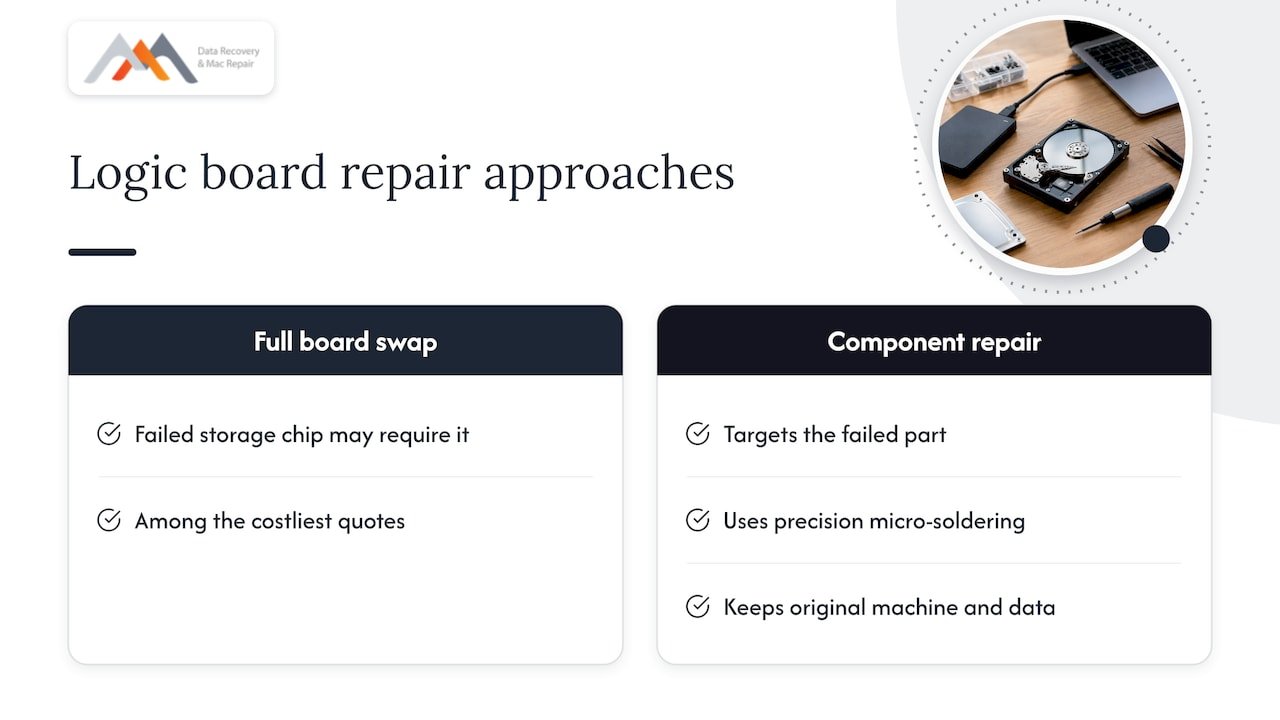
On Apple silicon iMacs, memory is part of the chip package and storage is not user-replaceable. SwitchingToMac notes that a failed storage chip can therefore lead to a full logic board replacement, which is among the costliest quotes an owner can receive. This is where component-level repair matters. Instead of swapping the whole board, our engineers work at the component level with precision micro-soldering, targeting the failed part so the repair stays closer to the size of the actual fault. Our guide to what Mac owners pay for logic board repair and why breaks down what goes into those quotes.
Storage and boot failures
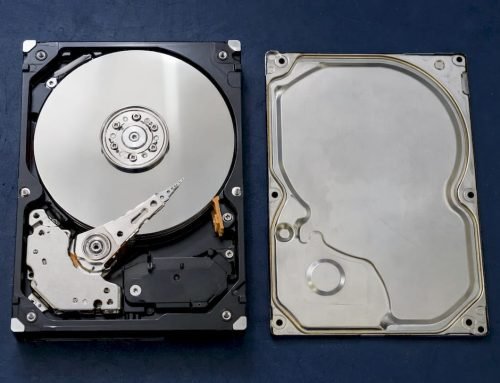
Older Intel iMacs with a spinning hard drive or a Fusion Drive fail in a mechanical way: clicking, slow beachballs, a folder with a question mark. The hardware swap itself is rarely the expensive part. The risk is the data on the failing drive, because every extra boot and every background write can reduce what can be read back.
Liquid damage
Liquid on an iMac is time-sensitive because corrosion keeps spreading after the spill. Power the machine off, unplug it and do not turn it back on. Cost depends on how many board areas are affected, which is only visible under magnification. See our liquid damage repair service for how we assess it.
What else shows up on an iMac repair estimate
A repair estimate is more than the part. These are the line items worth understanding before you approve anything.
- Diagnostic time. Locating a failed component on a board takes bench time. Ours is free, which means you see the finding before any repair charge. Our post on how diagnostics make Mac repairs fast and accurate explains the process.
- Parts. Display assemblies, power supplies and drives differ by iMac generation, size and configuration (21.5-inch, 24-inch, 27-inch).
- Labor. Opening an iMac means separating the display from the chassis, which is delicate work, and board-level soldering takes longer than a module swap.
- Data recovery. If the repair could overwrite or erase the drive, the data should be imaged first. That is a separate service from the repair, and we handle both under one roof.
- Urgency. Same-day and emergency work is available from us by appointment.
If your iMac holds data you cannot lose
Stop all disk writes immediately. That means no reinstalling macOS, no running disk utilities repeatedly, no “cleanup” apps and no restarting in a loop to see whether it comes back. Every write can overwrite blocks that still contain your files, and on SSD-based Macs, features such as TRIM can make deleted data harder to retrieve over time. Our page on how SSD data can vanish in minutes explains why speed matters.
What we do differs by storage type:
| Storage in your iMac | Typical failure | What the recovery involves |
|---|---|---|
| Mechanical hard drive | Clicking, not mounting, bad sectors | Forensic imaging of the drive before any repair |
| Fusion Drive | One half fails, volume will not mount | Imaging both parts and rebuilding the logical volume |
| Apple SSD or NVMe flash storage | Board failure, corrupted APFS container | Component-level board repair or direct NAND access to reach the data |
| FileVault-encrypted volume | Failed board or drive | Recovery depends on the encryption keys and the Mac’s security chip |
Our data recovery runs on a “no recovery, no charge” basis, so the file-retrieval part carries no cost if we cannot get your data back. If you want the broader picture, our guide on how to recover lost data on your Mac walks through the stages.
Businesses and RAID
If the iMac is part of a studio or office workflow, the data often lives on an attached array or NAS. We recover RAID 0, 1, 3 and 5 configurations, including server RAID. A failed iMac in that setup is rarely the only issue, and we can look at both in the same visit. See our RAID data recovery page for details.
Repair or replace: how to think about the quote
The useful comparison is the repair quote against the cost and disruption of a new machine, plus the value of what is stored on the old one. The M1 display example above, at about half the price of a new base iMac, shows why repair can make sense even out of warranty. When the failure is on the logic board, a component-level repair can keep the original machine, its configuration and its data intact, instead of replacing everything and migrating files afterward.
A few practical questions help you judge any quote:
- Is the quote for the failed component or for a whole assembly?
- Is the data protected before work begins?
- Is the diagnostic included, and is the price confirmed before repair starts?
With us, diagnostics are free and the repair figure is confirmed after the diagnostic.
Serving West LA and nearby neighborhoods
Our lab sits at 12041 Wilshire Blvd, Ste 26, between the 405 and Santa Monica, near UCLA and the Getty Center. We serve West LA, Santa Monica and Beverly Hills, plus Brentwood, Westwood, Venice, Hollywood and Culver City. Same-day appointments are available, so you can bring in the iMac, or call first to describe the symptom: 310-866-0828.
Perspective
Most iMac quotes go wrong at the first step: the machine is judged by its symptom instead of by its fault. A dark screen can be a cable, a backlight or a board component. A Mac that will not start can have a perfectly healthy drive behind it.
That is why we start with a free diagnostic and put the data question first. Since 2006, our work has centered on reading what the machine is actually telling us: forensic imaging for drives, micro-soldering for failed board components, and NAND access when the storage is part of the board. Apple Silicon Macs that are often treated as unrecoverable are exactly where this component-level work earns its keep.
Being local matters too. You can talk to the engineer, drop off the iMac the same day and know where your data is the whole time, in a lab on Wilshire instead of a shipping box.
Kaya
Book a same-day diagnostic
If your iMac has a cracked display, will not power on, was exposed to liquid or holds files you need, our iMac and Mac repair service starts with a free diagnostic and same-day appointments. For drive and board-level file retrieval, see our Mac data recovery service, which carries our no recovery, no charge policy. Call 310-866-0828.
FAQ
How much does iMac repair cost in Los Angeles?
It depends on the failed component, so there is no single price. Screen, power, logic board, storage and liquid damage fall into different ranges. We diagnose your iMac for free and confirm the repair figure before any work begins.
How much does a 24-inch M1 iMac screen repair cost?
Owners with the known display-line fault were reportedly quoted $650 to $700 for an out-of-warranty screen replacement. Bring the iMac in and we will identify whether your fault is the panel, the cable or a board component.
Is it worth repairing an iMac?
Often yes, especially when the fault is a single component and the machine holds data and a setup you rely on. Our free diagnostic gives you the real figure so you can decide with facts, and our component-level logic board repair aims to fix the failed part rather than replace the whole board.
What should I do first if my iMac will not start and I need my files?
Stop all disk writes immediately, which means no reinstalling macOS and no repeated restarts. Power it off and call us at 310-866-0828 for a same-day appointment. Our data recovery is no recovery, no charge.
Do you repair iMacs after liquid damage?
Yes. Power the iMac off and unplug it right away, and do not try to turn it on. We inspect the board for corrosion during the free diagnostic and can often offer a same-day appointment.
Sources
- M1 iMacs failing with dark horizontal lines on screen (AppleInsider)
- Mac Repair vs Replace: Genius Bar, Self Service Repair, or more (SwitchingToMac)
- There appears to be a hidden flaw in the iMac (Macworld)