TL;DR:
- Data loss from MacBook logic board failure depends on the model and encryption status. Pre-2018 Intel Macs may still allow access to data after damage, while T2 and Apple Silicon Macs usually require the original board to recover files. Prompt shutdown and professional diagnostics are essential before attempting repairs or data extraction.
Stop all disk writes immediately. If your MacBook has suffered a logic board failure, whether your files are recoverable depends heavily on which Mac generation you own. On pre-2018 Intel Macs without a T2 chip, the storage is often accessible even after board failure. On T2-equipped Macs (2018 and later) and all Apple Silicon models (M1 through M4), hardware encryption ties your data to the original Secure Enclave, making board replacement the equivalent of permanent data loss. The single most important thing you can do right now is power down and call MacWest Data Recovery & Mac Repair at 310-866-0828 for same-day diagnostics before any further action.
Immediate triage checklist — do these now, in order:
- Power down the MacBook completely; do not leave it in sleep mode
- Do not attempt to restart, reinstall macOS, or run Disk Utility repair operations
- Do not connect external drives or attempt Time Machine restores to the internal volume
- Avoid repeated power cycles, which can stress already-damaged power rails
- Note your login password and FileVault recovery key — both are critical for any recovery attempt
- If the machine was liquid-damaged, do not charge it or connect power
What to avoid entirely:
- Running First Aid in Disk Utility on a failing volume (writes metadata)
- Booting from the internal drive when it shows errors
- Attempting DIY logic board repairs without microsoldering equipment
Pro Tip: Target Disk Mode is read-only for the connected host, so attempting it on a pre-T2 Mac is safe and worth trying before calling a lab. On T2 and Apple Silicon Macs, Target Disk Mode requires the password and may not function if the board is partially failed.
Table of Contents
- What is a MacBook logic board, and what symptoms point to failure?
- How does logic board failure actually make your files inaccessible?
- Safe diagnostic checks to run before calling a recovery lab
- What are your realistic recovery options, costs, and timelines?
- What Apple typically does, and why that often means data loss
- How to choose a Mac data-recovery provider
- How Macwestlosangeles approaches logic-board data recovery
- Key Takeaways
- The reality of logic-board recovery work
- Macwestlosangeles: same-day diagnostics for logic-board data loss in Los Angeles
- Useful sources and further reading
- FAQ
What is a MacBook logic board, and what symptoms point to failure?
The logic board is the central circuit board of every MacBook. It carries the CPU (or Apple Silicon SoC), the Secure Enclave (embedded in the T2 chip or directly in the M-series SoC), power management ICs, the NVMe storage controller, and on all modern Macs, the NAND flash storage soldered directly to the board. Because the storage is physically part of the board rather than a removable module, any failure that takes the board offline also takes your data offline.
Recognizing logic board failure signs early can mean the difference between a straightforward recovery and a complex lab procedure. The symptoms below are the most common indicators of board-level problems:
- No power at all: The MacBook shows no response to the charger or power button
- Intermittent power: The machine starts, then shuts off randomly without warning
- Kernel panics: Repeated crashes with a restart screen, often tied to GPU or memory faults on the board
- SSD not detected: macOS or Recovery Mode cannot see any internal storage
- Boot hang at the Apple logo: The system starts but stalls before reaching the login screen
- Ports not functioning: USB-C, Thunderbolt, or MagSafe ports fail to charge or pass data
| Symptom | Likely hardware cause |
|---|---|
| No power, no charging LED | Power management IC or charging circuit failure |
| SSD not visible in Disk Utility | NVMe controller fault or Secure Enclave communication failure |
| Boot hang at Apple logo | Corrupted firmware or failed SoC handshake with storage |
| Kernel panics on load | GPU, RAM, or power-rail instability on the logic board |
| Ports dead, board powers on | Thunderbolt controller or USB-C power delivery IC failure |
| Intermittent shutdowns | Thermal sensor fault or power management IC degradation |
APFS (Apple File System) and NVMe are the storage architecture and interface protocol that modern Macs use. Both depend on the logic board’s controller and Secure Enclave to function. When either is disrupted at the hardware level, the file system becomes inaccessible regardless of whether the NAND chips themselves are physically intact.
How does logic board failure actually make your files inaccessible?
The technical pathway from board failure to data loss is not always physical destruction of the NAND. More often, it is a combination of hardware encryption and controller dependency that makes perfectly intact data unreadable.
Since the T2 chip (introduced in 2018) and through every Apple Silicon generation, Mac storage is hardware-encrypted by default. The encryption keys are generated inside the Secure Enclave and never leave it. Reading the raw NAND chips produces ciphertext with no practical way to decrypt it without the original Secure Enclave. This is why chip-off recovery that worked reliably on older, unencrypted drives is generally useless on modern Macs: the technique extracts ciphertext, not files.
On Apple Silicon Macs, the situation is even more tightly coupled. The SSD is bound to the SoC; storage, encryption, and the processor must all communicate for the system to unlock and read data. Moving NAND chips to another board does not work because the keys that decrypt them exist only in the original Secure Enclave. Board-level repair that revives the original board is typically the only path to those files.
The three technical failure modes and their recovery implications:
- Power-rail or component failure (board intact, NAND intact): The most recoverable scenario. A lab can often restore power rails or replace small components to bring the board up sufficiently to image the drive.
- NVMe controller fault: The storage exists but the controller cannot communicate with it. Component-level repair or a temporary board revival may restore access.
- Secure Enclave failure or destroyed board (T2/Apple Silicon): If the Secure Enclave is dead and the board cannot be revived, the encryption keys are gone. Without the original keys and the user’s login password or FileVault recovery key, recovery is effectively impossible.
| Failure scenario | NAND physically intact? | Encryption obstacle? | Realistic recovery chance |
|---|---|---|---|
| Power-rail failure, board repairable | Yes | No (keys accessible if board revived) | High with component repair |
| NVMe controller fault, board otherwise functional | Yes | Depends on Mac generation | Moderate with board-level repair |
| T2/Apple Silicon board destroyed, password known | Yes | Yes, but password helps | Low to moderate; lab required |
| T2/Apple Silicon board destroyed, password unknown | Yes | Yes, keys inaccessible | Near zero |
| NAND physically scorched or cracked | No | N/A | Very low to none |
The distinction between physical destruction and logical inaccessibility matters enormously for setting expectations. A scorched NAND chip is a hardware problem with no software solution. An intact NAND behind a failed power rail is a board problem that a skilled technician can often work around.
Safe diagnostic checks to run before calling a recovery lab
These tests are non-destructive and can tell you whether the storage is still visible to the system. Run them in order, and stop the moment you see warning signs.
Step 1: Check System Information
Boot into macOS (if possible) and open Apple menu > About This Mac > System Report > NVMe. If the drive appears with a model number and capacity, the storage controller is communicating. If the field is blank or shows an error, the controller or board is not passing the device through.
Step 2: Try Target Disk Mode (pre-T2 Macs)
Hold T during startup to enter Target Disk Mode, then connect to another Mac via Thunderbolt. If the drive mounts, you can copy files directly. This is read-only from the host Mac’s perspective and safe to attempt on older Intel Macs without a T2 chip.
Step 3: Boot from an external macOS installer
Create a bootable USB installer and attempt to boot from it. If the Mac reaches the installer, open Disk Utility from the Utilities menu and inspect (do not repair) the internal APFS container. A visible container confirms the NVMe device is present.
Step 4: Check System Report in Recovery Mode
Boot into Recovery Mode (hold Command-R or hold the power button on Apple Silicon). Open Disk Utility and look for the internal disk in the sidebar. Visible but locked volumes suggest the hardware is intact and the encryption key is the only barrier.
Stop immediately and call a professional if you see:
- Burn marks or discoloration on the board or near charging ports
- Liquid residue or corrosion on connectors
- The Mac repeatedly shorts out when connected to power
- Disk Utility shows the drive but reports I/O errors on every operation
Pro Tip: If the internal APFS volume appears but shows as “locked,” do not attempt password guessing. Three failed attempts can trigger a security lockout on T2 and Apple Silicon Macs. Write down your exact login password and your 24-character FileVault recovery key before calling a lab.
What are your realistic recovery options, costs, and timelines?
A realistic recovery estimate always requires a diagnostics session first, because success rates depend on the specific model, the type of damage, and whether you have the password or recovery key. The table below reflects typical ranges, not guarantees.
| Recovery option | When it applies | Rough cost | Rough success rate | Typical timeline |
|---|---|---|---|---|
| Restore from Time Machine / cloud backup | Backup exists and is current | $0 (self-service) | High | Hours |
| Target Disk Mode + file copy | Pre-T2 Mac, board partially functional | — | High if drive mounts | Same day |
| Component-level board repair | Board repairable; NAND intact | — | Moderate to high | a few days |
| Donor logic board swap | Same model board available; pre-T2 Mac | — | Moderate (pre-T2 only) | several days |
| Chip-off / NAND transplant | Pre-T2 unencrypted Macs only | — | Low on T2/Apple Silicon | 1–3 weeks |
| Software recovery (bootable Mac) | Mac boots; files deleted or corrupted | — | Moderate to high | Same day to 2 days |
The hardest case: A T2 or Apple Silicon Mac with a destroyed logic board and an unknown login password has a near-zero chance of recovery. The encryption keys are sealed in the Secure Enclave and cannot be extracted; reading the raw NAND yields ciphertext. No lab, regardless of cost, can decrypt that data without the original keys.
How to think through the decision:
- Confirm whether a current backup exists before spending anything on hardware recovery.
- If no backup exists and the data has significant value, prioritize component-level board repair over replacement — repair preserves the original soldered SSD and therefore the encryption keys.
- If the board is beyond repair, assess whether you have the password and recovery key. With both, a lab may be able to revive the board temporarily to image the drive.
- Chip-off is expensive and generally ineffective on T2 and Apple Silicon Macs. Labs that prioritize board repair and temporary revival get better results on modern hardware.
What Apple typically does, and why that often means data loss
Apple’s standard service path for a failed logic board is board replacement. That means a new board with a new Secure Enclave, new encryption keys, and no connection to the data on the original NAND. Even if the original NAND chips are physically intact, the replacement board cannot decrypt them.
Apple’s typical actions at an authorized service center:
- Replace the entire logic board assembly (most common outcome)
- Perform a full hardware swap and OS reinstall on the new board
- Offer component-level repair only in limited cases, and rarely as a data-preservation strategy for consumers
- Advise customers to restore from a backup after the repair
Apple will not attempt data recovery as part of a standard repair. If you bring a failed MacBook to an Apple Store or authorized service provider and the board needs replacement, the technician will typically confirm that data on the original machine will not be transferred. The replacement board generates entirely new keys, making the original storage permanently inaccessible.
Specialized data-recovery services differ from Apple’s approach in one critical way: they attempt to revive or repair the original board rather than replace it, preserving the Secure Enclave and its keys. If data recovery is your priority, tell the service provider that explicitly before any work begins, and request a data-preservation diagnostic rather than a standard repair quote.
How to choose a Mac data-recovery provider
Checklist: what a qualified provider should offer
- Component-level microsoldering capability (not just board swaps)
- Demonstrated experience with T2 and Apple Silicon recovery
- Fluency with APFS, NVMe, and FileVault encryption constraints
- A “No recovery, no charge” policy
- Free initial diagnostics before any commitment
- Transparent cost estimates after diagnostics, not before
- Same-day or next-day appointment availability
- Chain-of-custody documentation for your device
Questions to ask when you call:
- Can you perform board-level component repair on Apple Silicon Macs?
- Do you offer free diagnostics before I commit to a recovery attempt?
- What is your policy if the data cannot be recovered?
- How do you handle chain-of-custody for customer devices?
- What is the typical cost range and turnaround for a case like mine?
Red flags to watch for:
- A vendor who recommends board replacement without discussing data preservation
- A quote given before any diagnostics have been performed
- Vague guarantees (“we’ll do our best”) with no written policy
- No mention of encryption constraints on T2 or Apple Silicon Macs
The practical selection rule is straightforward: if the value of your data exceeds the cost of component-level repair, choose a specialist who will attempt board repair before replacement. A provider who defaults to replacement is optimizing for speed, not for your data.
How Macwestlosangeles approaches logic-board data recovery
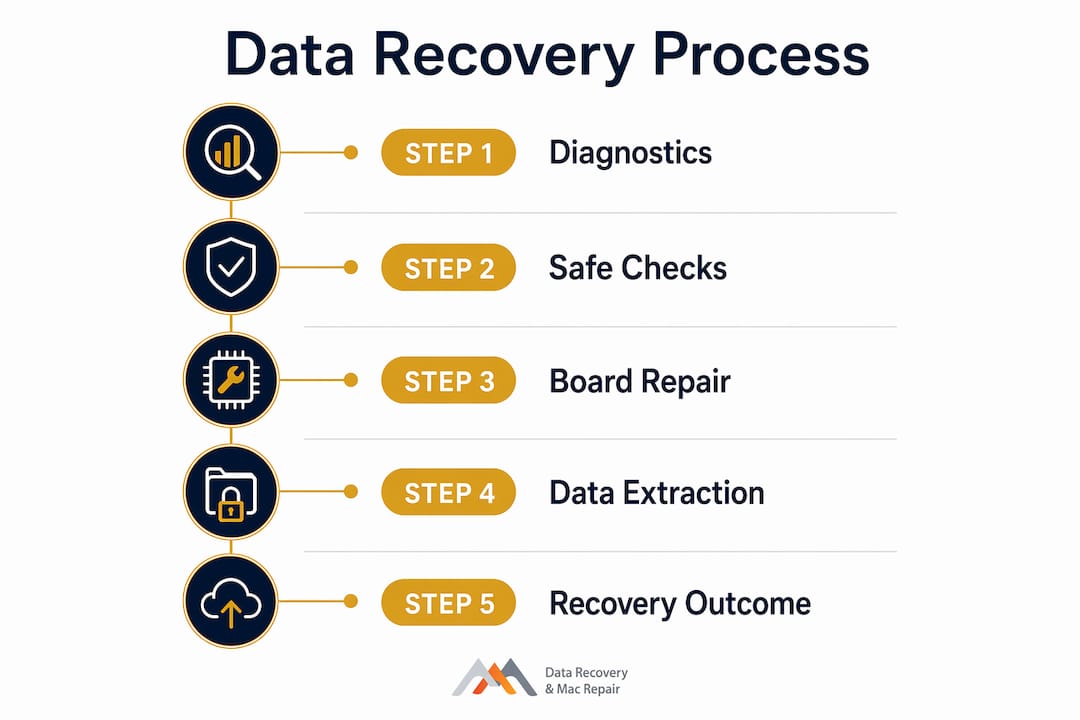
Macwestlosangeles has been performing Mac data recovery and logic board component repair in Los Angeles since 2006. The process for a logic-board data-loss case follows a deliberate sequence designed to preserve the original storage at every step.
The Macwestlosangeles recovery process:
- Free diagnostics: Every case begins with a no-charge assessment. Technicians identify the failure mode, confirm whether the NAND is intact, and provide an honest probability estimate before any work begins.
- Triage and stabilization: The board is inspected under a microscope for burn marks, liquid damage, and failed components. Microsoldering is used to replace failed ICs without disturbing the soldered NAND.
- Temporary board revival: When full repair is not immediately possible, technicians restore power rails or replace small components just enough to bring the storage controller online and allow imaging.
- Data imaging and extraction: Once the storage is accessible, the drive is imaged to a secure external medium. File-level recovery is performed from the image, not from the original drive.
- Verification and handoff: Recovered files are verified for integrity before the customer receives them. The original device is returned with a full account of what was and was not recovered.
Technical capabilities at Macwestlosangeles:
- APFS and NVMe storage architecture
- RAID configurations (0, 1, 3, 5) for Mac Pro and server setups
- Logic board component repair and microsoldering under microscope
- T2 and Apple Silicon recovery techniques
- MacBook logic board repair with data-preservation priority
Service terms and trust signals:
- Since 2006
- Free Diagnostics
- No recovery, no charge
- Same-day appointments available
- Phone: 310-866-0828
- Location: 12041 Wilshire Blvd, Ste 26, Los Angeles (serving West LA, Santa Monica, Beverly Hills, Brentwood, Westwood, Venice, Hollywood, and Culver City)
Pro Tip: When you call, mention that data recovery is your priority, not just board repair. That single instruction changes the diagnostic approach: technicians will focus on preserving the original board and NAND rather than defaulting to a replacement quote.
Key Takeaways
MacBook logic board data loss is recoverable in many cases, but the outcome depends on your Mac’s generation, the type of board failure, and whether you have your login password and FileVault recovery key.
| Point | Details |
|---|---|
| Generation determines recovery path | Pre-T2 Macs allow drive-level access; T2 and Apple Silicon Macs require original board revival to decrypt data. |
| Stop writes immediately | Powering down and avoiding disk operations preserves recoverable metadata and prevents overwriting. |
| Board repair beats replacement | Component-level repair keeps the original Secure Enclave and encryption keys intact; replacement destroys data access. |
| Password and recovery key are critical | Without the login password or 24-character FileVault recovery key, T2/Apple Silicon data recovery is near impossible. |
| Macwestlosangeles offers free diagnostics | Since 2006, Macwestlosangeles provides free diagnostics and a no-recovery, no-charge policy for Los Angeles clients. |
The reality of logic-board recovery work
The cases that end well almost always share one thing: the customer powered down quickly and called before attempting any DIY fixes. A board with a failed power management IC, for example, can often be revived with a single component replacement under a microscope, and the data comes off cleanly in an imaging session the same day. The cases that end badly tend to involve repeated power cycling on a damaged board, which stresses already-failing rails and can push a recoverable situation into an unrecoverable one.
The hardest conversations in this work involve T2 and Apple Silicon Macs where the board is beyond revival and the customer does not have their password or recovery key. The encryption is not a flaw; it is working exactly as Apple designed it. But it means that without the original Secure Enclave and the credentials that unlock it, the data is mathematically inaccessible. No amount of lab time or expense changes that outcome. Setting that expectation honestly, before any work begins, is part of what a responsible recovery process looks like. Careful handling, documented chain-of-custody, and a clear written assessment after diagnostics are the minimum a customer should expect from any provider they trust with irreplaceable files.
Macwestlosangeles: same-day diagnostics for logic-board data loss in Los Angeles
When your data is at stake, the first call matters. Macwestlosangeles offers free data recovery diagnostics for MacBook logic board failures, with same-day appointments available at 12041 Wilshire Blvd, Ste 26, centrally located between the 405 and Santa Monica, near UCLA and the Getty Center. The service area covers West LA, Santa Monica, Beverly Hills, Brentwood, Westwood, Venice, Hollywood, and Culver City.
Every case starts with a no-charge assessment. If the data cannot be recovered, there is no fee. That policy has been in place since 2006, and it reflects a straightforward commitment: you should know what you are paying for before you pay for it. For MacBook Pro and MacBook Air logic board cases, the MacBook Pro data recovery service page outlines what to expect at your appointment, including diagnostic findings, a written recovery probability estimate, and a cost quote before any work begins.
Call 310-866-0828 now to schedule your same-day diagnostic.
Useful sources and further reading
The following sources support the technical claims in this article and are recommended for readers who want to verify specific points about encryption, board repair, and recovery procedures:
- Apple Support: Volume encryption with FileVault in macOS — primary source for how FileVault, APFS, and Secure Enclave key handling work on T2 and Apple Silicon Macs
- Desert Data Recovery: Apple T2 & Apple Silicon Encryption — explains why chip-off recovery fails on modern Macs and how Secure Enclave encryption affects recovery options
- ZA Support: MacBook Logic Board Repair vs. Replacement — covers the data-preservation case for component repair over full board replacement
- Prime Tech Support: Apple Silicon Mac Data Recovery — details why traditional drive-removal methods do not work on M1–M4 Macs and what labs do instead
- Macwestlosangeles: MacBook logic board repair step-by-step guide — outlines the lab workflow for board-level repair with data preservation as the priority
- Macwestlosangeles: Mac logic board failure signs — symptom reference for diagnosing board-level vs. storage-level failures
FAQ
What are the symptoms of a bad MacBook logic board?
Common symptoms include no power response, random shutdowns, kernel panics, the internal SSD not appearing in Disk Utility, and USB-C or Thunderbolt ports failing to function. A boot hang at the Apple logo that persists across restarts also points strongly to a board-level fault.
Can a MacBook logic board be repaired without losing data?
Yes, in many cases. Component-level board repair that replaces only the failed ICs preserves the original soldered SSD and its encryption keys, keeping data accessible. Full board replacement, by contrast, introduces new encryption keys and makes the original data permanently inaccessible.
What happens to my files when a MacBook logic board fails?
On pre-T2 Intel Macs, files often remain accessible once the board is repaired or the drive is connected to another machine. On T2 and Apple Silicon Macs, files are hardware-encrypted and tied to the original Secure Enclave; if the board cannot be revived, data access depends entirely on having the login password or FileVault recovery key.
How much does MacBook logic board repair or data recovery cost?
Component-level board repair typically runs several hundred dollars, while a full board replacement can be more expensive. Data recovery costs vary by damage type and recovery method. Macwestlosangeles offers free diagnostics and a no-recovery, no-charge policy, so you receive a written cost estimate before any work begins. Call 310-866-0828 for a same-day assessment.