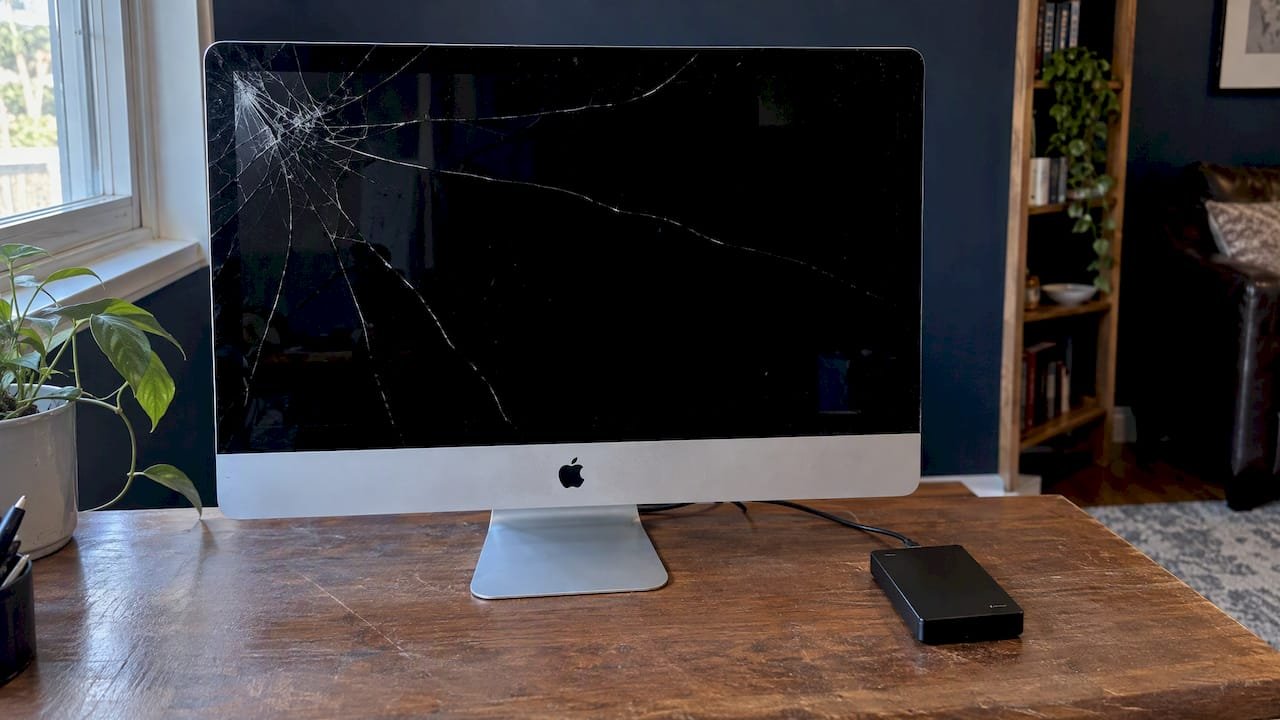
Stop all disk writes immediately if your iMac took a hit and holds files you cannot lose: shut it down, unplug it, and do not keep using a cracked display while the drive is spinning or the system is writing. A cracked iMac front glass can almost always be repaired, but the glass is usually bonded to the LCD, so the real job is a display repair, and it should be done by someone who can also protect your data. We offer free diagnostics and same-day appointments at our West LA lab, and you can reach us at 310-866-0828.
TL;DR
- Power the iMac down, unplug it, and keep your hands off the crack. Glass fragments and live components are a poor combination.
- On most iMacs the glass and the LCD are glued together, so a cracked front glass often means replacing or professionally rebuilding the display, not swapping a pane.
- Expect a wide price range. Users report screen-replacement quotes of roughly $640 to $900, and the figure depends on the model, panel size and what else is damaged.
- Your data is separate from the glass. We recover files from damaged iMacs, and under our no recovery, no charge policy you pay nothing if we cannot get your data back.
Table of Contents
- Key Takeaways
- What to do in the first ten minutes
- Is it only the glass, or is the display damaged too?
- Can the front glass be replaced on its own?
- How the repair is done, and why DIY goes wrong
- What does iMac glass or display replacement cost?
- Protecting your data when the display fails
- Our perspective on cracked iMac glass
- Same-day iMac and data help in West LA
- Questions to ask before you hand over your iMac
- FAQ
- Sources
Key Takeaways
A cracked iMac front glass is a hardware problem that rarely destroys your files, but impact, liquid or repeated power cycling can damage the drive, so power the machine down and stop all disk writes first. Most iMacs have glass fused to the LCD, which makes the repair a display-level job that needs the right tools, fresh adhesive and a clean reseal. Macwest Data Recovery & Mac Repair, serving Los Angeles since 2006, offers free diagnostics, same-day appointments and no recovery, no charge on data recovery at 12041 Wilshire Blvd, Ste 26.
What to do in the first ten minutes
The first steps protect two things: you and your data. Work through them in order.
- Stop all disk writes immediately. Save nothing, close nothing, and shut the iMac down from the Apple menu if it still responds. If it is frozen or flickering badly, hold the power button until it turns off.
- Unplug the power cable. A damaged panel can sit next to live components, and cracked glass can shift if the machine is moved while it is running.
- Do not press on the crack or wipe it with liquid. Pressure spreads the fracture, and cleaner can seep into the display edge. If glass is flaking, cover the screen loosely with a soft cloth or tape it lightly across the crack to hold fragments.
- Do not try to open the machine. The display is held by factory adhesive, and the cables behind it are fragile (more on this below).
- Note what happened. A drop, a strike, a pressure point or a liquid spill each point to different hidden damage, and the technician will want to know.
- Call us. If the iMac fell or was hit, ask for a same-day appointment so we can check the drive and the display together.
If the iMac was also splashed, read our notes on Apple liquid damage repair before you power it on again, because corrosion keeps working after the surface dries.
Is it only the glass, or is the display damaged too?
A crack you can see is only part of the story. The glass is the outer layer, and behind it sits the LCD, the backlight and the cabling. The table below shows what each symptom usually points to and what we check first.
| What you see | What it usually means | What we check |
|---|---|---|
| Hairline crack at a corner, picture normal | Outer glass damaged, panel may be intact | Pressure marks behind the crack, backlight uniformity |
| Spiderweb crack, picture normal | Glass broken across a wide area, risk of fragments | Edge seal, any early signs of liquid or dust intrusion |
| Black or colored patches under the crack | LCD layer damaged along with the glass | Panel and display connector |
| Vertical or horizontal lines | Panel or display cable fault | Cable seating, panel, logic board output |
| Dark screen but the Mac chimes or the fans run | Backlight or power fault, possibly from the impact | Backlight circuit, power supply, logic board |
| Screen flickers or dims | Backlight or connection fault | Connectors and backlight components |
Our guides to iMac screen flicker and iMac power supply repair cover the two most common companion faults we see after an impact.
A quick home test is safe: if you hear the startup chime, see the Apple logo faintly in a flashlight beam, or can connect remotely to the Mac from another device, the computer itself is probably running and the damage is limited to the display chain. Do this only once, then power down. Keep in mind that an external monitor makes the iMac usable again for some owners, but MacReports describes that as a workaround rather than a fix for the underlying hardware failure.
Can the front glass be replaced on its own?
On many iMacs it cannot, at least not in the way a phone screen protector or a car window can. iFixit’s repair community has noted that on the 27-inch Intel iMac both the glass and the LCD are glued to the frame, and that the glass is also bonded to the panel. Separating them cleanly is, according to iFixit contributors, a job for a vacuum chamber, because handling can damage the panel and gluing without vacuum can trap air bubbles.
This is why the pages that rank for this problem are full of owners asking where to buy only the glass and being told that the part available is the full assembly. In practice you have three routes:
- Full display replacement. The simplest route. The cracked assembly comes out and a new one goes in with fresh adhesive.
- Glass-only rework. A specialist separates the glass from a working LCD and bonds new glass, which requires equipment most shops do not have. Whether it is sensible depends on the model and the condition of the panel.
- Repair through the manufacturer’s service channel. Some customers with accidental damage coverage will prefer this route. Check your coverage terms first.
Which route fits depends on your model year, screen size and whether the LCD survived. We confirm that during free diagnostics rather than guessing from a photo. We cover iMac repairs at our Mac repair service page.
How the repair is done, and why DIY goes wrong
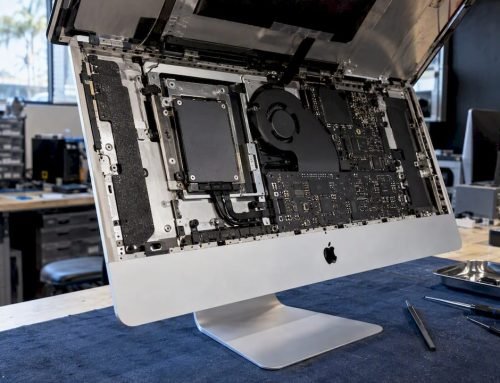
If you have watched a repair video and think this looks manageable, here is what the process involves. iFixit’s guide for the 2019 21.5-inch 4K model shows that the technician must cut through factory adhesive strips with a dedicated opening tool, lift the display away, and then replace the adhesive during reassembly so the display seals properly. The same guide warns about the risks of rushing: severing antenna cables, damaging internal components, and failing to reseal the display.
Safety comes first even for professionals. iFixit’s guidance for an older 21.5-inch model recommends unplugging the iMac and holding the power button for ten seconds to discharge the power supply’s capacitors before any internal work. The delicate cables and specialized tools involved in taking a display out are also why the steps for safe electronics removal matter when a machine is retired rather than repaired.
Our own workflow on an iMac with a cracked display looks like this:
- Free diagnostics: we test power, display output, backlight and storage before anything is opened.
- Data check: if the drive shows trouble, we image it first so repairs never put your files at risk.
- Display removal using the correct tools and adhesive-cutting method.
- Inspection of the display connector, backlight circuit and logic board for impact or liquid damage, including component-level logic board repair where a fault is found on the board.
- Installation of the new or reworked display with fresh adhesive, then burn-in testing.
The common mistakes we see after failed home attempts are torn display cables, adhesive that was reused, dust sealed behind the glass, and screws put back in the wrong holes.
What does iMac glass or display replacement cost?
We do not publish a fixed price for this repair because it depends on your model and what the diagnostics find, and we will give you a firm quote after the free check. For context, MacReports says users have reported screen-replacement quotes in the United States between $640 and $900. Owners quoted in iFixit’s forum threads mention quotes in both lower and higher ranges for older machines, which is the point: the spread is wide.
The factors that move the price most:
| Factor | Why it changes the cost |
|---|---|
| Screen size and resolution | A larger or 4K and 5K panel costs more than a smaller one |
| Glass only vs. LCD included | If the LCD is damaged, the whole display assembly is involved |
| Model year | Older machines have scarcer parts, and some are cheaper to repair than to replace |
| Hidden damage | Backlight, cables or logic board damage found after the impact adds work |
| Liquid exposure | Corrosion repair is a separate job from the display |
| Urgency | Same-day service may need parts and bench time set aside |
Repair or replace the computer?
A simple rule of thumb: if the iMac is otherwise healthy (fast, enough storage, still supported by the macOS versions you need), repairing the display usually keeps more value than replacing the whole machine. If it was already slow and you are close to the cost of a newer model, the decision is closer. Whatever you choose, do not throw away the old iMac before the data is off it. If you do retire it, wipe it properly or hand it to a certified recycler.
Protecting your data when the display fails
A cracked screen does not by itself destroy data, but the event that cracked it might have. A drop with the machine running can damage a spinning hard drive, a spill can corrode connectors, and repeated forced restarts can corrupt the APFS volume.
We recover data from iMacs with failed or unmounting storage, including internal hard drives, SATA and NVMe SSDs, and Apple Silicon machines with soldered storage, where the repair needs NAND-level access and an understanding of the security chip and FileVault encryption. If you have encrypted your Mac, keep your login password or recovery key to hand, because it is needed to read an encrypted volume.
Businesses often keep iMac files on a shared array. If your studio or office stores projects on a NAS or server, we also recover RAID 0, 1, 3 and 5 arrays; do not rebuild or reinitialize a degraded array before you speak to us. See our RAID recovery service for details.
What to do if you can still boot the iMac: copy your most important folders to an external drive or cloud storage, then stop. If the drive makes clicking sounds or the Mac will not boot, stop all disk writes immediately and call us instead. More background is in our guide to recovering lost data on your Mac.
Our perspective on cracked iMac glass
We have repaired Macs in Los Angeles since 2006, and the pattern with cracked iMac displays has been the same for years: the glass is the visible problem and the hidden ones decide the outcome. A customer who walks in worried about a crack frequently has a perfectly healthy logic board and drive, and an owner who powered the machine on repeatedly after a drop sometimes has a drive in trouble.
That is why we test before we quote. We would rather tell you the glass is the only issue than sell a bigger repair, and we would rather image a questionable drive before the display comes off than explain afterward what was lost. Our engineers work at component level, with micro-soldering and forensic imaging, which matters when the impact that broke the glass also stressed the logic board. And because we are a local lab, you can hand us the machine in the morning, see the diagnosis the same day and ask questions face to face rather than through a shipping label.
— Kaya
Same-day iMac and data help in West LA
We are a Los Angeles Mac repair and data recovery lab, in business since 2006. Our services for a cracked iMac include:
- Free diagnostics on the display, backlight, power and drive
- Same-day appointments for urgent cases
- No recovery, no charge on data recovery
- iMac, MacBook, Mac mini and Mac Pro repair, including logic board component repair and liquid damage
Our address is 12041 Wilshire Blvd, Ste 26, between the 405 and Santa Monica, near UCLA and the Getty Center. We serve West LA, Santa Monica and Beverly Hills, as well as Brentwood, Westwood, Venice, Hollywood and Culver City. Book an iMac repair through our Mac repair service page, see our data recovery services, or call 310-866-0828 to get a same-day slot.
If you are comparing local options, our overview of iMac repair experts in Los Angeles explains what to ask any shop before you hand over a machine.
Questions to ask before you hand over your iMac
Whoever you choose, ask these:
- Will you diagnose first and quote after, and is the diagnosis free?
- Is the repair a full display replacement or a glass-only rework, and why?
- Will the drive be checked or imaged before the display is removed?
- Is fresh adhesive used, and is the display tested before return?
- What happens to my data if the Mac turns out to have a second fault?
FAQ
Can I keep using my iMac with a cracked front glass?
We do not recommend it. Glass fragments can come loose, the crack can spread, and dust or moisture can reach the panel. If you must use it briefly to copy files, do so once and then power down and call us.
Is iMac front glass replacement possible without replacing the whole display?
Sometimes, depending on the model. On many iMacs the glass is bonded to the LCD, and separating them needs specialized equipment such as a vacuum chamber, so a full display replacement is often the more reliable route. We confirm the best option during free diagnostics.
Will I lose my files if my iMac glass cracked?
Not from the crack itself. Files are at risk only if the impact, a spill or repeated forced shutdowns damaged the storage. Stop all disk writes immediately, power down, and let us check the drive; under our no recovery, no charge policy you pay nothing if we cannot recover your data.
How long does a cracked iMac screen repair take?
We offer same-day appointments so you can get a diagnosis quickly. The repair time itself depends on part availability for your model and whether we find damage beyond the glass, and we tell you after the free diagnosis.
Can I fix the crack myself with tape or a screen protector film?
Tape or film can hold fragments temporarily but does not repair the damage. Opening the iMac yourself risks cut antenna cables and a poor reseal, so we advise against it.
Sources
- iFixit: iMac Intel 21.5" Retina 4K Display 2019 Display Replacement
- iFixit: iMac Intel 21.5" EMC 2544 Display Replacement
- iFixit Answers: Can I separate the display glass from the display?
- iFixit Answers: How to get the display glass off of the LCD
- macReports: Mac Screen Lines and Flickering: What to Do?