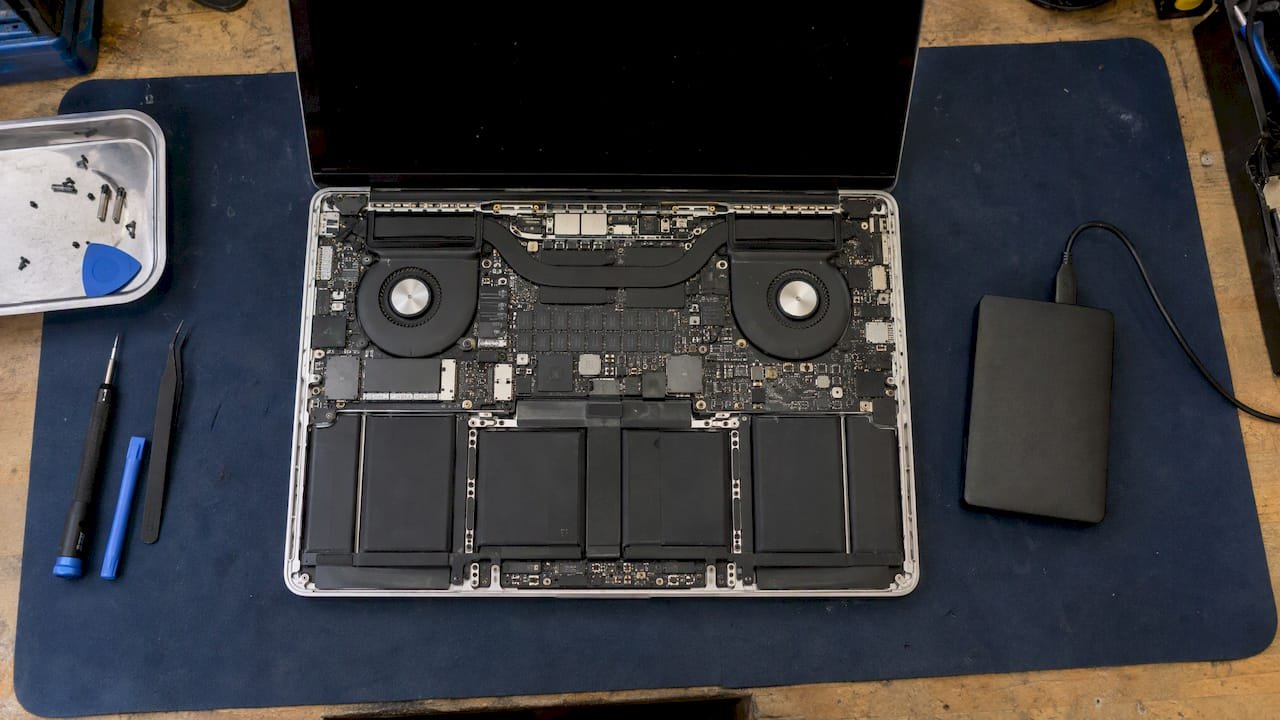
A MacBook battery replacement takes anywhere from a few hours to about a week, and the provider you choose matters more than the hands-on work. The swap itself is short, but ordering the part, shipping the machine and testing it afterward are what stretch the calendar. In Los Angeles you can book a same-day appointment with us at Macwest Data Recovery & Mac Repair, and a free diagnostic tells you the realistic turnaround for your specific model before you commit to anything.
TL;DR
- Local lab: a battery replacement can be done in hours when the right part is on hand, and we offer same-day appointments at 12041 Wilshire Blvd, Ste 26.
- Mail-in or depot service: plan on roughly 3 to 7 business days, because modern MacBook batteries are bonded to the top case and the computer often has to ship.
- Screen repair: one reported MacBook Air M4 case ran about 8 working days through a repair center, against a quoted 5 to 7.
- Faster outcomes: back up first, know your model number, and confirm part availability before you drop off.
- Free Diagnostics and a “No recovery, no charge” policy on data work apply when you call (310) 866-0828.
Table of Contents
- Key Takeaways
- How long a MacBook battery replacement takes by provider type
- Why a short repair still takes several days
- How long MacBook screen repair takes
- What a replacement costs, and how it ties to time
- Before you book: a checklist that prevents delays
- If your data is at risk, do this first
- Service in West Los Angeles
- Book a same-day appointment
- Our perspective
- FAQ
- Sources
Key Takeaways
Most MacBook battery replacements take 3 to 5 business days through manufacturer channels and a few hours to one day at a local specialist with parts in stock. The delay comes from part ordering, depot shipping and testing, not from the repair itself. Since 2006 we have repaired Macs in West Los Angeles, and we offer same-day appointments, free diagnostics and in-house lab work so you do not have to be without your machine for a week.
How long a MacBook battery replacement takes by provider type
The honest answer is a range, and it depends on who does the work and whether the part is already on a shelf. The table below puts the common routes side by side using the figures reported in recent U.S. sources.
| Route | Typical time | What drives the time |
|---|---|---|
| Local Mac repair lab with part in stock | Hours to same day | Model identification, part on hand, adhesive removal, testing |
| Manufacturer in-store service | 3 to 5 business days, sometimes same day if stock allows | Battery usually has to be ordered |
| Manufacturer mail-in service | 5 to 7 business days | Shipping both ways, queue, repair, testing |
| MacBook Pro through an authorized provider | 3 to 5 business days including shipping | Reported requirement since May 2024 to send the unit to a repair facility |
| Do it yourself | 30 minutes to a few hours of work, plus parts shipping | Skill, tools, adhesive tabs |
Public discussions line up with those numbers. Owners on forums describe 3 to 5 days when a store sends a modern MacBook to a depot, while older models with separate battery modules could be done in a couple of hours. Another thread on recent MacBook Pros says stores typically have to order the part, so a walk-in same-day swap is not the norm there.
Apple does not publish a fixed turnaround for MacBook battery service, and policies vary by store and model, so treat any single number as a planning figure rather than a promise. A reasonable rule from one buyer’s guide: assume a MacBook Pro is gone for most of a working week and arrange a backup machine.
Why a short repair still takes several days
The labor on a battery is short. The calendar is long because of how recent MacBooks are built and shipped.
The battery is bonded to the top case
On most current MacBooks the battery cells are glued to the inside of the top case. According to one repair-cost guide, that means a manufacturer battery repair often replaces the whole top case, keyboard included. A whole top case is a larger part than a battery pack, so it is more likely to be ordered rather than shelved.
A component-level shop works differently. Because we do the repair in our own lab, our technicians can service the battery assembly and the surrounding hardware directly, and we can look at the logic board at the same time if the machine has a second fault. If the keyboard is also worn, our MacBook keyboard replacement cost page explains how we handle that alongside the battery.
Depot shipping adds days
A repair that needs a part order or a depot shipment becomes a multi-day process, because intake, inspection, repair, testing and transport are added to the hands-on work. The same guide notes that a repair can happen during the same visit only when the part, tools, technician capacity and procedure are all available.

Shipping rules for lithium-ion batteries are a further reason. During a past 15-inch MacBook Pro battery recall, one discussion explained that service took 1 to 2 weeks because machines shipped by ground rather than overnight air under lithium-ion shipping rules. A normal paid repair is faster than a recall, but the same logistics are why mail-in is slower than an in-person fix.
Model and age change the answer
- MacBook Air (M1 and later): usually the simplest, with a smaller top case assembly.
- MacBook Pro (2016 and later): more steps, more connectors and a heavier top case swap when done through a manufacturer.
- Older white unibody and early aluminum models: removable or separately modular batteries, so the swap itself is straightforward even if official service may take a few days.
If you are unsure of your model, look at the small text on the underside of the case or open Apple menu > About This Mac. Our MacBook Air repair service page lists what we work on for Air models.
How long MacBook screen repair takes
Screen repair has the same logistics pattern, so it tends to run longer than a battery swap when it goes through a depot. One owner reported that a New York City store quoted 5 to 7 days for a MacBook Air M4 screen repair, and the real turnaround was about 8 working days. The machine shipped to a repair center, waited in the queue for 3 to 5 days, was repaired in a day and shipped back.
That single account is not a guarantee for anyone else, but it shows where the time goes: most of it is waiting, not repairing.
| Symptom | Likely cause | Likely repair path |
|---|---|---|
| Cracked glass, display still works | Impact damage | Display assembly replacement |
| Vertical or horizontal lines | Display flex, panel or board fault | Diagnosis first, since the fix differs |
| Backlight dead, image faintly visible | Backlight circuit or panel | Component-level diagnosis |
| Dark or flickering after a spill | Liquid damage | Lab cleaning and board repair |
If you are seeing lines, see our page on MacBook screen lines and repair from $250, which describes the free diagnosis step. For spills, our liquid damage repair costs in Los Angeles page covers the range.
What a replacement costs, and how it ties to time
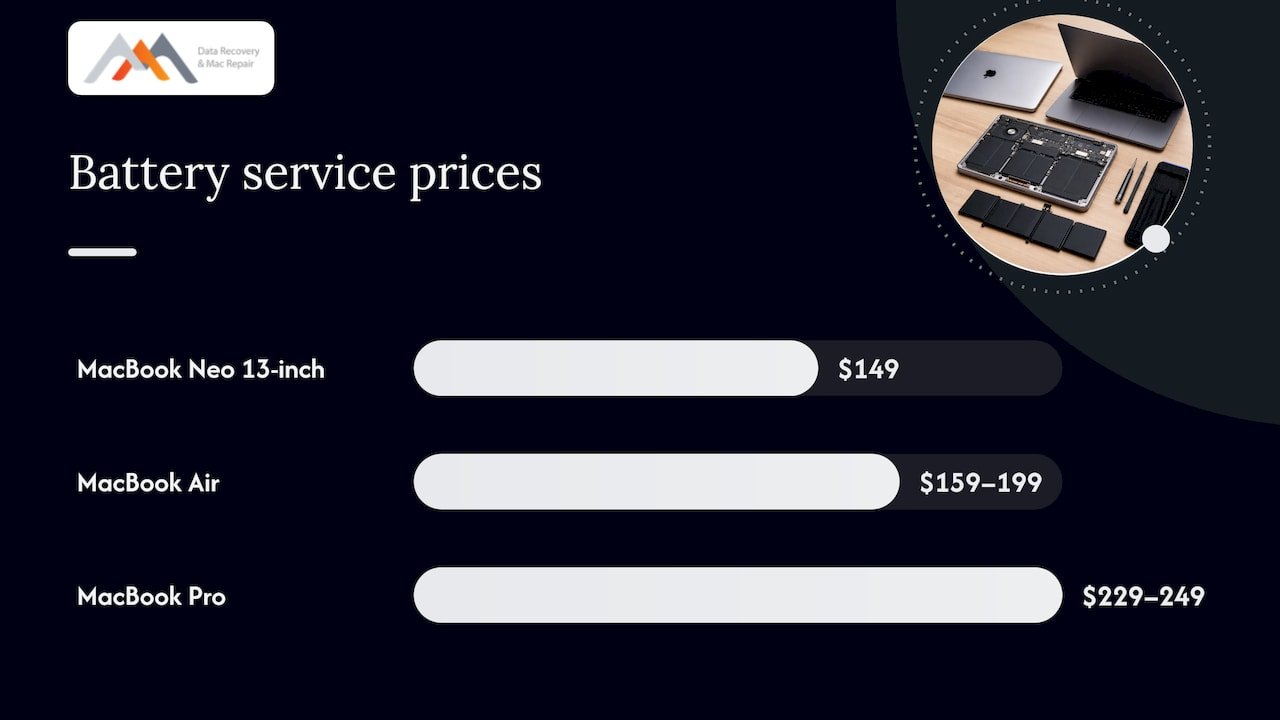
Price and speed are linked, because the cheapest route is often the slowest. As of October 2026, one tracker of Apple U.S. pricing lists out-of-warranty MacBook battery service at $149 for the MacBook Neo 13-inch, $159 to $199 for MacBook Air models and $229 to $249 for MacBook Pro models, excluding tax, with the final price confirmed after inspection. The same source says that with AppleCare+, battery service is free once maximum capacity falls below 80%, and lists a $49 to $99 service fee for screen damage under that plan.
Older machines may also qualify for extended coverage: a media report notes that obsolete MacBooks may be eligible for battery-only repair for up to ten years from when the product was last sold.
We do not publish a fixed price for battery replacement, because the right part depends on the model and condition. Our page on what a MacBook battery replacement costs in 2026 explains the factors, and the quote you get after a free diagnostic is specific to your machine.
Before you book: a checklist that prevents delays
Most avoidable delays come from the first phone call, not the repair. Run through these steps first.
- Check battery health. Open System Settings > Battery and look at Battery Health. A low maximum capacity or a “Service Recommended” message confirms the battery is the issue rather than software.
- Rule out software. Update macOS and reset the SMC or restart on Apple Silicon models, so you do not wait for a battery you do not need.
- Find your model identifier. Year, screen size and chip (Intel, M1, M2, M3 and later) determine the part.
- Back up the Mac. Use Time Machine or another backup. If the battery has failed with no backup, tell us before anything else.
- Note other faults. A flickering screen, a sticky keyboard or past liquid exposure should be mentioned up front, since each changes the repair scope.
- Ask about part availability and testing. A provider with the part in stock and a testing step finishes faster than one that has to source it.
- Arrange a backup device. If you choose a route that ships the Mac, plan for several working days without it.
- Bring your charger and login details. Technicians need to power the Mac and confirm charging after the repair.
A swollen battery, a case that bulges, a trackpad that lifts or a Mac that gets unusually hot are different: stop charging and using the machine and bring it in or call us on (310) 866-0828.
If your data is at risk, do this first
Stop all disk writes immediately if your MacBook will not boot, shuts down at random or lost power during a write, and you have no backup. Keep using it only long enough to copy what you can, and do not run repeated restarts or install software on the same drive.
On recent Macs the SSD is soldered to the logic board and the volume is usually APFS with FileVault encryption, so a battery-related failure can cut power mid-write. That is why we treat a failing battery with an unbacked drive as a data question first and a battery question second. Our team can image the drive, work with the NVMe storage and, where the board is damaged, do component-level logic board repair to reach the data. For details, see our MacBook logic board repair guide and our Mac data recovery service. Data work carries our “No recovery, no charge” policy.
| Symptom | What it can mean | What to do |
|---|---|---|
| Shuts off at 20 to 40% charge | Worn battery, uneven cells | Back up, then book a battery diagnostic |
| Will not turn on, charger light fine | Battery, board or SMC fault | Do not keep forcing restarts; call us |
| Shuts off with a spill history | Liquid damage to board | Power it down and bring it in |
| Folder missing after a crash | Corrupted APFS volume | Stop writes and request recovery |
Service in West Los Angeles
We are centrally located at 12041 Wilshire Blvd, Ste 26, between the 405 and Santa Monica, near UCLA and the Getty Center. That puts us within an easy drive for Brentwood, Westwood, Santa Monica, Beverly Hills, Venice, Hollywood and Culver City. Local drop-off removes the shipping days from the timeline, which is where most of the delay sits in manufacturer and mail-in service.
If you want a broader view of what to expect, our guide to fast, reliable MacBook repair in Los Angeles walks through the process.
Book a same-day appointment
If your MacBook needs a new battery, a screen repair or a look at the logic board, call (310) 866-0828 to book a same-day appointment. We offer free diagnostics, emergency service and repairs for MacBook Air, MacBook Pro, iMac, Mac mini and Mac Pro. See our Mac repair service in Los Angeles page for the full list.
Our perspective
Since 2006 we have watched the same pattern: people accept a week without their MacBook because they assume the repair is complicated, when most of the time is shipping and queueing.
Bonded batteries and soldered storage have changed Mac repair. A battery fault on an Apple Silicon Mac is rarely only a battery issue, since the same power path feeds the logic board and the SSD. That is why our approach starts with a free diagnostic in our own lab, where we can handle the battery, the board and, if needed, the data in one place.
We believe the fastest honest answer is a local one. You hand us the Mac, we tell you what it needs, and you decide with a clear quote. Component-level repair, forensic imaging and same-day appointments are how we try to keep your downtime short.
Kaya
FAQ
How long does a MacBook battery replacement take?
At a local specialist with the part available it can take hours, and we offer same-day appointments. Through manufacturer channels, reported turnaround is about 3 to 5 business days in store and 5 to 7 for mail-in. The exact time depends on your model and part availability.
Can I wait while my MacBook battery is replaced?
Sometimes. Older models and Airs with the part on hand are the best candidates, while recent MacBook Pros often need a part order. Call (310) 866-0828 with your model and we will tell you whether a wait-in visit is realistic.
How long does MacBook screen repair take?
It depends on whether the display assembly is in stock and whether the machine has to ship. One reported depot repair of a MacBook Air M4 took about 8 working days. A diagnostic first tells you whether it is the glass, the panel or the board.
Is it worth replacing the battery on an older MacBook?
Often yes, if the logic board, storage and screen are healthy. A free diagnostic checks those, so you spend money only where the machine has life left. For a Mac with data you cannot lose, back it up first.
What should I bring to a battery replacement appointment?
Bring the MacBook, its charger, your login password and, if you know it, the model year. Mention any spills, drops or other faults, since they change the scope. If the drive has no backup, tell us so we can protect your data from the start.
Sources
- MacBook Battery Replacement Cost: Every Model (2026)
- MacBook Pro Battery Replacement Cost 2026
- MacBook Air battery replacement in Apple Store turnaround thread
- Battery replacement on M5 MacBook Pro thread
- Apple Repair Costs and Wait Times guide
- 15-Inch MacBook Pro Battery Recall Program discussion
- White Unibody MacBook battery replacement, EveryMac
- MacBook Air M4 screen repair time experience
- MacBook Repair Cost in the United States
- How much does it cost to replace a MacBook battery?