Stop all disk writes immediately: a Boot Camp partition that has vanished is usually still on the drive in some form, and every new file, update or repartitioning attempt can overwrite what is left of it. Shut down Windows if it is running, avoid reinstalling anything, and work out which of three situations you are in: the partition is hidden from the startup menu, it is present but will not boot, or its entry in the partition map is gone. If Windows files matter to you, call us at (310) 866-0828 for a same-day appointment and free diagnostics at our West LA lab.
TL;DR
- Stop writing to the disk now. Do not run Boot Camp Assistant, reinstall Windows, or save new files to the Mac until you know what happened to the partition.
- Check the easy case first: hold the Option (Alt) key at startup and see whether the Boot Camp volume is listed. A missing menu entry is not the same as a deleted partition.
- If the partition map entry was deleted, the Windows data often still exists on the disk and can be imaged and recovered. We offer free diagnostics, same-day appointments and a no recovery, no charge policy, serving the Mac community since 2006.
Table of Contents
- What “disappeared” can mean on a Mac
- Step one: stop writing and take stock
- Check whether the partition is only hidden
- What not to do, and why
- Can a deleted Boot Camp partition be recovered?
- When the partition is present but will not start
- What recovery looks like at our lab
- Same-day help in West LA
- If Windows was only a convenience
- Frequently asked questions
- Sources
What “disappeared” can mean on a Mac
The phrase covers several different failures, and the right response depends on which one you have. Boot Camp installs Windows on its own partition next to macOS on an Intel-based Mac, and Apple’s own instructions treat that volume as something you pick from a startup menu. When it stops appearing, the partition may be fine and only the boot entry is missing, the partition may be damaged, or the partition map may no longer describe it at all.
| Symptom | Most likely situation | Is the data likely intact? |
|---|---|---|
| Boot Camp volume missing from the Option-key menu, but Disk Utility shows a partition | Boot entry or boot flag problem | Usually yes |
| Volume appears but fails to start, with a message such as “No Boot Disk Attached” | Wrong formatting or damaged Windows boot files | Often yes, if you stop and image first |
| Disk Utility shows “Free Space” where Windows used to be | Partition map entry removed or damaged | Often yes, until the space is overwritten |
| Disk Utility shows the Windows partition split in two, or free space next to it | Failed resize operation | Depends on how far the resize got |
| The internal disk does not appear in Disk Utility at all | Hardware or controller problem | Needs professional diagnosis |
Common triggers include a macOS update, an interrupted resize in Disk Utility, file system corruption, and a damaged GUID Partition Table. Many of the pages that rank for this problem are forum threads where someone deleted a Boot Camp volume in Disk Utility and then asked whether it could be undone, which is the same story we hear at the bench.
Step one: stop writing and take stock
The first hour decides how much of the partition can be saved. A partition map is a small table at the start of the disk. When an entry is removed, the Windows file system it described is usually still sitting in the same sectors, but it is now marked as available space. Anything the Mac writes there, including a macOS update, Time Machine snapshots, cache files or a Boot Camp reinstall, can overwrite it.
Do this immediately:
- Shut the Mac down normally. If you cannot boot into macOS, do not keep restarting it to “see if it comes back.”
- Do not run Boot Camp Assistant. Its job is to partition and format, and on a disk where the Windows volume is missing it can format the space you are trying to preserve.
- Do not click Erase, Partition or First Aid on the missing or unallocated area until you have a copy of the disk or a professional opinion.
- Write down exactly what you did before the partition vanished: a resize, an update, a deletion in Disk Utility, a failed install. That history tells us where to look.
- Note whether the Mac has a Fusion Drive, a single SATA SSD, or an NVMe SSD, and whether macOS volumes use APFS. This changes how the disk is imaged.
Apple itself stresses the backup point: before using Disk Utility, have a current backup in case repairs need damaged files recovered or the tool finds errors it cannot fix. If you do not have a backup of the Windows side, treat the disk as the only copy.
Check whether the partition is only hidden
Before assuming the worst, confirm what the Mac can still see. Apple explains that you can restart the Mac, hold the Option (Alt) key until the startup volumes appear, and choose the Boot Camp volume. On macOS Ventura 13 or later, the same page describes opening Apple menu, System Settings, General, Startup Disk, selecting the Boot Camp volume and restarting.
Then compare what you see against Disk Utility:
- Open Disk Utility and choose View, then Show All Devices, so you see the physical disk and not only the volumes.
- Select the internal physical disk and look at the partition layout. A Windows volume labeled BOOTCAMP, formatted as NTFS or FAT, should sit next to your APFS container.
- Note whether there is a block of free space, an unlabeled partition, or nothing where Windows used to be.
What you find narrows the problem:
- Volume visible in Disk Utility but not in the startup menu. The data is present and the boot entry is the problem. Do not delete or reformat it. Bring it to us or have the boot files rebuilt carefully, since fixes on this side involve changing the partition table or boot files, which are writes.
- Free space where Windows was. The partition map entry is gone. This is the situation where imaging first matters most.
- Nothing in Disk Utility at all. The disk may have a hardware or controller problem. Apple says that if a storage device does not appear in Disk Utility, the Mac or the device might need service, and suggests shutting down, unplugging nonessential devices and retrying. If it still does not show up after that, stop and call us.
What not to do, and why
The tempting fixes are the ones that cause the most damage.
| Tempting action | Why it risks your Windows data |
|---|---|
| Re-running Boot Camp Assistant | It partitions and formats; on a missing Windows volume it can overwrite the old data blocks |
| Reinstalling Windows over the free space | A new install writes a fresh file system and boot files across the same area |
| Running First Aid on an unallocated or damaged volume | Repair operations write to the disk and can change structures a recovery depends on |
| Removing the free space with the minus button | It expands macOS into that area, so new macOS writes can land there |
| Installing a recovery app on the same disk | The installer itself writes files to the disk you are trying to protect |
| Letting macOS keep updating or syncing | Background writes continue even when you are not using the Mac |
Apple is explicit that deletion is final when it is done the supported way: when Windows is removed with Boot Camp Assistant, the Windows partition and all data stored in it are erased permanently, and you are told to back up first. A partition removed accidentally in Disk Utility is a different case from a supported removal, because the data was not deliberately wiped, but the longer the Mac keeps writing, the more it behaves like one.
Can a deleted Boot Camp partition be recovered?
There are two separate questions, and mixing them up leads to mistakes: getting the partition back, and getting the files back.
The partition table entry itself is hard to restore in a trustworthy way. One long-standing community answer puts it plainly: once a partition is deleted there is no effective way to recover the table itself, but the data is still there and a data recovery tool can retrieve it. That matches how we approach these jobs. The goal is not to “undelete the partition” by writing a guess into the partition map. The goal is to read the disk as it is, find the old Windows file system by its signatures and boundaries, and copy your files out to a separate drive.
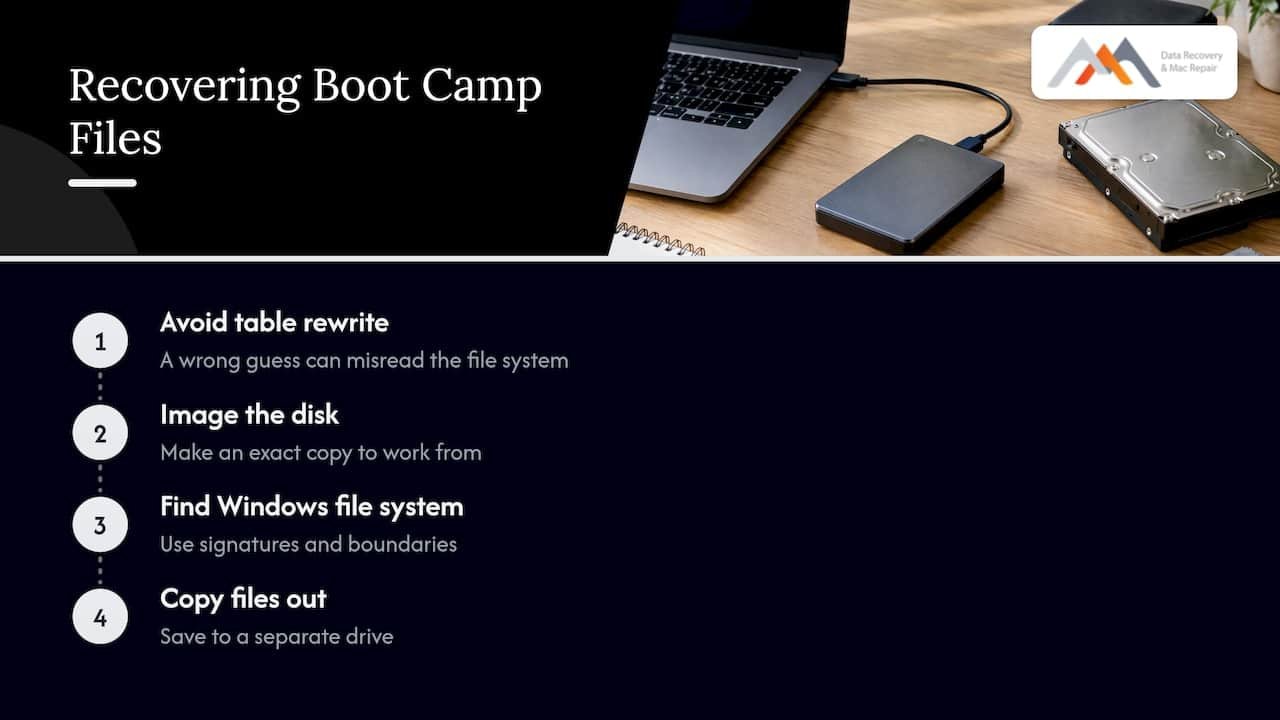
That is why imaging comes first. Rewriting a partition entry changes the disk, and if the guess is off by even a few sectors, it can make the volume look valid while the file system underneath is misread. A forensic image gives us an exact copy to work from, so every attempt happens on the copy and never on your only original.
Reclaiming space is not recovering Windows
Disk Utility can give the free space back to macOS. Apple’s steps for a disk that cannot be restored to a single partition are to open Disk Utility, select the disk, click Partition, and remove leftover OSXRESERVED and BOOTCAMP entries with the minus button. Those entries are empty partitions from a failed installation, which is why removing them is safe in that case. It is not a safe step when the “free space” used to hold a working Windows installation you still want. Reclaiming space and recovering files are opposite goals, and the first one destroys the chance at the second.
If you have a backup
Backup tools that image the whole disk can restore a Boot Camp partition as part of a full-disk restore, and some documentation notes that the Boot Camp partition cannot be backed up separately from the rest of the drive. If you have such a backup, restoring from it is usually cleaner than any repair. Check that it is complete before you erase anything.
When the partition is present but will not start
Sometimes Windows is listed and still fails. Apple’s older Boot Camp guide says that if “No Boot Disk Attached” appears, the partition may have been formatted incorrectly, and the fix is to remove and recreate it, reinstall Windows and format it. That is a fine fix for a Windows installation with nothing on it. It is the wrong move if the volume holds files you need, since recreating the partition erases them.
If the volume is yours to keep, the order should be:
- Copy the Windows files out first, either by booting from an external drive or by having the disk imaged.
- Only then repair the boot entry or recreate the partition.
For the macOS side, Apple’s instructions are to start in macOS Recovery, choose Disk Utility and run First Aid starting with the last volume in the sidebar and moving up through the container to the device. This is reasonable when the problem is the macOS volume and you have a backup. It is not the first step when the missing item is the Windows partition and you have no copy of it.
Two repair concepts are worth keeping straight. A repair of the partition map layout and a repair of a volume’s file system are different operations, as the diskutil reference documents with separate repairDisk and repairVolume commands. Seeing the partition and mounting the file system inside it are separate problems, and each needs a different fix.
What recovery looks like at our lab
We repair and recover data from Apple Macs at 12041 Wilshire Blvd, Ste 26, in West Los Angeles, between the 405 and Santa Monica, close to UCLA and the Getty Center. A missing Boot Camp partition typically goes through these stages:
- Free diagnostics. We check whether the internal disk is detected, how the partition map looks, and whether the drive is healthy. This costs nothing and does not write to your disk.
- Imaging. We make a sector-level copy of the drive, handling the issues unique to Macs: APFS containers, FileVault encryption, and soldered SSDs or NVMe storage on newer machines, where the storage is part of the logic board. When storage is soldered, a failing board can mean working at the component level. Our in-house engineers do logic board component repair and precision micro-soldering for that purpose.
- Partition and file system analysis on the image. We search for the old Windows boundaries and file system signatures, then check whether the NTFS or FAT structures can be read.
- File recovery to a separate drive. Documents, project folders, mail stores and virtual machines are copied to new media, and you verify what you need before we finish.
We work from “no recovery, no charge.” If we cannot recover your data, you do not pay for the recovery. For the general process on the macOS side, see our step-by-step guide to lost partition recovery on a Mac, and for volumes that will not mount, our APFS volume recovery workflow.
What affects the outcome
| Factor | Helps recovery | Hurts recovery |
|---|---|---|
| Time since the partition vanished | Powered off quickly, little use since | Weeks of normal use after the loss |
| Writes since the loss | None | Updates, reinstall, new files, Boot Camp Assistant |
| Drive condition | Healthy, detected | Failing or undetected storage |
| Encryption | Known password or recovery key | Lost key on an encrypted volume |
| Windows volume size | Large, with files in the first sectors intact | Small volume overwritten by a new macOS write |
We do not promise an outcome before we look at the disk, since it depends on those factors. What we can say is that the earlier you stop, the better the starting point.
Same-day help in West LA
If you are in Westwood, Santa Monica, Beverly Hills, Brentwood, Venice, Hollywood, Culver City or elsewhere in greater Los Angeles, we offer same-day appointments for urgent cases. Call (310) 866-0828, tell us what the Mac is, which macOS version it ran and what happened before the partition disappeared, and we will tell you how to bring it in. The most useful thing you can do before the call is to leave the Mac off.
Our data recovery services cover Mac internal drives, SSDs, external drives, RAID arrays and memory cards, and we can also handle the repair side if the Mac itself has a hardware fault. For a machine that no longer starts, our guide on why Macs fail to boot lists the common causes, and our overview of Mac data recovery steps explains what to do before you hand a machine over.
If Windows was only a convenience
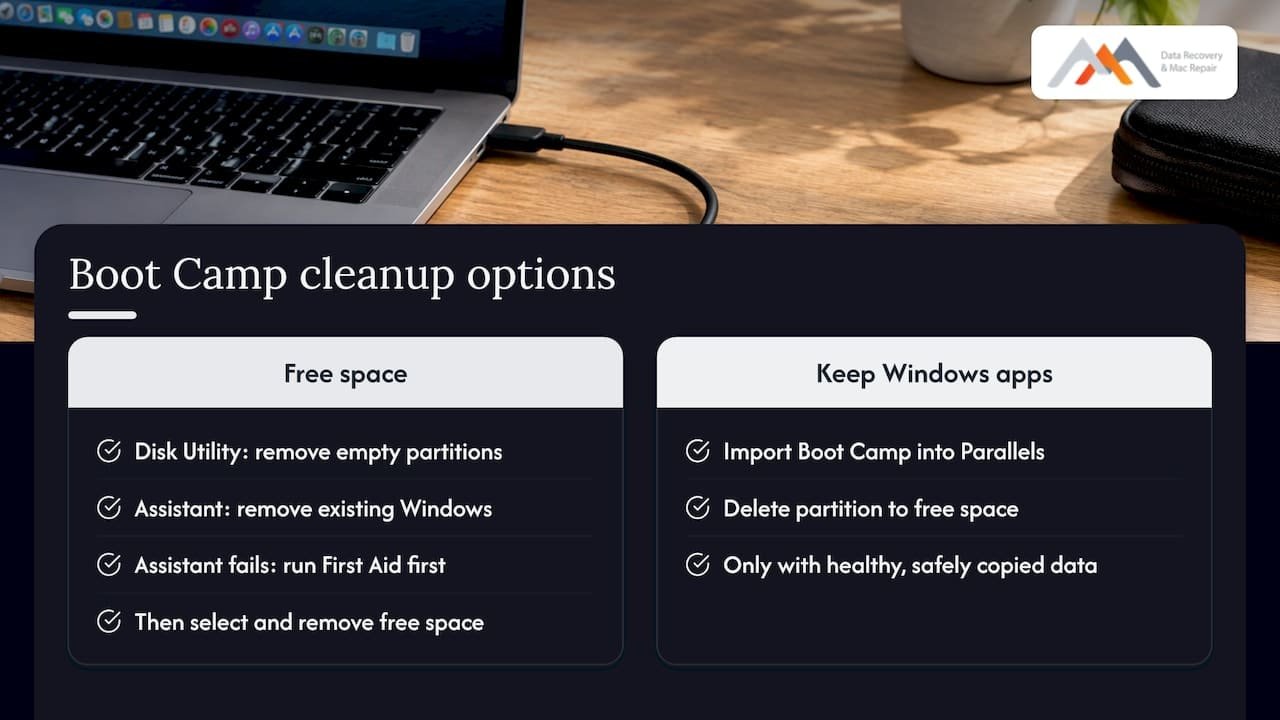
Some people finding this problem simply want the space back and have nothing of value in Windows. In that case the cleanup is straightforward: remove empty leftover partitions in Disk Utility as Apple describes, or use Boot Camp Assistant to remove Windows while the volume still exists. For Apple’s recommended fix when Boot Camp Assistant cannot restore a single partition, run First Aid on the startup disk first, then select the free space in the Partition view and remove it so macOS can use it.
If you still need Windows apps, there is another route. Parallels documents that you can import a Boot Camp installation into a virtual machine and then delete the Boot Camp partition, which frees the space. Do this only after the Boot Camp volume is healthy and its data is safely copied.
Our perspective
Over the years we have seen the same pattern with vanished Boot Camp partitions: the original problem is small, and the follow-up attempts make it large. A missing boot entry is a five-minute fix. A removed partition map entry is recoverable work. A partition that was reformatted, reinstalled over and then updated is a much harder job. The difference is almost always how many writes happened between the loss and the call.
Our approach is to image first and repair later. We copy the disk, work on the copy, and give you your files on new media before any partition is rebuilt. That is why we offer free diagnostics and no recovery, no charge: we look at the actual drive before asking you to decide anything.
If your Mac is an Apple Silicon model or has soldered storage, the work shifts toward NAND access and logic board component repair, which we do in-house. You do not need to guess which situation you are in. Leave the Mac off, call us, and bring it in the same day.
Kaya
Frequently asked questions
Why did my Boot Camp partition disappear after a macOS update?
An update can change startup behavior, and a resize or an interrupted update can leave the partition map damaged or the boot entry missing. First check the Option-key startup menu and Disk Utility’s Show All Devices view to see whether the partition still exists. If it does not, stop writing to the disk and call us before trying a repair.
Why is my Boot Camp partition not showing in Disk Utility?
Disk Utility may show only volumes by default, so switch to View, Show All Devices to see the physical disk. If the Windows volume is still missing there, the partition map entry may be gone or the disk may not be reading correctly. Do not run First Aid on the free space; bring the Mac in for free diagnostics.
Can I recover files from a deleted Boot Camp partition?
Often, yes. The partition table entry is the part that is hard to restore, but the Windows data frequently remains on the disk until something overwrites it. The sooner you stop using the Mac, the better the odds, and we image the drive first so every recovery attempt runs on a copy.
Should I reinstall Boot Camp to get it back?
No, not if you need what was in Windows. Boot Camp Assistant partitions and formats the disk, which can overwrite the old Windows data. Reinstalling is appropriate only once your files are safely copied, or if the old installation holds nothing you need.
How much does Boot Camp partition recovery cost?
We do not publish a fixed price because it depends on the drive, the Mac model and the condition of the data. Diagnostics are free, and under our no recovery, no charge policy you do not pay for a recovery that does not succeed. Call (310) 866-0828 for same-day diagnostics and a quote.
Sources
- Restart your Mac in macOS or Windows, Apple Support
- How to repair a Mac storage device with Disk Utility, Apple Support
- Remove Windows from your Mac using Boot Camp, Apple Support
- If Boot Camp Assistant stops responding or says that Boot Camp can’t be restored, Apple Support
- If Boot Camp Assistant says that your disk could not be partitioned, Apple Support
- Boot Camp Installation and Setup Guide, Apple
- Couldn’t modify partition map, Super User
- DISKUTIL command reference, SS64
- Acronis True Image user manual
- Using Boot Camp with Parallels Desktop, User’s Guide v20