TL;DR:
- Hard drive repair costs in Los Angeles vary from under $100 to over $750 depending on failure type.
- Preventive measures like regular backups and SMART monitoring significantly reduce the risk of costly repairs.
- Choosing a reputable, experienced shop with transparent estimates and proper facilities ensures data recovery success.
Hard drive repair costs in Los Angeles can range from under $100 to well over $750, and most Mac users have no idea where their situation falls until they’re already staring at a blank screen or a folder full of inaccessible files. The assumption that all repairs are equally expensive, or that pricing is always predictable, leaves many people either overpaying or choosing the wrong service. This guide gives you a clear, locally grounded breakdown of what drives Mac hard drive repair costs, what to expect at each price tier, and how to make a confident, informed decision when your data is on the line.
Table of Contents
- What impacts hard drive repair cost for Mac users?
- Typical price ranges for hard drive repair and data recovery in Los Angeles
- Comparing local Mac repair shops: service, reliability, and value
- Can you prevent expensive repairs? Maintenance and early warning tips
- The truth about hard drive repair costs in LA: What most guides won’t tell you
- Find trusted Mac hard drive repair and recovery in Los Angeles
- Frequently asked questions
Key Takeaways
| Point | Details |
|---|---|
| Know cost drivers | Repair costs depend on issue type, urgency, and your Mac model. |
| Expect LA-specific pricing | Typical Los Angeles prices range from $99 for simple fixes to $750 for complex repairs. |
| Evaluate provider value | Shop based on service transparency, expertise, and real customer reviews—not just price. |
| Prevention saves money | Regular backups and early action can avoid expensive emergency repairs. |
| Get clear estimates | Choose repair shops with upfront pricing and a strong reputation for Mac data recovery. |
What impacts hard drive repair cost for Mac users?
Now that you know repair costs aren’t set in stone, let’s break down what truly drives the price for you as a local Mac user in Los Angeles.
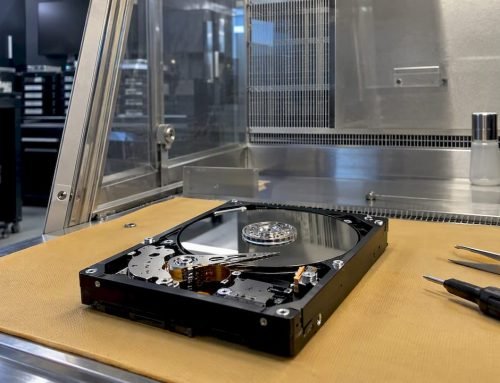
The single biggest variable is the type of failure your drive has experienced. Logical failures, such as a corrupted APFS (Apple File System) partition, accidental formatting, or a failed macOS update, are generally the least expensive to address because the physical hardware is still intact. Mechanical failures, where the read/write heads have crashed or the spindle motor has seized, require physical intervention in a cleanroom environment and cost significantly more. Then there’s accidental damage, including liquid exposure or a dropped MacBook, which often combines both logical and physical damage simultaneously.
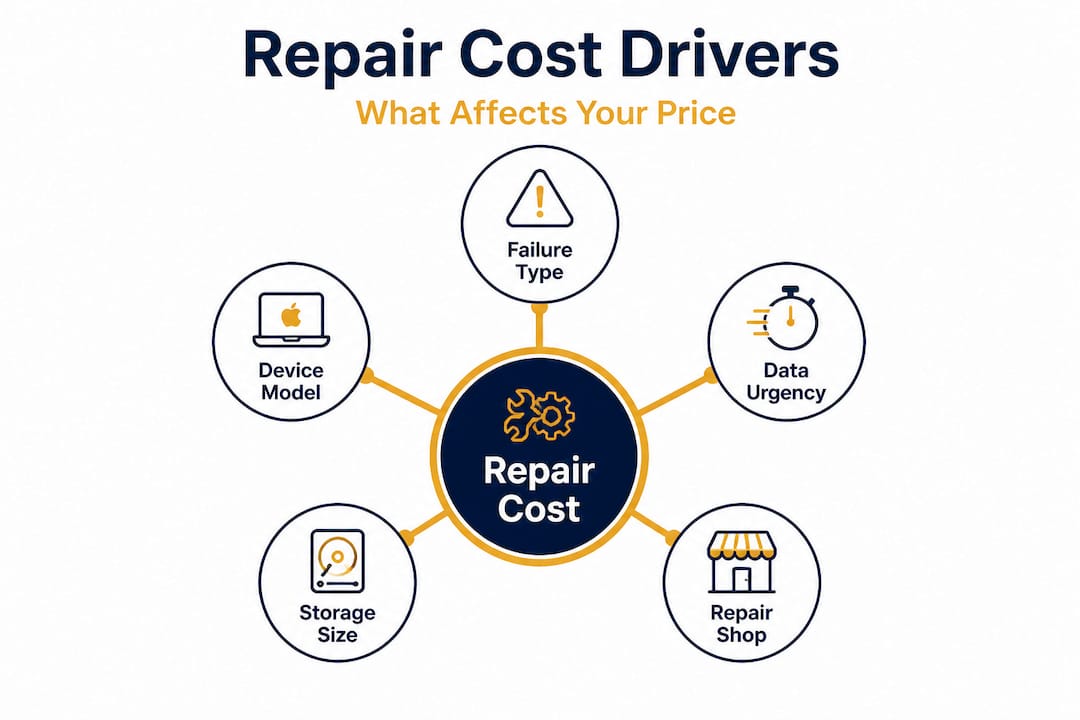
Your device model and storage type also play a major role. Older MacBook Pros with traditional spinning hard disk drives (HDDs) are often easier to access physically, but parts may be scarce. Newer MacBook Air and MacBook Pro models use soldered SSDs, meaning the storage is fused directly to the logic board and cannot simply be swapped out. Recovering data from a soldered SSD requires specialized NAND access tools and cleanroom-level expertise, which raises costs considerably.
As Mac recovery cost factors show, pricing for Mac hard drive recovery varies widely depending on the type of failure, service provider, and device model. Urgency is another major driver. Standard turnaround might be three to five business days, while emergency or same-day service in Los Angeles typically adds a significant premium to the base rate.
Key factors that affect Mac hard drive repair cost:
- Type of failure: logical (software), mechanical (physical), or combination
- Storage type: traditional HDD vs. soldered SSD vs. external drive
- Device model and year (affects parts availability and labor complexity)
- Whether FileVault encryption is active (adds decryption steps to recovery)
- Urgency: standard turnaround vs. emergency same-day service
- Labor rates in Los Angeles, which run higher than national averages
| Failure type | Complexity | Relative cost |
|---|---|---|
| Logical/software failure | Low | $ |
| Minor physical damage | Medium | $$ |
| Mechanical failure (HDD) | High | $$$ |
| Soldered SSD recovery | Very high | $$$$ |
| Liquid damage + data recovery | Very high | $$$$ |
Pro Tip: Before you commit to any service, request a free or low-cost diagnostic. A reputable shop will assess your drive’s condition and give you a written estimate before charging for recovery work. This prevents surprise costs and gives you a realistic starting point for decision-making.
Typical price ranges for hard drive repair and data recovery in Los Angeles
With those drivers in mind, here’s what you can expect to pay in real-world Los Angeles scenarios, organized by severity and service type.
Logical repairs and minor software issues represent the most affordable tier. If your Mac is showing a folder with a question mark, failed to boot after a software update, or experienced an accidental deletion of critical files, recovery typically falls in the $99 to $250 range. These cases often involve tools like Apple’s Disk Utility, APFS reconstruction, or specialized recovery software that can retrieve deleted or corrupted data without opening the drive.
Minor physical repairs step up in complexity. If there’s visible damage to the drive enclosure, a failing drive cable, or an early-stage mechanical issue where the drive is still partially spinning, costs generally land between $200 and $400. This tier includes iMac hard drive replacements where the original drive hasn’t fully failed but is showing SMART (Self-Monitoring, Analysis, and Reporting Technology) warnings.
Severe mechanical failures and multi-drive issues represent the upper end of pricing. Cleanroom recovery for a crashed HDD or advanced NAND chip-level recovery for a soldered MacBook SSD commonly runs from $450 to $750 or more. RAID (Redundant Array of Independent Disks) system recovery or cases involving both physical and logical damage often exceed $750. As noted by local repair specialists, basic data recovery can start under $100 for minor logical issues, but complex mechanical repairs can exceed $600.
Key statistic: Over 60% of Mac hard drive recoveries handled by Los Angeles specialists fall in the $200 to $400 range, making this the most common pricing bracket for local users.
How pricing breaks down by service scenario:
- Accidental file deletion, no physical damage: $99 to $200
- Failed macOS upgrade with APFS corruption: $150 to $250
- HDD making clicking noises (early mechanical failure): $300 to $500
- Dropped MacBook with unresponsive drive: $400 to $600
- Liquid-damaged MacBook with data recovery needed: $500 to $750+
- Emergency same-day service surcharge: add $100 to $200 to base rate
Exploring your data recovery service types before reaching out helps you frame the right questions and understand what tier of service your situation likely requires. If you want to understand how top providers in the area stack up, reviewing the best recovery services in LA gives you a practical comparison point.
Comparing local Mac repair shops: service, reliability, and value
Now that you have pricing benchmarks, it’s crucial to choose the right provider, not just the cheapest one available.
A low quote doesn’t mean good value. In Los Angeles, the market ranges from certified Apple specialists and cleanroom-equipped data recovery labs to general electronics repair shops that may lack Mac-specific expertise. The difference in outcome can be significant, especially when your files are irreplaceable. As the data shows, service quality, transparency, and turnaround time separate top Los Angeles data recovery shops from the rest.
What to evaluate before choosing a repair shop:
- Does the shop offer a written, up-front estimate before beginning work?
- Is there a diagnostic fee, and is it applied toward the total repair cost?
- What is the shop’s specific experience with Apple Mac devices and macOS systems?
- Do they have cleanroom facilities for mechanical drive recovery?
- What warranty do they offer on parts and labor?
- Is there a “no data, no fee” policy for recovery work?
- How do they handle data privacy, and will they sign a confidentiality agreement if requested?
| Service factor | What to look for | Red flag |
|---|---|---|
| Estimate process | Written, detailed quote | Verbal-only pricing |
| Diagnostic fee | Waived or credited | Non-refundable flat fee |
| Mac experience | Apple-certified or Mac-specialist | General PC repair only |
| Warranty | 30 to 90 days minimum | No warranty offered |
| “No data, no fee” | Clearly stated policy | Vague or absent promise |
| Turnaround time | Specific timeline given | “Whenever it’s done” |
Pro Tip: Always ask whether the shop has recovered data from the exact Mac model you own. Soldered SSD recovery on a 2021 MacBook Pro M1 is technically very different from recovering data from a 2015 MacBook Pro with a removable drive. A shop familiar with your specific hardware will handle it far more effectively.
Understanding the full LA Mac data recovery guide process helps you ask sharper questions. And if you want to understand the physical steps involved in restoring a drive to a recoverable state, reviewing Mac restoration steps provides useful technical context before your appointment.
Can you prevent expensive repairs? Maintenance and early warning tips
Beyond price and provider, maintenance can make the difference between a quick fix and a data disaster that costs you weeks of work and hundreds of dollars.
The most impactful thing any Mac user can do is maintain a consistent, verified backup routine. Time Machine is Apple’s built-in backup solution and works well for most users, but it should be supplemented with at least one off-site or cloud backup. If your only copy of critical data is on the failing drive itself, your recovery options narrow dramatically and costs rise accordingly. As the data clearly shows, routine backups and early diagnosis can save hundreds on data recovery.
“The best time to set up a backup is before something goes wrong. The second-best time is right now. Drives in the Los Angeles climate, especially in warmer San Fernando Valley or downtown areas, are subject to heat stress that accelerates mechanical wear. Don’t wait for a warning before protecting your data.” This reflects the consistent advice from experienced Mac specialists who work with failed drives every day.
Top 5 maintenance actions for LA Mac users:
- Run Time Machine weekly and verify the backup completed successfully, not just that it ran.
- Use Disk Utility or a third-party tool like DriveDx to monitor SMART status and catch early failure indicators.
- Monitor operating temperatures using iStatMenus or similar software, especially during LA’s hot summer months when thermal stress is highest.
- Avoid force-shutdowns when possible, since abrupt power loss can cause APFS journal corruption that leads to logical failures.
- Replace aging drives proactively: HDDs older than five years and SSDs showing high wear indicators should be backed up immediately and replaced before failure occurs.
Early warning signs that your drive may be failing include slow file access times, applications that take unusually long to load, clicking or grinding sounds from an HDD, frequent kernel panic crashes, and files that appear corrupted or won’t open. Catching these signs early can drop your repair cost from the $400 to $600 range down to a simple $99 to $150 diagnostic and software recovery. For more detail on recognizing failure patterns and acting quickly, the recovery and prevention tips page covers the most common Mac failure scenarios in depth.
Pro Tip: Schedule an annual drive health checkup, just as you would for any critical piece of equipment. Many Los Angeles Mac repair shops offer free or low-cost diagnostic screenings that catch issues before they escalate into full drive failures.
The truth about hard drive repair costs in LA: What most guides won’t tell you
Stepping back from the details, here’s an honest perspective from LA Mac specialists who’ve seen it all since 2006.
The most dangerous assumption Mac users make is that a low quote equals a good deal. In Los Angeles, where dozens of shops compete for repair business, aggressive lowball pricing is common. But shops that quote below market rates frequently lack the cleanroom equipment or Mac-specific expertise needed to handle complex recoveries safely. Attempting recovery without proper tools on a mechanically failed HDD can permanently destroy the platters, making recovery impossible even by the best specialists in the industry. The short-term savings aren’t worth that risk.
The “rush fee” reality is another point most guides skip. If you’re a freelancer, creative professional, or small business owner in Los Angeles, your data has real financial value tied to it. Paying a $150 to $200 emergency service surcharge to recover client files, project assets, or financial records within 24 hours is almost always more cost-effective than the alternative. Experienced Mac users know that speed sometimes matters more than savings.
Here’s a perspective shift that surprises many clients: older drives can actually cost more to fix than newer SSDs in some scenarios. Cleanroom recovery for a 2013 iMac’s aging HDD with crashed read/write heads can exceed $600. In some cases, buying a modern SSD replacement and paying for data recovery methods from the old drive separately costs less total than a complex platter-level recovery. Always ask whether replacement plus recovery is more economical than repair alone.
Finally, warranty is where real long-term savings appear. A shop that offers 60 to 90 days of post-repair warranty coverage protects you from the frustrating scenario where a drive fails again shortly after service. Always get warranty terms in writing.
Find trusted Mac hard drive repair and recovery in Los Angeles
Ready to act or just need an expert opinion? Here’s where to turn for the most reliable help in Los Angeles.
When your data is at risk, you need a team that combines technical depth with genuine transparency. Macwest Data Recovery & Mac Repair has served Los Angeles Mac users since 2006, offering expert diagnostics, written estimates, and proven recovery results across every Mac model and storage type.
Whether you need a hard drive data recovery service for a physically damaged drive, a full suite of Mac repair services after liquid damage or a logic board failure, or you simply want to consult with local data recovery experts before making a decision, Macwest provides clear, upfront pricing and same-day service options for urgent cases. Located centrally in Los Angeles, the team works with individuals, creative professionals, and business clients who can’t afford extended downtime. Reach out today for a no-pressure diagnostic consultation and get the clear answers you need.
Frequently asked questions
How much does it typically cost to repair a Mac hard drive in Los Angeles?
Most LA Mac hard drive repairs and recoveries range from $99 for minor logical issues to $750 or more for severe mechanical failures, with the majority of cases falling between $200 and $400. As detailed in local repair data, basic data recovery can start under $100 and go up to $750 or more for complex problems.
Is it worth repairing an old or unresponsive Mac hard drive?
If the data on the drive is critical and irreplaceable, repair almost always makes sense financially compared to permanent data loss. However, for aging drives, older drives often cost more to fix than newer ones, so asking whether replacement combined with targeted data recovery is more cost-effective is always a smart first question.
How can I avoid high repair costs for my Mac’s hard drive?
Maintaining verified Time Machine backups and monitoring your drive’s SMART health status are the two most effective preventive measures. Research confirms that routine backups and early diagnosis can save hundreds of dollars on data recovery by catching problems before they become catastrophic failures.
What questions should I ask before choosing a hard drive repair service?
Ask specifically about up-front written estimates, whether the diagnostic fee is credited toward the repair cost, what warranty covers parts and labor, how the shop handles data privacy and confidentiality, and what direct experience the technicians have with your specific Mac model and storage type. These questions separate genuinely qualified shops from less experienced competitors.