RAID 6 tolerates two simultaneous drive failures while RAID 5 tolerates only one, which makes RAID 6 the safer choice for modern large-capacity arrays built on high-density drives. That extra protection costs you the capacity of a second drive and a heavier write penalty. If you suspect a drive has already failed in either configuration, stop all disk writes immediately and avoid rebuilding until you understand the risk.
TL;DR:
- RAID 5 requires at least three drives and provides (N minus 1) times drive capacity; RAID 6 requires four and provides (N minus 2).
- RAID 5’s four I/O operations per write and RAID 6’s six can slow transactional databases and virtual machines; RAID 10 suits sustained write loads better.
- During a RAID 5 rebuild, one unreadable sector on a surviving drive can halt reconstruction; regular scrubbing and prompt drive replacement help catch errors earlier.
- RAID 5 can suit smaller, read intensive arrays with fast rebuilds and tight budgets, but neither RAID level protects against deletion, corruption, or disaster.
Table of Contents
- 1. What RAID 5 is: striping with distributed parity
- 2. What RAID 6 is: double parity for extra protection
- 3. RAID 5 vs RAID 6: the core trade-offs side by side
- 4. Rebuilds and risk: why large drives change the math
- 5. Performance considerations for write-heavy and read-heavy workloads
- 6. Capacity examples and how to calculate your own usable space
- 7. How to choose between RAID 5 and RAID 6
- 8. What our RAID recovery experience tells us about failure patterns
- 9. Our take on RAID 5 versus RAID 6 for growing storage needs
- 10. When to call Macwest for RAID and NAS data recovery
- FAQ
- Sources
1. What RAID 5 is: striping with distributed parity
RAID 5 spreads data and parity information across all disks in the array rather than dedicating a single drive to parity. Every disk holds a mix of data blocks and parity blocks, so no single drive becomes a bottleneck during normal reads. According to IBM’s documentation on parity protection, RAID 5 requires a minimum of three disks and tolerates the failure of exactly one drive before data becomes unrecoverable.
Usable capacity follows a simple formula: (N minus 1) multiplied by the size of one drive, where N is the total number of disks in the array. A four-drive RAID 5 array built from 4TB disks gives you the capacity of three drives, because the array reserves the equivalent of one full disk for parity information, even though that parity is distributed rather than isolated on a single drive.
Read performance on RAID 5 is strong, since data is striped across multiple spindles and reads can pull from several disks at once. Writes are a different story. Every write operation requires reading the existing data block, reading the existing parity block, writing the new data, and writing the new parity, a sequence known as read-modify-write. IBM’s analysis of RAID capacity and performance puts the RAID 5 write penalty at four I/O operations per logical write, which is why write-heavy database volumes often feel sluggish on this layout.
RAID 5 fits environments where storage efficiency matters, budgets are tight, and workloads lean heavily toward reads rather than writes.
- Efficient capacity use: only one drive’s worth of space goes to parity, maximizing usable storage for the money.
- Strong read throughput: data striped across multiple disks supports fast sequential and random reads.
- Single point of failure risk: a second drive failure, or an unreadable sector during rebuild, can destroy the array.
- Write-heavy penalty: the four-operation write penalty slows transactional workloads that write constantly.
- Shrinking margin of safety: as drives grow larger, rebuild windows stretch out and the single-failure tolerance becomes a bigger liability.
2. What RAID 6 is: double parity for extra protection
RAID 6 extends the same striping concept but calculates two independent parity blocks for every stripe instead of one. Those two parity sets are mathematically distinct, which means the array can reconstruct lost data even when two drives fail at once. IBM’s RAID 6 documentation notes that RAID 6 dedicates the capacity of two disk units to parity and recommends using more than four disks in practice to keep the parity overhead proportionally small.
The usable capacity formula shifts accordingly: (N minus 2) multiplied by drive size. A RAID 6 array yields the capacity of two fewer drives than it contains, since two drives’ worth of space goes toward the dual parity scheme.
Read performance on RAID 6 is close to RAID 5, since reads still benefit from striping across many disks. Writes carry a heavier cost. Calculating and writing two parity blocks instead of one pushes the write penalty to six I/O operations per logical write, according to the same IBM capacity analysis. That overhead also demands more from the RAID controller or CPU handling parity calculations, particularly in software RAID implementations.
- Survives two drive failures: the array stays online even if a second disk fails before the first is replaced.
- Safer during rebuilds: a read error on a surviving drive during reconstruction does not automatically kill the array.
- Lower capacity efficiency: two drives’ worth of space is reserved for parity instead of one.
- Heavier write penalty: six I/O operations per write make RAID 6 less ideal for write-intensive transactional loads.
- Better suited to large, dense pools: the extra parity layer matters most in arrays built from high-capacity drives, where rebuild windows run long.
3. RAID 5 vs RAID 6: the core trade-offs side by side
The decision between these two levels comes down to how much risk you can tolerate against how much capacity and write performance you’re willing to give up.
| Factor | RAID 5 | RAID 6 |
|---|---|---|
| Fault tolerance | One drive failure | Two simultaneous drive failures |
| Usable capacity formula | (N − 1) × drive size | (N − 2) × drive size |
| Parity overhead | One drive’s capacity | Two drives’ capacity |
| Minimum drives | 3 | 4 |
| Read performance | Strong, striped across disks | Comparable to RAID 5 |
| Write penalty | 4 I/O operations per write | 6 I/O operations per write |
| Rebuild risk on large drives | Higher, single URE can fail rebuild | Lower, tolerates a second error during rebuild |
Source for fault tolerance and minimum drive counts: IBM, Benefits of RAID 5 and RAID 6 Device Parity Protection. Source for parity overhead and write penalty: IBM, Capacity in RAID 6 array is less than expected.
Two things stand out when you read this table against real-world drive sizes. First, the capacity gap between RAID 5 and RAID 6 shrinks in relative terms as you add more drives to the array, since the fixed two-drive parity cost gets spread across a larger pool. Second, the write penalty difference (four versus six operations) matters far less for archival or read-mostly storage than it does for active databases or virtual machine datastores, so your workload type should weigh at least as heavily as raw capacity math.
4. Rebuilds and risk: why large drives change the math
A RAID rebuild reads surviving drives so the controller can reconstruct the missing disk’s data. The time required depends on the array, drives, and workload, and the array remains in a degraded, vulnerable state during the rebuild.
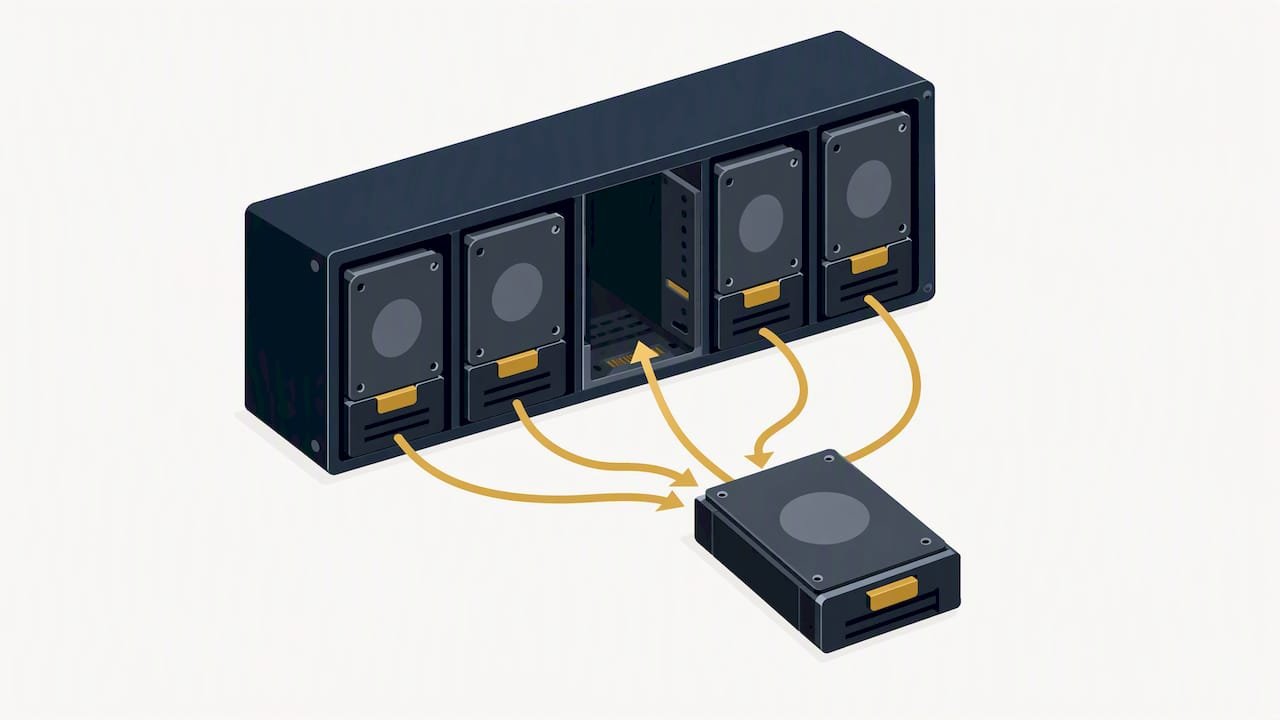
Rebuild-failure risk rises sharply with drive capacity. IBM’s re-evaluation of RAID 5 and RAID 6 for slower, larger drives reports a higher rebuild-failure probability for RAID 5 than RAID 6 in its analysis of 600GB 15K drives. The results illustrate that rebuild risk depends on the drive and array conditions. That analysis helps explain why storage administrators may favor double parity for high-capacity drives.
The mechanism behind that risk is the unrecoverable read error, or URE. During a RAID 5 rebuild, if the controller hits even one unreadable sector on any surviving drive, the rebuild can fail outright and take the array down with it. RAID 6 absorbs that same error because its second parity set can reconstruct the missing block even while handling a URE elsewhere, which is the practical reason double parity exists in the first place.
- Full-read stress: every surviving disk is read end to end, and any weak sector becomes a visible problem during rebuild rather than staying hidden.
- Longer windows on HDDs: high-capacity mechanical drives take proportionally longer to rebuild than SSDs, extending the exposure period.
- One URE kills a RAID 5 rebuild: a single unreadable sector on a surviving drive can halt reconstruction and leave the array unusable.
- RAID 6 absorbs a second event: the array can tolerate one URE or one additional drive failure during the same rebuild window.
- Replace drives immediately: once a failure is confirmed, swapping in a replacement without delay shortens the exposure window.
- Scrubbing catches latent errors early: periodic consistency checks surface weak sectors before a failure forces a rebuild to find them the hard way.
If a drive in your array has already failed or is throwing errors, stop all disk writes immediately. Continuing to write data increases the chance of a second failure or a parity mismatch before you’ve had a chance to assess the array’s condition. Our guide on causes of RAID rebuild failure and what to do first walks through the triage steps in more detail if you’re facing this right now.
5. Performance considerations for write-heavy and read-heavy workloads
To write penalty numbers from the comparison table translate into real throughput differences once you put them next to an actual workload. A RAID 5 array’s four I/O operations per logical write can add latency on a busy database compared with mirrored writes, and RAID 6’s six-operation penalty can widen that gap.
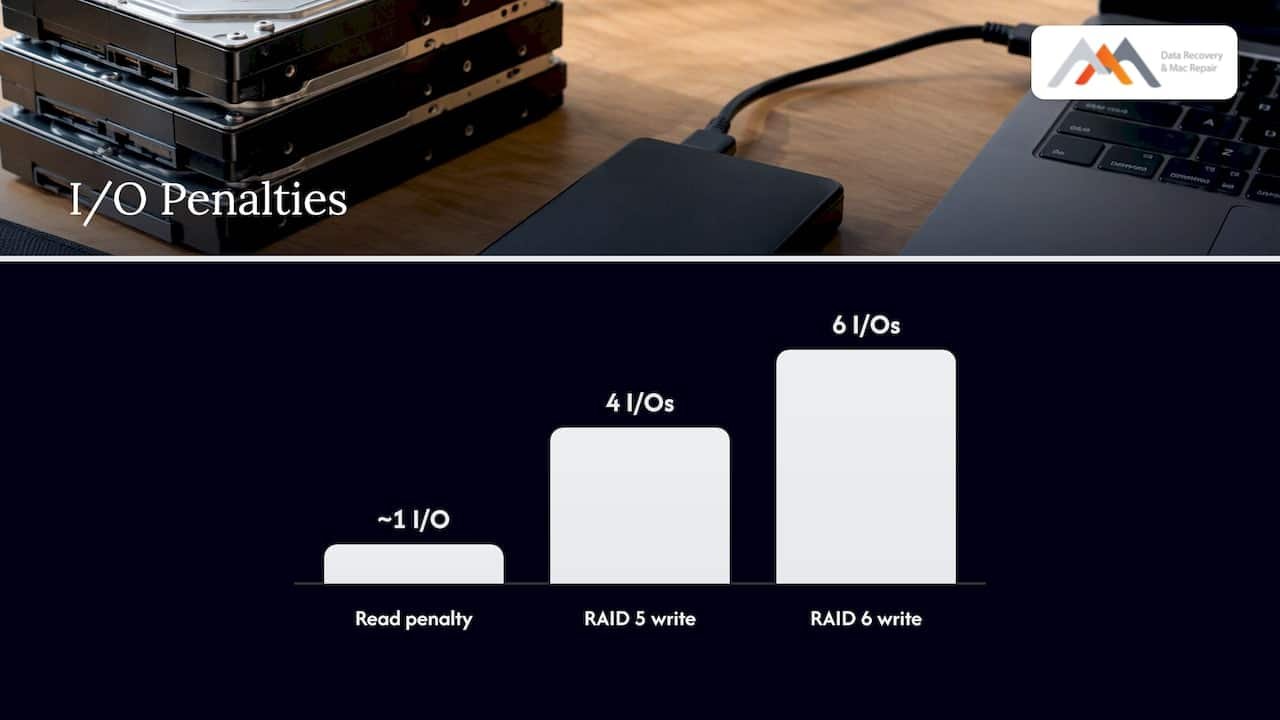
Oracle’s storage performance guidance lists the same read penalty of roughly 1 and confirms that RAID 5’s write penalty sits well above RAID 10’s, reinforcing that parity-based arrays are not the natural fit for transactional, write-intensive systems. When a volume’s write ratio climbs much above roughly 20 percent of total I/O, storage engineers commonly point to RAID 10 or straight mirroring as the better performance choice, since mirrored writes avoid the read-modify-write cycle entirely.
Solid-state drives change part of this calculation. NVMe and SATA SSDs rebuild dramatically faster than mechanical disks because there’s no seek time penalty and sustained read speeds are far higher, which shrinks the dangerous rebuild window that makes RAID 5 risky on large HDDs. Even so, RAID 6 remains worthwhile on very large SSD pools, since URE risk and the sheer volume of data to reconstruct still scale with capacity, just on a faster timeline.
- Write penalty in practice: RAID 5’s four operations and RAID 6’s six operations both add latency that’s most noticeable under sustained write load.
- Database and VM workloads: transactional systems with constant small writes often perform better on RAID 10 than on either parity level.
- Archival and media storage: read-mostly workloads barely notice the write penalty and benefit more from RAID 6’s extra fault tolerance.
- SSD pools still benefit from RAID 6: faster rebuilds reduce exposure time, but don’t eliminate the value of a second parity layer on large arrays.
Pro Tip: Match your RAID controller to the parity math: a hardware controller with dedicated parity offload keeps RAID 6 write penalties from bottlenecking a busy server, while software RAID leans harder on your CPU for the same calculations.
6. Capacity examples and how to calculate your own usable space
Running the numbers for a few common configurations makes the capacity trade-off concrete. Each example uses the formulas confirmed in IBM’s RAID capacity documentation: RAID 5 usable capacity equals (N − 1) × drive size, and RAID 6 usable capacity equals (N − 2) × drive size.
Vendors sometimes report slightly less usable space than these formulas suggest, since formatting overhead and the way manufacturers define a terabyte both shave a small amount off the raw number, a quirk IBM addresses directly in its RAID 6 capacity guidance.
To calculate usable space for your own array:
- Count the total number of drives in the planned array (N).
- Confirm the capacity of each individual drive, assuming all drives match.
- Subtract one drive (RAID 5) or two drives (RAID 6) from the total count.
- Multiply the remaining count by the per-drive capacity to get usable space.
- Round down slightly to account for formatting and controller overhead.
Our RAID 5 disk calculator and capacity guide walks through this math with more drive-size combinations if you want to model a specific array before buying hardware.
7. How to choose between RAID 5 and RAID 6
A few direct questions narrow the decision quickly once you know your priorities.
- How many drives and how large is each one? Arrays built from multi-terabyte drives lean toward RAID 6 because rebuild windows and URE risk both grow with capacity.
- How critical is the data? Business records, client files, and irreplaceable media favor the extra fault tolerance RAID 6 provides.
- What’s the read-to-write ratio? Read-heavy archives tolerate RAID 5’s lighter overhead well; write-heavy transactional loads do better outside parity RAID entirely.
- What’s the budget for raw capacity? RAID 5 delivers more usable space per dollar of drive spend, which matters for smaller or cost-sensitive deployments.
- How actively is the array monitored? Regular scrubbing and prompt drive replacement reduce risk on either level, but matter more on RAID 5’s thinner safety margin.
- Is backup in place regardless of RAID level? Neither RAID 5 nor RAID 6 is a backup; both protect against drive failure, not against accidental deletion, corruption, or site-level disaster. Understanding the importance of disaster recovery can help you plan more comprehensive protection for your business continuity with the role of disaster recovery in business continuity.
As a rule of thumb, RAID 6 may be a safer choice for large arrays and datasets where integrity matters more than maximizing capacity. Whether RAID 5 is appropriate depends on the array, rebuild conditions, monitoring, and backups. For workloads that write constantly, RAID 10, replication, or erasure coding schemes can serve you better than either parity level. Our breakdown of RAID types for businesses covers how those alternatives compare across different business sizes.
Pro Tip: If you’re choosing RAID 6 purely for the extra fault tolerance but your array is small and fast to rebuild, confirm the capacity loss is actually worth it before committing your hardware budget.
8. What our RAID recovery experience tells us about failure patterns
We have worked on RAID and NAS recovery cases, and the pattern holds steady: arrays running RAID 5 on large, aging drives show up far more often with a failed rebuild already in progress than arrays running RAID 6. Our free diagnostics process typically starts by imaging surviving drives before any reconstruction is attempted, since a second read pass on a weak disk can turn a recoverable situation into an unrecoverable one.
- Stop all disk writes immediately the moment you suspect a failed drive, before attempting any rebuild.
- Document the array state: note which drive slot failed, any error codes, and how long the array has been degraded.
- Avoid unnecessary power cycling: repeatedly powering a failing drive on and off increases the odds of a second failure.
- Call a recovery specialist for multi-drive or rebuild failures: these cases require forensic imaging, not another rebuild attempt.
- Ask about no recovery, no charge: our policy means a diagnostic assessment carries no obligation if recovery isn’t possible.
9. Our take on RAID 5 versus RAID 6 for growing storage needs
Our view, informed by RAID recovery work, is that RAID 5 may be a poor fit for many high-capacity deployments. Rebuild windows can be longer on larger drives, leaving the array exposed to another failure or an unreadable sector while it is degraded.
RAID 6 costs you a second drive’s worth of capacity and a heavier write penalty, but for arrays holding anything you can’t easily recreate, that trade is worth making. Monitoring and tested backups matter more than the RAID level itself. When a rebuild does fail, professional recovery is often the only path back to your data, and getting a specialist involved early protects what’s still recoverable.
— Kaya
10. When to call Macwest for RAID and NAS data recovery
If a rebuild has already failed, a second drive has dropped out, or your controller is throwing errors you can’t explain, that’s the moment to stop troubleshooting on your own and bring in a specialist. We handle RAID & NAS data recovery for arrays built on RAID 0, 1, 3, 5, and 6, with free diagnostics and a no recovery, no charge policy.
- Failed rebuilds: we image surviving drives before attempting reconstruction, reducing the risk of further data loss.
- Multiple-drive failures: forensic recovery techniques can often reconstruct data even when standard RAID logic can’t.
- Controller corruption or suspected UREs: our lab diagnoses the actual point of failure instead of guessing.
- Same-day appointments are available for urgent business and personal data loss cases.
We’re centrally located at 12041 Wilshire Blvd, Ste 26, between the 405 and Santa Monica, near UCLA and the Getty Center, serving West LA, Santa Monica, Beverly Hills, Brentwood, Westwood, Venice, Hollywood, and Culver City. Call us at 310-866-0828 or start with our RAID data recovery page to check availability.
FAQ
What are the key differences between RAID 5 and RAID 6?
RAID 5 tolerates one drive failure and reserves one drive’s capacity for parity, while RAID 6 tolerates two simultaneous failures and reserves two drives’ capacity for its double parity scheme. RAID 6 also carries a heavier write penalty, six I/O operations per write versus RAID 5’s four, which can affect performance on write-intensive workloads.
What are the advantages of RAID 10 for data storage?
RAID 10 mirrors and stripes data simultaneously, avoiding the read-modify-write cycle that slows parity-based RAID levels like RAID 5 and RAID 6. It can perform well on write-heavy database and virtual machine workloads, though it uses a substantial share of raw drive capacity for redundancy rather than the smaller parity overhead of RAID 5 or RAID 6.
How many drives can fail in a RAID 6 array?
A RAID 6 array tolerates the failure of two drives at the same time without losing data, since its dual parity design can reconstruct missing information from either parity set. A third simultaneous failure, however, exceeds what the array can recover from on its own.
What are the main types of RAID configurations?
Common RAID levels include RAID 0 for striping without redundancy, RAID 1 for mirroring, RAID 5 for single-parity striping, RAID 6 for double-parity striping, and RAID 10 for combined mirroring and striping. Each level trades capacity, performance, and fault tolerance differently, so the right choice depends on your workload and risk tolerance.
Is RAID 6 worth the extra capacity cost?
For arrays built from large, high-capacity drives, RAID 6 is generally worth the trade-off because rebuild windows on those drives are long enough that a single-parity array faces meaningfully higher rebuild-failure risk. Smaller arrays with fast rebuilds and strong backup practices can still use RAID 5 reasonably, but RAID 6 is the safer default once drive sizes climb into multi-terabyte territory.