TL;DR:
- A RAID 5 disk calculator estimates usable storage by applying (Number of Drives – 1) multiplied by the smallest drive size, helping plan capacity and performance. It highlights that large drives increase rebuild risk and that adding hot spares reduces capacity but improves rebuild safety, while mixed drives limit usable space to the smallest capacity. For critical or large arrays, RAID 6 offers better fault tolerance, and real-world capacity is always lower due to controller, filesystem, and overhead factors.
A RAID 5 disk calculator is a formula-driven estimation tool that computes usable storage capacity and performance characteristics for RAID 5 arrays by applying the industry-standard formula (Number of Drives – 1) × Smallest Drive Size. System administrators use this tool to input drive count, individual drive size, parity allocation, and hot spare assignments before a single disk is purchased or provisioned. The result is a precise capacity figure paired with performance projections that inform both budget decisions and infrastructure design. Tools from providers like Synology, Expedient, and Calcipedia each implement this core formula while adding controller-specific overhead adjustments that raw math alone cannot capture.

How does a RAID 5 disk calculator determine usable storage capacity?
The RAID 5 capacity formula is defined as (N-1) × smallest drive size, where N equals the total number of drives in the array. One full drive’s worth of space is reserved for distributed parity data, which is the mechanism that allows the array to reconstruct data after a single drive failure. This means a 4-drive array of 4TB disks yields 12TB of usable space, not 16TB. That distinction matters enormously when you are specifying storage for a production environment.
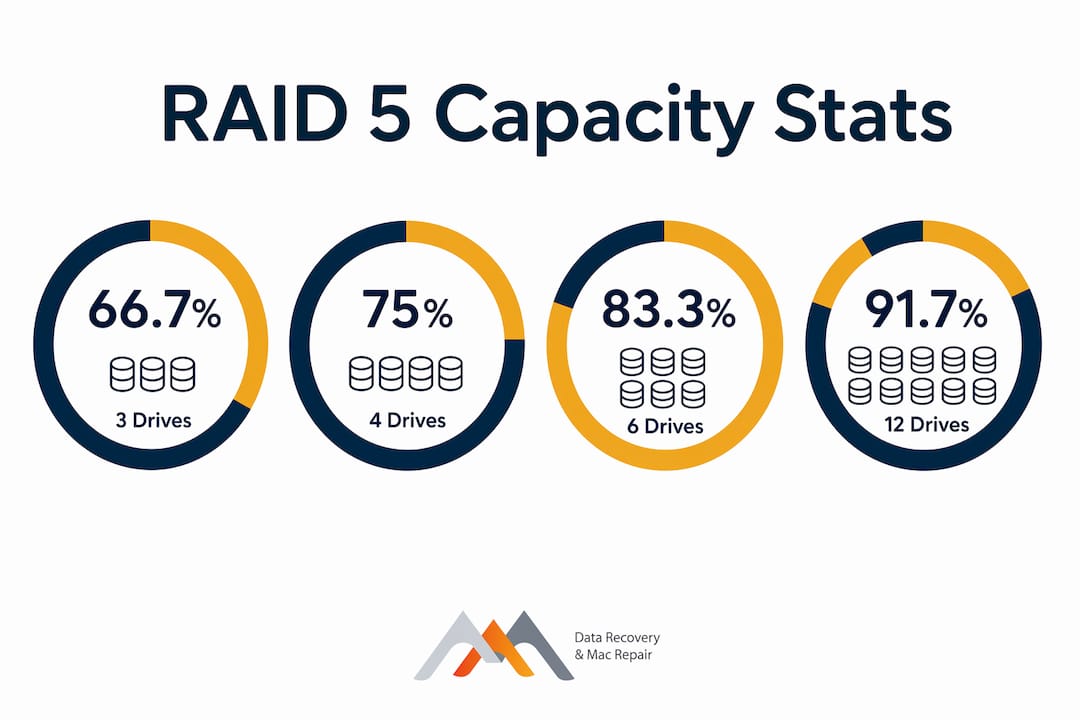
Storage efficiency scales predictably with drive count. A 3-drive RAID 5 array delivers 66.7% efficiency, while a 12-drive array reaches 91.7% efficiency, according to capacity efficiency data. Each additional drive added beyond the minimum of three reduces the proportional cost of parity overhead. For budget-constrained deployments, this efficiency curve is a strong argument for larger arrays when the workload and controller support it.
Hot spares alter the capacity equation in a meaningful way. Adding a hot spare reduces usable capacity by one full drive but shortens the rebuild window by allowing automatic reconstruction to begin the moment a failure is detected. A 4×4TB RAID 5 array normally provides 12TB usable; adding a hot spare drops that figure to 8TB usable. That 4TB sacrifice is the cost of reduced exposure during the most dangerous period in a RAID 5 array’s operational life.
Mixed-drive configurations introduce a constraint that many administrators overlook. Controllers cap each drive’s effective size to match the smallest active disk in the array during parity calculations, which means larger drives contribute no additional capacity beyond that floor. A 3-drive array mixing one 2TB disk with two 4TB disks will calculate as three 2TB drives, yielding only 4TB of usable space. A RAID 5 space calculator will surface this immediately, which is why entering accurate per-drive sizes is non-negotiable.
The table below illustrates how drive count and size interact to produce usable capacity:
| Drive count | Drive size | Usable capacity | Efficiency |
|---|---|---|---|
| 3 drives | 4 TB each | 8 TB | 66.7% |
| 4 drives | 4 TB each | 12 TB | 75.0% |
| 6 drives | 4 TB each | 20 TB | 83.3% |
| 8 drives | 4 TB each | 28 TB | 87.5% |
| 12 drives | 4 TB each | 44 TB | 91.7% |
Pro Tip: Always enter the exact raw drive capacity in your RAID 5 capacity calculator, not the formatted size. A “4TB” consumer drive formats to approximately 3.63 TiB, and that gap compounds across every drive in the array.
What performance factors does a RAID 5 disk calculator estimate?
RAID 5 delivers high read but low write performance due to the overhead of parity calculations on every write operation. Each write to a RAID 5 array requires four I/O operations: reading the old data, reading the old parity, writing the new data, and writing the new parity. This write penalty is the primary reason RAID 5 underperforms RAID 10 in write-intensive environments. A RAID 5 speed calculator quantifies this by projecting IOPS based on drive count and rotational speed or NVMe latency.
Key performance characteristics that a RAID 5 disk calculator evaluates include:
- Read throughput: Scales near-linearly with drive count because all drives participate in reads simultaneously, making RAID 5 competitive with RAID 0 for sequential read workloads.
- Write IOPS: Constrained by parity overhead regardless of drive count. Adding more drives improves raw throughput but does not eliminate the four-I/O write penalty per operation.
- Degraded mode performance: During a rebuild, the array reconstructs missing data by reading all remaining drives simultaneously. This process saturates drive I/O and can reduce read performance by 30 to 50 percent depending on array size and controller capability.
- Rebuild duration: Directly proportional to drive capacity and array load. A 4TB drive in a lightly loaded array may rebuild in 6 to 12 hours; an 8TB drive under production load can take 24 hours or more.
- IOPS under mixed workloads: A RAID 5 array with spinning HDDs typically delivers 50 to 150 IOPS per drive for random reads. NVMe-based RAID 5 arrays can reach hundreds of thousands of IOPS, though the write penalty still applies proportionally.
RAID 5 is well suited for read-heavy workloads such as data warehousing, web serving, and archiving, where write frequency is low and sequential read speed is the primary metric. For transaction-heavy databases or virtual machine storage, a RAID 10 calculator comparison will almost always favor RAID 10 on write performance grounds.
Pro Tip: When using a RAID 5 speed calculator, input your expected read-to-write ratio. A 90/10 read-write workload will see dramatically better real-world performance than a 50/50 split, even with identical hardware.
What are the risks and practical considerations when using RAID 5?
RAID 5 tolerates only one drive failure; a second failure during the rebuild window results in complete, unrecoverable data loss. This is not a theoretical risk. It is the most common failure mode that data recovery specialists at Macwestlosangeles encounter in RAID 5 arrays brought in for recovery. The rebuild window is the interval between the first drive failure and the completion of reconstruction, and it is the most operationally dangerous period in the array’s life.
The risk profile of RAID 5 worsens as drive capacity increases. Rebuild window risk grows with larger drives because reconstruction requires reading every bit on every remaining drive. During that process, remaining drives endure heavy read I/O stress to reconstruct parity data, which increases the probability of a latent sector error or secondary failure on an already-stressed drive. This is precisely why RAID 5 on drives above 4TB is considered high-risk in 2026 production environments.
Practical risk considerations every system administrator should factor in:
- Single-failure tolerance only: RAID 5 provides no protection against simultaneous or sequential dual-drive failure. RAID 6 tolerates two simultaneous failures and should be the default choice for arrays with six or more drives.
- Hot spare trade-off: A hot spare reduces rebuild exposure but costs one full drive of usable capacity. For a 5-drive array, that represents a 20% capacity reduction.
- Drive age correlation: Drives purchased together in the same batch share similar wear patterns. When one fails, others in the same cohort are statistically more likely to fail within the same window.
- Filesystem overhead: ZFS recommends keeping usage below 80% for performance and fragmentation control, which means your calculator output is not your true working capacity.
- RAID 10 as an alternative: For write-intensive or mission-critical workloads, a RAID 10 calculator comparison will show lower usable capacity but significantly better write performance and dual-drive failure tolerance.
RAID is not a backup. A RAID 5 array that loses two drives simultaneously loses all data permanently. Always maintain an independent backup, whether on-site NAS, cloud storage, or tape, regardless of your RAID configuration.
How to use a RAID 5 disk calculator effectively for planning and deployment
Applying a RAID 5 disk calculator correctly requires more than entering drive count and size. Follow this sequence to produce planning estimates that hold up in production:
- Enter exact drive count and raw capacity. Start with the number of physical drives and their raw unformatted size. Do not use marketed capacity figures without converting to actual binary values (GiB or TiB) if your filesystem reports in those units.
- Specify hot spare allocation. Decide whether your risk tolerance requires a hot spare before calculating usable space. A hot spare is a pre-provisioned standby drive that the controller activates automatically on failure, reducing rebuild time from hours to minutes in some configurations.
- Apply the 10 to 20 percent overhead buffer. Filesystem overhead and snapshots require reserving 10 to 20 percent of usable RAID 5 capacity as a buffer. If your calculator shows 20TB usable, plan to use no more than 16TB for active data. This buffer accommodates APFS metadata, ZFS snapshots, and OS-level journaling.
- Run a parallel comparison using a RAID 6 calculator and a RAID 10 calculator. The RAID 6 calculator will show lower usable capacity for the same drive count but double the fault tolerance. The RAID 10 calculator will show 50% usable capacity with superior write performance. These comparisons clarify the cost of redundancy and performance at a glance.
- Account for controller and OS overhead beyond the calculator estimate. Real-world usable capacity is lower than theoretical due to controller, filesystem, and OS overheads. Hardware RAID controllers from vendors like Broadcom (formerly LSI) and software RAID implementations under Linux mdadm each introduce different overhead profiles that no online calculator fully models.
- Evaluate cost per usable terabyte across configurations. Divide total drive cost by usable capacity for RAID 5, RAID 6, and RAID 10 to produce a cost-per-TB figure. RAID 5 typically wins on cost efficiency for read-heavy, non-critical workloads. RAID 10 wins on performance and reliability for anything mission-critical.
Storage professionals advise combining calculator estimates with operational knowledge to avoid pitfalls from rebuild risk and performance bottlenecks. The calculator gives you the math. Operational experience tells you whether that math is safe for your specific workload and failure tolerance.
Key takeaways
A RAID 5 disk calculator produces accurate usable storage estimates only when drive count, hot spare allocation, and a 10 to 20 percent overhead buffer are all factored into the final capacity plan.
| Point | Details |
|---|---|
| Core capacity formula | Usable space equals (N-1) × smallest drive size, with efficiency ranging from 66.7% to 91.7%. |
| Write performance penalty | Every RAID 5 write requires four I/O operations, making it unsuitable for write-heavy workloads. |
| Single-failure tolerance | RAID 5 cannot survive two simultaneous drive failures; RAID 6 is the safer choice for larger arrays. |
| Overhead buffer required | Reserve 10 to 20 percent of calculated usable capacity for filesystem metadata, snapshots, and fragmentation control. |
| Calculator limits | Real-world capacity is always lower than calculator output due to controller, OS, and filesystem overhead. |
Why RAID 5 calculators tell only half the story
I have reviewed storage configurations for clients across West LA and the broader Los Angeles area since 2006, and the pattern is consistent: administrators trust the calculator output without stress-testing the assumptions behind it. The number the tool produces is mathematically correct. The problem is that correct math applied to the wrong risk model produces dangerous infrastructure.
The most common misconception I encounter is that RAID 5 on modern high-capacity drives is as safe as it was on 500GB drives a decade ago. It is not. A 16TB drive takes exponentially longer to rebuild than a 1TB drive, and every hour of that rebuild is an hour where a second failure ends in total data loss. RAID 5 on drives above 4TB is a configuration I would not recommend for any data that cannot be fully restored from an independent backup within 24 hours.
That said, RAID 5 remains a legitimate and cost-effective choice for read-centric workloads with limited budgets, particularly in archival storage, media serving, and development environments where write frequency is low and the data has a secondary copy elsewhere. The RAID 5 capacity calculator is the right starting point. Pairing it with a RAID 6 calculator comparison and an honest assessment of your rebuild risk tolerance is what separates a well-designed array from a liability.
— Kaya
RAID 5 recovery and storage planning support in Los Angeles
When a RAID 5 array fails, whether from dual-drive failure, controller corruption, or a botched rebuild, stop all disk writes immediately to preserve the best chance of recovery. Macwestlosangeles has provided RAID data recovery and storage diagnostics since 2006, serving IT professionals and businesses across West LA, Santa Monica, Beverly Hills, Brentwood, Westwood, and Culver City from our location at 12041 Wilshire Blvd, Ste 26. We offer free diagnostics and operate on a no-recovery, no-charge basis for hard drive data recovery cases, including RAID 5, RAID 6, and NAS arrays. Same-day appointments are available. Call us at (310) 866-0828 to speak directly with a recovery specialist.
FAQ
What is the formula used by a RAID 5 disk calculator?
The standard formula is (Number of Drives – 1) × Smallest Drive Size, which reserves one drive’s equivalent capacity for distributed parity. Efficiency ranges from 66.7% with three drives to 91.7% with twelve drives.
How does a hot spare affect RAID 5 usable capacity?
Adding a hot spare reduces usable capacity by one full drive but enables automatic rebuild initiation on failure, shortening the high-risk rebuild window significantly. A 4×4TB RAID 5 array drops from 12TB to 8TB usable when a hot spare is assigned.
When should I use a RAID 6 calculator instead of RAID 5?
Use a RAID 6 calculator when your array contains drives larger than 4TB or six or more drives, since RAID 6 tolerates two simultaneous failures and is the preferred configuration for critical data in 2026 production environments.
Why is real-world RAID 5 capacity lower than the calculator shows?
Controller firmware, OS filesystem structures, and features like APFS snapshots or ZFS journaling consume space beyond what the parity formula accounts for. Storage professionals recommend reserving 10 to 20 percent of calculated usable capacity as an operational buffer.
Can I use a RAID 5 disk calculator for mixed drive sizes?
You can, but the calculator will cap every drive’s effective contribution to the size of the smallest drive in the array. A configuration mixing 2TB and 4TB drives calculates as all 2TB drives, wasting the additional capacity of the larger disks entirely.