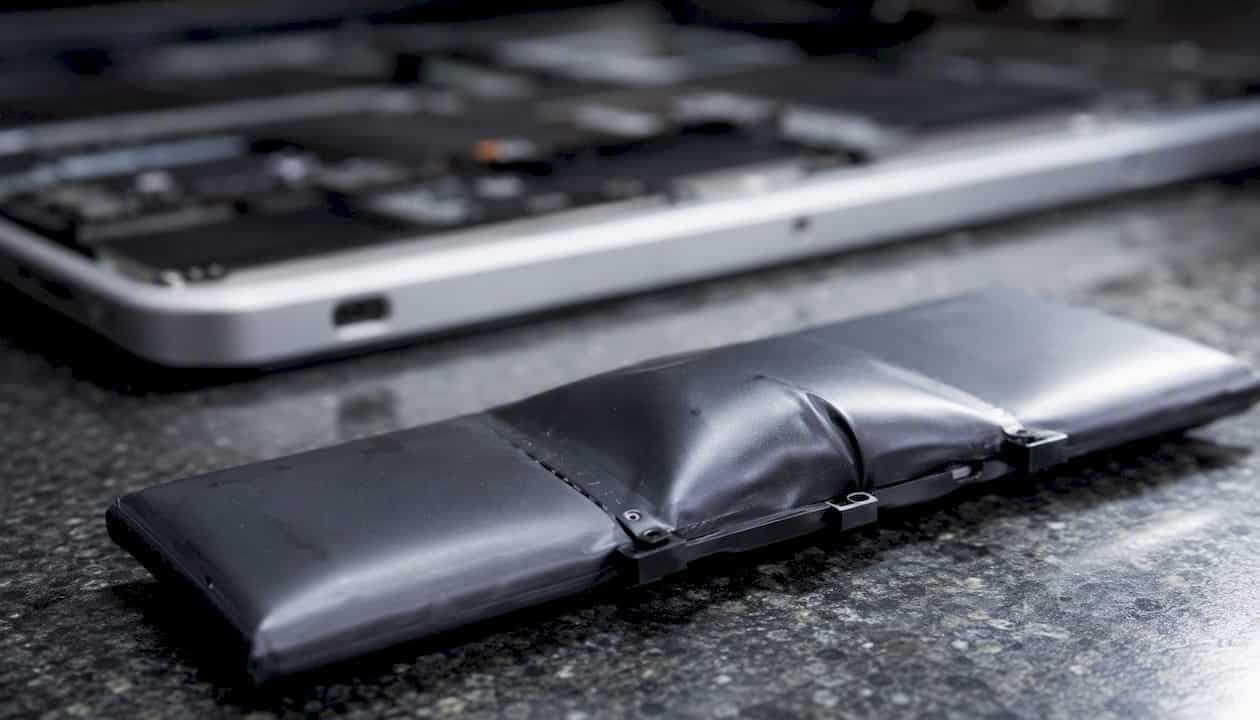
A swollen MacBook battery is a safety emergency, not a minor inconvenience. Power down your MacBook immediately, unplug the charger, and move the device to a hard, non-flammable surface away from anything that can burn. Do not charge it again. MacWest Data Recovery & Mac Repair offers same-day Mac repair service with free diagnostics and no-charge-if-no-recovery. Call 310-866-0828 now to book.
Key Takeaways
A swollen MacBook battery is caused by irreversible internal gas generation and requires immediate shutdown, professional replacement, and proper recycling through a certified program like Call2Recycle.
| Point | Details |
|---|---|
| Stop using the device immediately | Power down, unplug, and move to a non-flammable surface the moment you suspect swelling. |
| Swelling never reverses | Gas trapped inside a pouch cell is permanent; replacement is the only safe resolution. |
| Visual signs come before software warnings | A raised trackpad, chassis wobble, or case gap often appears before battery health metrics drop. |
| Dispose through Call2Recycle | Lithium batteries cannot go in household trash; use a certified U.S. drop-off location. |
| Macwestlosangeles offers same-day service | Free diagnostics, battery replacement, and data recovery at 12041 Wilshire Blvd, Ste 26, West LA; call 310-866-0828. |
Table of Contents
- How to tell if your MacBook battery is swelling
- Why MacBook batteries swell in the first place
- Risks of continuing to use a MacBook with a swollen battery
- What to do right now if you suspect a swollen battery
- Repair and replacement options in the U.S.
- Safe removal, transport, and disposal of a swollen battery
- Practical steps to reduce the risk of battery swelling
- Does battery swelling ever reverse on its own?
- MacWest Data Recovery & Mac Repair: local professional option
- What a repair technician wants you to know about swollen batteries
- Macwestlosangeles is the fast, local answer for West LA MacBook owners
- Sources
- FAQ
How to tell if your MacBook battery is swelling
The earliest signs of MacBook battery swelling are physical, not software-reported. Your battery health percentage can still read “Normal” while the cell is already deforming. According to the Apple Community, the most reliable clues in the field are:
- Trackpad resistance or raised height. A swollen battery pushes up from beneath the keyboard deck, making the trackpad feel stiff, unresponsive, or visibly elevated.
- Wobble on a flat surface. Set the MacBook on a table. If it rocks where it never did before, the bottom case is bowing outward.
- Visible gaps at case seams. The bottom panel separating from the chassis along the edges is a strong indicator.
- Keys that feel raised or uneven. The battery sits directly below the keyboard on many MacBook models; swelling lifts the key deck.
- Lid that no longer closes flush. Pressure from below can misalign the hinge gap.
- Loose or missing bottom screws. A bulging case can back screws out over time.
Pro Tip: Lean close and gently waft air from the seam toward your nose. A sweet, chemical odor suggests electrolyte outgassing. Do not press on the case, squeeze the chassis, or attempt to pry the bottom panel open. Any puncture risk is a fire risk.
Do not charge the device after noticing any of these signs of battery swelling. Do not place it in a sealed bag or a car trunk.
Why MacBook batteries swell in the first place
Swelling is caused by gas generation inside the pouch-format lithium-ion cells Apple uses in MacBooks. A peer-reviewed analysis in Frontiers in Chemical Engineering confirms that internal electrochemical reactions produce gas during both manufacturing and normal use, and that accumulated gas can fracture housings, damage adjacent components, and create fire and toxic-gas hazards.
Pouch cells are thinner and lighter than cylindrical cells because they replace a rigid metal casing with a flexible foil envelope. That design saves space inside a slim MacBook chassis, but it also means any internal gas pressure deforms the cell visibly rather than being contained. The battery management system (BMS) can slow but not prevent this process once cell degradation begins.
The table below maps the main causes to their mechanisms and the practical sign you are most likely to notice:
| Cause | Mechanism | Practical sign |
|---|---|---|
| Age and high cycle count | SEI layer thickens; electrolyte decomposition accelerates | Gradual wobble or trackpad stiffness after 3+ years |
| Sustained heat exposure | Accelerated electrolyte oxidation; faster gas generation | Swelling after heavy workloads or hot environments |
| Overcharging or charger defects | Lithium plating on anode; electrolyte breakdown | Rapid onset, sometimes with odor |
| Manufacturing or formation defects | Incomplete formation cycling; trapped gas from production | Early swelling at low cycle counts |
| Physical damage or liquid intrusion | Separator breach; short-circuit-driven heating | Sudden swelling after a drop or spill |
| Counterfeit or low-quality replacement cells | Poor BMS calibration; substandard electrolyte | Swelling shortly after a third-party battery swap |
Swelling can appear at any point in a MacBook’s life. Community repair threads document cases where cells swelled with fewer than 200 cycles, pointing to formation defects or specific manufacturing batches rather than simple wear. According to MakeUseOf, overcharging, heat, and counterfeit replacement batteries are among the most frequently cited triggers.
Risks of continuing to use a MacBook with a swollen battery
Continued use of a MacBook with a swollen battery increases the risk of thermal runaway, fire, toxic fume release, and irreversible damage to the trackpad, logic board, and display assembly. This is not a gradual risk that builds slowly; once a pouch cell begins outgassing, the process can accelerate without warning.
PCMag’s reporting on swollen laptop batteries describes heat and outgassing as the core drivers and recommends immediate shutdown, isolation on a non-flammable surface, and professional replacement to avoid fire risk. Thermal runaway, the chain reaction where heat triggers more gas generation which triggers more heat, can produce temperatures high enough to ignite surrounding materials and release hydrogen fluoride gas.
The practical consequences of delaying service extend beyond personal safety:
- Logic board damage. A swollen battery pressing against the logic board can crack solder joints and damage NVMe storage controllers, turning a battery-only repair into a far more expensive board-level job.
- Data loss. If the device fails suddenly, APFS volumes on soldered NVMe storage may become inaccessible without specialist recovery tools.
- Trackpad and display damage. Physical pressure from the expanding cell can crack the trackpad mechanism or distort the display cable routing.
- Property fire. A venting or igniting lithium cell can ignite a desk, bag, or vehicle interior.
What to do right now if you suspect a swollen battery
- Shut down completely. Hold the power button until the MacBook is fully off. Do not just close the lid.
- Unplug the charger and all accessories. Remove the USB-C or MagSafe cable immediately.
- Move to a hard, non-flammable surface. A concrete floor, ceramic tile, or metal tray is ideal. Keep it away from paper, fabric, and wood.
- Ventilate the area. Open a window or door. If you smell a chemical or sweet odor, leave the room and let it air out.
- Do not seal the device in a bag or case. A sealed enclosure concentrates any venting gas and increases heat buildup.
- Do not attempt to charge, use, or open the device. iFixit’s safety guidance explicitly warns that removing a swollen battery is hazardous and recommends professional removal and disposal.
- If the battery is warm, hissing, or smoking, evacuate and call 911. Do not attempt to move the device with your bare hands.
- Back up your data only if the device is cool and stable. If the MacBook powers on safely without charging, connect to Time Machine or copy critical files to an external drive. Stop all disk writes immediately if you suspect storage corruption alongside the battery issue.
Pro Tip: If you need a quick backup and cannot safely charge the device, use a USB-C hub with a passthrough power port rated for your MacBook’s wattage and keep the session under 15 minutes. Prioritize APFS snapshots or a direct file copy over a full system clone.
Repair and replacement options in the U.S.
Professional battery replacement is the correct next step. Do not attempt a DIY swap on a swollen cell; the iFixit guidance is unambiguous that the hazard level makes professional handling the responsible choice. Your options in the U.S. fall into three categories:
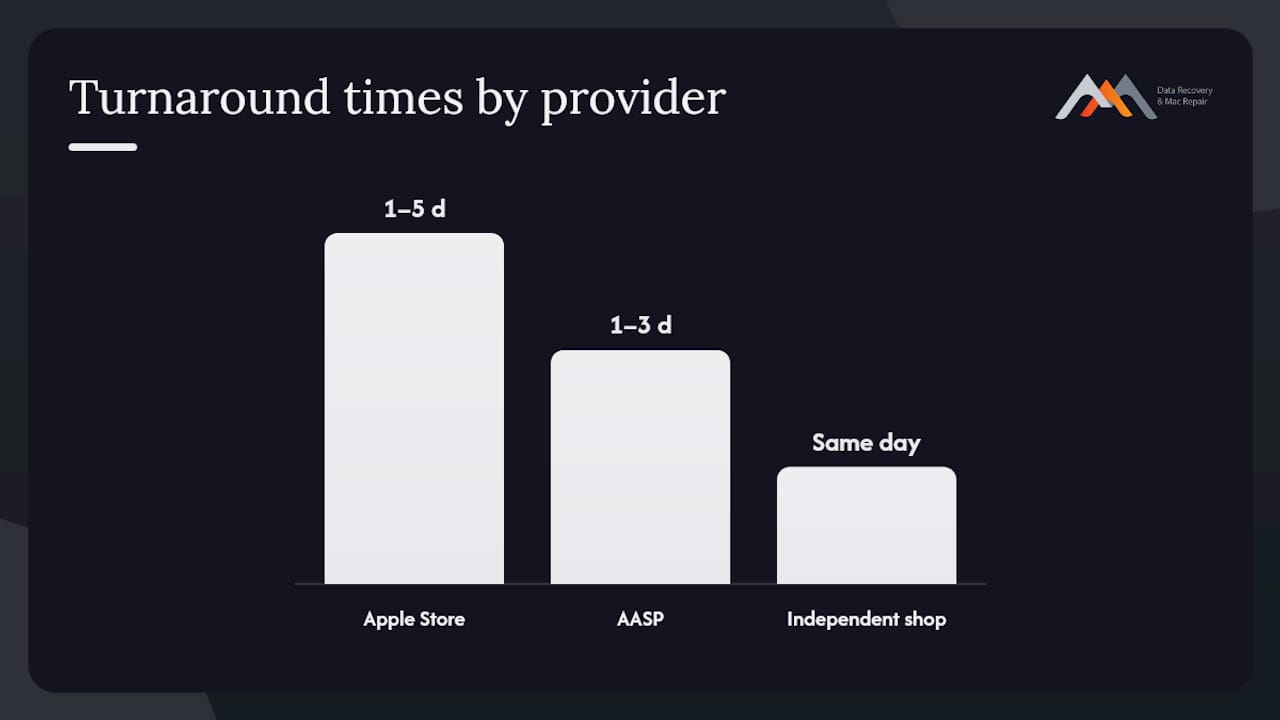
- Apple Store / Genius Bar. Apple uses genuine parts and covers battery replacement under AppleCare+ when health drops below 80%. Out-of-warranty battery service typically costs $129–$199 depending on model. Apple has also run targeted replacement programs for specific MacBook models with documented swelling issues; check Apple’s support pages for your serial number.
- Apple Authorized Service Providers (AASPs). These shops use Apple-certified parts and follow Apple’s repair protocols. Turnaround is often 1–3 business days, and pricing is comparable to Apple’s own rates.
- Independent repair shops. Shops like Macwestlosangeles can often provide same-day diagnostics and repair using quality replacement cells, with more scheduling flexibility than Apple’s appointment system. Cost expectations are generally competitive, and a good independent shop will inspect the logic board for secondary damage before closing the case.
| Provider type | Typical speed | Cost expectation | Official Apple parts | Same-day possible |
|---|---|---|---|---|
| Apple Store / Genius Bar | 1–5 business days | $129–$199+ | Yes | Rarely |
| Apple Authorized Service Provider | 1–3 business days | Comparable to Apple | Yes | Sometimes |
| Independent repair shop | Same day | Competitive; varies | Quality third-party | Often |
For MacBook battery replacement on models where the battery is adhesive-bonded to the top case, Apple and AASPs typically replace the entire top case assembly. Independent shops with component-level capability can sometimes replace the cell alone, reducing cost when the top case is undamaged.
Safe removal, transport, and disposal of a swollen battery
Handling a swollen battery incorrectly is as dangerous as leaving it in the device. Follow these rules:
Do:
- Power down fully before any transport.
- Carry the MacBook in a ventilated area of your vehicle, not in a sealed trunk.
- Bring it directly to a repair shop or hazardous waste drop-off.
- Use Call2Recycle’s drop-off locator to find a certified battery recycling site near you. Lithium batteries must not go in household trash under U.S. regulations.
Do not:
- Puncture, bend, or compress the battery under any circumstances.
- Place the device in a sealed plastic bag for transport.
- Attempt to ship a swollen battery without proper hazardous materials authorization; U.S. DOT regulations heavily restrict lithium battery shipments, and a visibly damaged cell may be prohibited entirely.
- Dispose of it in a dumpster or curbside recycling bin.
If the battery becomes warm, begins hissing, or you see smoke at any point during handling, set the device down on a non-flammable surface, move away, and call 911. Do not attempt to carry it outside yourself.
Practical steps to reduce the risk of battery swelling
Managing heat and charging habits is the single highest-impact thing you can do to extend cell life and reduce swelling risk.
- Enable Optimized Battery Charging. This macOS feature learns your charging schedule and holds the charge at 80% until shortly before you typically unplug, reducing time spent at full charge where electrolyte stress is highest.
- Avoid high-heat environments. Do not leave your MacBook in a parked car, in direct sunlight, or on a surface that traps heat beneath the chassis.
- Use hard, flat surfaces. Soft surfaces like beds and couches block the bottom vents, raising internal temperatures during workloads.
- Use Apple-certified or MFi-certified chargers. Off-brand chargers with poor voltage regulation are a documented overcharging risk.
- Monitor your cycle count. Open System Information (About This Mac > System Report > Power) and check the cycle count against Apple’s rated maximum for your model. Most modern MacBooks are rated for 1,000 cycles.
- Schedule a physical inspection for devices older than three years. Battery health metrics can lag behind actual cell condition; a technician can spot early physical deformation before it becomes a safety issue.
Does battery swelling ever reverse on its own?
No. A swollen lithium-ion battery cannot recover. The gas produced by internal electrochemical reactions is permanently trapped inside the pouch cell; there is no mechanism by which the cell reabsorbs it. Swelling only progresses. Delaying replacement does not stabilize the cell; it increases the pressure on surrounding components and raises the probability of a more serious failure. Replace the battery promptly.
MacWest Data Recovery & Mac Repair: local professional option
If you are in West LA, Santa Monica, Beverly Hills, Brentwood, Westwood, Venice, Hollywood, or Culver City, Macwestlosangeles is the local option for same-day diagnostics and battery service. Call 310-866-0828 to book.
Services relevant to a swollen battery situation include:
- Battery replacement and top-case assessment
- Logic board inspection and component-level repair
- Data recovery from APFS and NVMe storage, including RAID 0, 1, 3, and 5 configurations
- Free diagnostics with no charge if no recovery is possible
- Same-day appointments for urgent cases
Macwestlosangeles has been serving the Los Angeles area since 2006, operating from 12041 Wilshire Blvd, Ste 26, between the 405 and Santa Monica, near UCLA and the Getty Center.
| Service | Details |
|---|---|
| Diagnostics | Free; no charge if no recovery or repair is performed |
| Typical turnaround | Same day for battery and common hardware repairs |
| Same-day availability | Yes, by appointment; call 310-866-0828 |
| Logic board repair | Component-level; covers secondary damage from swelling |
| Data recovery | APFS, NVMe, RAID 0/1/3/5; FileVault-encrypted volumes |
What a repair technician wants you to know about swollen batteries
The most common pattern seen in shop is a MacBook that has been running hot for months, often on a soft surface or in a warm room, before the owner notices the trackpad stiffening. By that point, the cell has usually been generating gas for weeks. Age and heat are the dominant causes, but defective replacement cells from non-certified sources are a growing factor; a battery swapping shortly after a third-party repair is a red flag for a counterfeit or substandard cell.
The first priority in any professional workflow is data. Before any physical intervention, a technician should assess whether the storage is accessible and, if so, image the drive or create an APFS snapshot before disturbing the chassis. That step costs very little time and can save everything if the logic board is more compromised than it appears externally. The cost difference between a battery-only replacement and a full top-case or logic board repair is significant, which is exactly why a thorough diagnostic before quoting matters.
Macwestlosangeles is the fast, local answer for West LA MacBook owners
A swollen MacBook battery needs professional attention the same day you notice it, not next week. Macwestlosangeles offers Mac repair in Los Angeles with free diagnostics, same-day appointments, and no charge if no repair is completed. Since 2006, the shop has handled battery replacements, logic board component repairs, and data recovery from APFS and NVMe volumes for individual and business clients across West LA, Santa Monica, Beverly Hills, Brentwood, Westwood, Venice, Hollywood, and Culver City. The shop is at 12041 Wilshire Blvd, Ste 26. Call 310-866-0828 today to describe your situation and confirm same-day availability.
Sources
- Pouch cell swelling in consumer electronics — mechanisms, cases, and mitigation (Frontiers in Chemical Engineering)
- What to do with a swollen battery — iFixit Wiki
- Call2Recycle — battery recycling locator
- How can I tell if the MacBook battery has started to swell? — Apple Community
- Help — my laptop battery is swollen. Now what? — PCMag
- Why is MacBook battery swelling? — MakeUseOf
FAQ
Can I still use my MacBook if the battery is swollen?
No. Stop using it immediately, power it down fully, and unplug the charger. Continued use raises the risk of thermal runaway, fire, and permanent hardware damage.
Will Apple replace a bulging MacBook battery?
Out-of-warranty service is available at a fee; check your serial number against Apple’s support pages for any active programs.
Will battery swelling go away on its own?
No. The gas generated inside a swollen lithium-ion pouch cell is permanent and cannot be reabsorbed. Swelling only progresses, and delaying replacement increases the risk of more serious failure.
Is it safe to transport a MacBook with a swollen battery?
Transport it only when necessary, powered off, on a ventilated surface in your vehicle rather than in a sealed trunk or bag. Do not ship it without verifying U.S. DOT hazardous materials rules for damaged lithium cells. Bring it directly to a repair shop or a Call2Recycle drop-off location.
How much does MacBook battery replacement cost in the U.S.?
Apple’s out-of-warranty battery service typically costs within a moderate price range depending on the model. Independent shops like Macwestlosangeles are often competitive on price and can frequently complete the repair the same day; call 310-866-0828 for a free diagnostic and quote.