Stop all disk writes immediately if your RAID 1 or RAID 5 array has already failed or is acting up. If your array is healthy and you are still choosing, pick RAID 1 when you want simplicity and dependable behavior with two drives, and pick RAID 5 when you have three or more drives and need more usable space than mirroring allows. The rest of this guide explains why, with numbers, and what to do if the choice has already caught up with you.
TL;DR
- RAID 1 mirrors two or more drives and gives you the capacity of one drive. RAID 5 stripes data with parity across three or more drives and gives you the capacity of all but one.
- Both survive exactly one drive failure. Neither protects you from deletion, corruption, ransomware, fire or theft, so neither replaces a backup.
- RAID 5 is more space efficient but slower on writes and riskier during a rebuild, especially with large drives.
- If an array degrades or a rebuild fails, stop writing to it and call us at (310) 866-0828 for a free diagnostic. Same-day appointments are available, and if we do not recover your data, you do not pay.
Table of Contents
- Key Takeaways
- How RAID 1 and RAID 5 actually work
- RAID 1 vs RAID 5 side by side
- Performance: where each level wins
- Rebuild risk: the real difference between RAID 1 and RAID 5
- Which one should you choose?
- Why RAID is not a backup
- Symptoms that an array is failing
- What we do when a RAID 1 or RAID 5 array fails
- Our perspective: what we tell customers who ask RAID 1 or RAID 5
- Need help with a failed array in West Los Angeles?
- Frequently asked questions
- Sources
Key Takeaways
RAID 1 keeps a full copy of your data on each drive, so it is simple, fast to read and predictable, but it costs you half of your raw capacity in a two-drive pair. RAID 5 spreads data and parity across at least three drives, which makes it more efficient with space but slower to write and more stressful to rebuild. Whichever level you run, keep a separate backup, and bring a failed or degraded array to a professional lab before you attempt a forced rebuild.
How RAID 1 and RAID 5 actually work
RAID 1: mirroring
RAID 1 writes the same data to two or more drives at the same time, so each member holds an exact copy. Backblaze describes RAID 1 as an exact copy of a set of data on two or more disks, written simultaneously. If one drive dies, the other carries on with no reconstruction math involved.
The cost is capacity. Two 8 TB drives in RAID 1 give you 8 TB of usable space, which is a 50% penalty on raw capacity. Reads can be served from either drive, and writes are a simple duplication, so the behavior under load is easy to predict.
RAID 5: striping with distributed parity
RAID 5 needs at least three drives. Data is split into stripes across the members, and a parity block for each stripe is distributed among them. If one drive fails, the controller or software recomputes the missing blocks from the survivors and the parity.
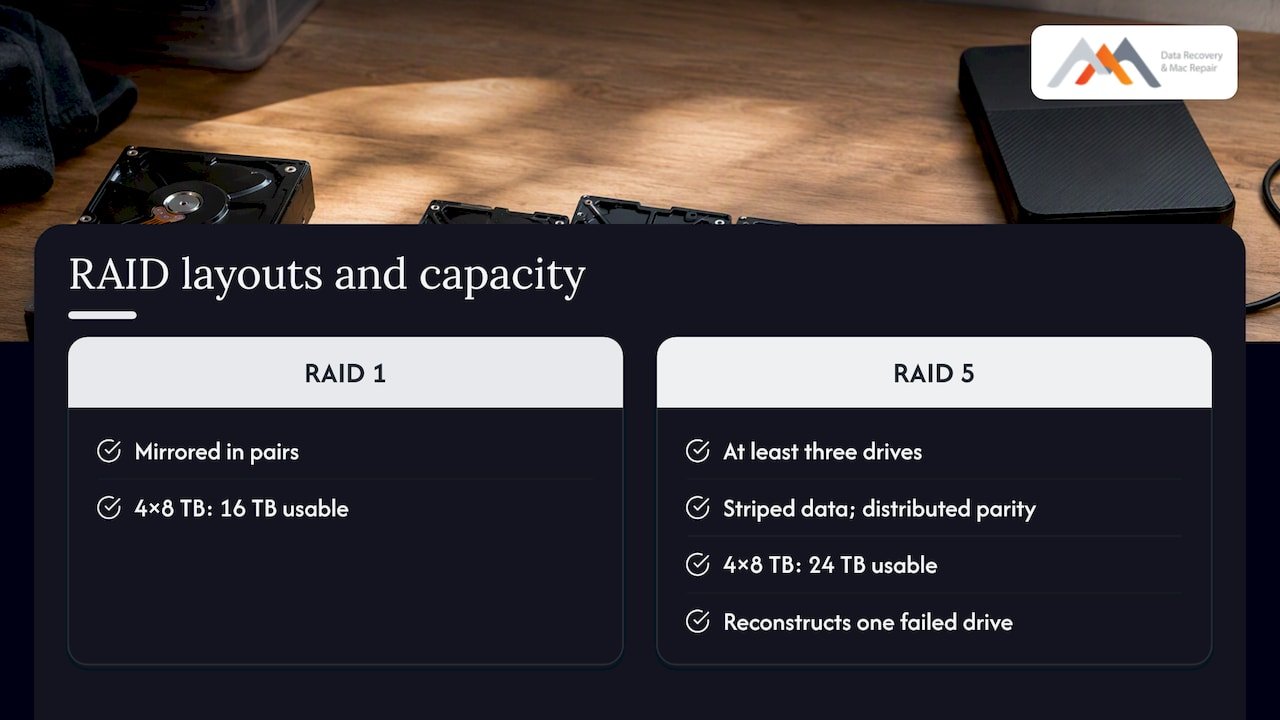
The efficiency is the main attraction. Three drives yield about 67% usable capacity, as Backblaze’s NAS RAID guide notes, and the share rises as you add drives, because you lose only one drive’s worth of space regardless of how many members the array has. Four 8 TB drives give you 24 TB usable, compared with 16 TB if you mirrored them in pairs.
RAID 1 vs RAID 5 side by side
| Feature | RAID 1 | RAID 5 |
|---|---|---|
| Minimum drives | 2 | 3 |
| Usable capacity | 50% in a pair (one drive’s worth) | All drives minus one (about 67% with three) |
| Drive failures survived | One (more with extra mirrors) | One |
| Write performance | Fast, simple duplication | Slower, parity must be calculated |
| Read performance | Good, reads can come from either member | Good, striped across members |
| Rebuild behavior | A straight copy from the surviving drive | Reads every surviving drive in full |
| Best for | Boot volumes, databases, critical small data sets | Large media archives, read-heavy file storage |
The comparison in the table matches what Western Digital’s RAID 1 vs RAID 5 guide lays out on minimum drives, capacity loss and rebuild risk.
Performance: where each level wins
RAID 1 suits workloads where latency matters. Dell’s storage guidance describes RAID 1 as the better choice for write-intensive work, while treating RAID 5 as a compromise for read-dominant data that should not take heavy random writes. Every small write on RAID 5 forces the system to update both the data block and the parity block, and that overhead is what slows it down.
Software RAID adds another wrinkle. Red Hat’s documentation on managing RAID covers both mirroring and parity levels, and on a busy machine, parity math consumes CPU cycles that a mirror never needs. A hardware controller with cache hides much of this, but it does not remove it.
If your array mostly holds video, photos or archived projects that you write once and read many times, RAID 5 performs well enough. If it hosts a database, a mail store or virtual machines, a mirror is usually the calmer choice.
A note on NVMe and SSD arrays
Solid-state members change the arithmetic. NVMe drives rebuild far faster than spinning disks, so the long rebuild windows described below shrink considerably. They also introduce different failure modes, such as controller faults and wear, that a RAID level alone does not address. On a Mac, soldered SSDs and APFS containers add their own recovery complications, which is why we treat Mac storage and RAID work as separate disciplines even though many customers need both.
Rebuild risk: the real difference between RAID 1 and RAID 5
The argument over RAID levels is mostly an argument about what happens after a drive fails. The array is now running without redundancy, and the next few hours or days decide whether you lose data.
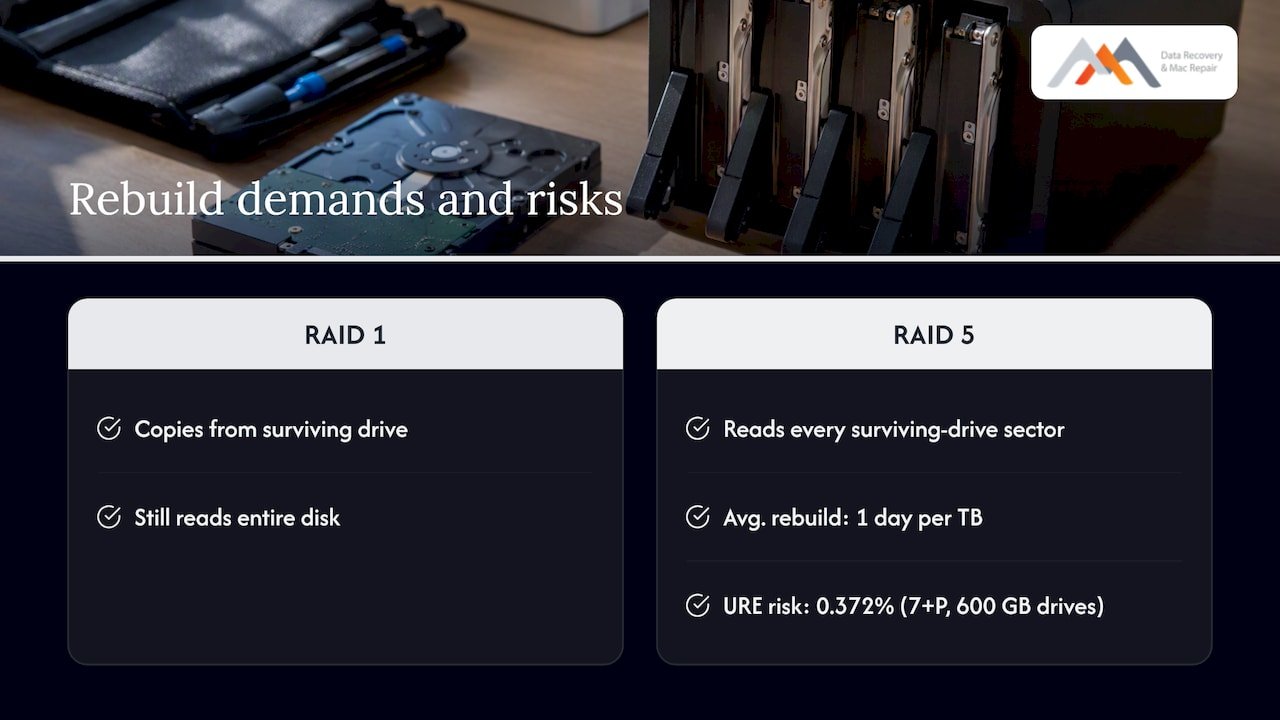
On RAID 5, a rebuild has to read every sector of every surviving drive to recompute the missing one. Backblaze cites rebuild times that average about one day per terabyte, depending on capacity and workload. That is a long period of heavy sustained reading on drives that are probably the same age and batch as the one that just failed.
The specific danger is the unrecoverable read error. IBM’s analysis, Re-Evaluating RAID-5 and RAID-6, estimates roughly a 0.372% chance of a URE during the rebuild of a 7+P RAID 5 set built from 600 GB drives. That figure is for small drives. The more capacity you read, the more opportunities you give a latent bad sector to appear, so the risk grows as drives get bigger. A RAID 1 rebuild is a simple copy from one surviving drive, so it avoids the parity-rebuild stress, although it still has to read the whole surviving disk.
IBM also explains how a rebuild fails when a sector on a remaining drive cannot be read in either a RAID 1 or RAID 5 array, and recommends regular synchronization, often called scrubbing, so those bad sectors are found and corrected before a drive fails. If your controller or NAS offers a scheduled scrub, turn it on.
We cover the larger-capacity version of this problem in our piece on RAID 5 vs RAID 6 and why large drive rebuilds raise risk, and the most common causes in five causes of RAID rebuild failure.
Double faults and punctures
A second hazard is the double fault, sometimes called a puncture, where the same stripe is unreadable on more than one drive. Dell’s guide to double faults and punctures explains that arrays are not immune to data errors, and that a degraded array hitting such a stripe can fail its rebuild. If you suspect this has happened, do not force the rebuild yourself. Forcing it can overwrite the very data a lab would need.
Which one should you choose?
Use these criteria rather than a blanket rule.
| Your situation | Better fit | Why |
|---|---|---|
| Two drives, important documents or a boot volume | RAID 1 | Simple, predictable, easy to recover from |
| Home or small office NAS with large drives and mostly media | RAID 5 with a real backup, or RAID 1 pairs | Space efficiency against rebuild risk |
| Database, mail or virtual machine storage | RAID 1 (or a nested level) | Write latency and rebuild behavior |
| Many large drives, 8 TB and up | Consider dual parity instead of RAID 5 | A second parity block tolerates a second failure |
| You need maximum capacity and have no backup | Neither: fix the backup first | RAID does not protect against deletion |
For a home environment, Backblaze concludes that RAID 1 is often the more reliable choice because the architecture is simpler, even though RAID 5 uses space better. Businesses weighing several tiers can read our overview of RAID types for businesses. If you are sizing a RAID 5 build, our RAID 5 disk calculator guide shows how capacity and performance change with drive count.
Can you go from RAID 1 to RAID 5?
Sometimes, but it is a migration, not a switch. Some NAS operating systems and Linux software RAID can reshape a two-drive mirror into a three-drive RAID 5 by adding a drive, but the reshape rewrites every block while the array has reduced protection. Hardware controllers vary widely. Back up everything first, confirm your specific controller or NAS supports the conversion, and do not start it on an array that already shows errors.
Why RAID is not a backup
RAID 1 and RAID 5 both protect against a hardware failure of one drive, and nothing else. A mirror copies mistakes instantly: delete a folder, and it vanishes from both drives. Malware encrypts both members. A power surge, a flooded office or a stolen enclosure takes the whole array. Seagate’s documentation for its multi-drive enclosures makes a similar point, that RAID levels differ in how much protection they offer, and none of them is a substitute for a separate copy of the data.
A practical baseline is one array for availability and a separate backup on different hardware, with a third copy off site. Our guides on the role of RAID in data backup and data backup best practices walk through the setup.
Symptoms that an array is failing
Catching a degraded array early is the single biggest factor in a good outcome. Use this table to decide how urgent your situation is.
| Symptom | Likely meaning | What to do |
|---|---|---|
| Controller or NAS reports “degraded” | One member failed or dropped out | Stop heavy writes, back up what you can, and call before replacing anything |
| Rebuild stalls or restarts | Unreadable sector on a survivor | Power down and stop the rebuild; do not retry repeatedly |
| Clicking, grinding or drives not spinning | Mechanical failure on a member | Power off immediately; do not power cycle |
| Volume will not mount, or Disk Utility shows errors | Logical or file system damage | Do not run repair tools on the live array |
| Two drives offline at once | Beyond single-fault tolerance | Stop all activity and bring every drive in, in their original order |
Label each drive with its slot position before you remove it. Order matters for reconstructing a RAID 5 set, and a mislabeled array costs lab time.
What we do when a RAID 1 or RAID 5 array fails
Stop all disk writes immediately. Do not initialize, do not run a repair utility on the live volume, and do not swap in a blank drive and hope the rebuild finishes. Each of those can overwrite recoverable data.
Our approach in the lab follows a fixed order:
- Free diagnostics. We assess each member drive and the array metadata to determine what failed and what is readable.
- Forensic imaging. We image every member, using hardware repair where a drive is physically damaged, so that all reconstruction happens on copies and never on your originals.
- Virtual reassembly. We work out the stripe size, parity rotation and drive order for RAID 5 sets, or the freshest mirror member for RAID 1, and rebuild the array virtually.
- File system recovery. We then recover the volume, whether it holds APFS, HFS+, NTFS, ext4 or another file system, and verify the files with you.
This matches the staged process in our step by step RAID recovery guide, and our examples of RAID failures show how these cases typically unfold. If your array is attached to a Mac, the Mac RAID recovery tutorial and our page on SoftRAID failures and APFS triage cover the macOS-specific details.
Our perspective: what we tell customers who ask RAID 1 or RAID 5
We have been recovering data in Los Angeles since 2006, and the pattern behind most array failures we see is not the RAID level. It is the decision made after the first drive dropped out. People replace the failed drive, start a rebuild, and walk away. When a surviving member then throws a read error, the rebuild fails and the array is in worse shape than before.
For that reason we lean toward RAID 1 for small, important data sets and for anyone who will not monitor an array closely. It is easy to understand, and a single surviving drive is a complete, readable copy that we can image directly. We do not dismiss RAID 5. For a media archive with a proper backup, it is a sensible way to get more space from the same number of bays. But we would ask that you keep the drives modest in size, run scheduled scrubs, and treat a degraded warning as an emergency.
The most useful habit is the simplest: when the array reports a problem, stop writing, label the drives and call us before you act. A free diagnostic costs you nothing, and our no recovery, no charge policy means you only pay when we get your data back.
— Kaya
Need help with a failed array in West Los Angeles?
Macwest Data Recovery and Mac Repair has served Los Angeles since 2006 from 12041 Wilshire Blvd, Ste 26, between the 405 and Santa Monica, near UCLA and the Getty Center. We work with customers in West LA, Santa Monica, Beverly Hills, Brentwood, Westwood, Venice, Hollywood and Culver City. Our RAID and NAS data recovery service covers RAID 0, 1, 3 and 5 arrays, plus server RAID recovery for business systems.
Diagnostics are free, we offer same-day appointments, and you pay nothing if we cannot recover your data. Call (310) 866-0828 to book. For a deeper look at the process, read our overview of RAID data recovery methods for Los Angeles systems.
Frequently asked questions
Should I use RAID 1 or RAID 5?
Use RAID 1 if you have two drives and want simple, dependable protection for data you cannot afford to lose. Use RAID 5 if you have three or more drives and need the extra capacity, and you keep a separate backup. With very large drives, think about dual parity or mirrored pairs instead, because RAID 5 rebuilds put every surviving drive under heavy load.
Why should RAID 5 no longer be used?
The concern is rebuild risk on large drives. A rebuild must read every sector of the surviving drives, and one unreadable sector can fail it, a risk that IBM’s analysis of RAID 5 shows growing with capacity. It is not useless, but it is a poor fit for large drives without a backup and scheduled scrubbing.
Can I go from RAID 1 to RAID 5?
Often yes, if your NAS or controller supports reshaping and you can add a third drive. The conversion rewrites the whole array and leaves it less protected while it runs, so back up first and never attempt it on an array that is already degraded. Check your device’s documentation for the supported path.
What is the difference between RAID 1 and RAID 5?
RAID 1 mirrors data onto two or more drives, so usable capacity equals one drive. RAID 5 stripes data and parity across at least three drives, so you lose only one drive’s worth of space. Both tolerate one drive failure, but RAID 5 writes more slowly and has a riskier rebuild.
Can a failed RAID 1 or RAID 5 array be recovered?
In many cases yes, particularly when you stop writing to it and do not force a rebuild. We image each member drive and reassemble the array virtually, so your originals stay untouched. Call (310) 866-0828 for a free diagnostic, and remember that if we do not recover your data, you do not pay.
Sources
- NAS RAID Levels Explained: Which Level Is Right For You (Backblaze)
- Re-Evaluating RAID-5 and RAID-6 for slower larger drives (IBM)
- Synchronization to prevent RAID hard drive rebuild failures (IBM)
- PowerVault ME5, ME52: Pool and Disk Group Selection Guidance (Dell)
- How to fix Double Faults and Punctures in RAID Arrays (Dell)
- Managing RAID, Red Hat Enterprise Linux 10 documentation
- RAID 1 vs. RAID 5: Performance, Cost & Safety Compared (Western Digital)
- LaCie 6big and 12big Thunderbolt 3 manual, RAID (Seagate)